CertLeaf
Certificate Email Not Received? A Resend Workflow for Event Teams
A practical workflow for event and training teams handling missing certificate emails, wrong recipient addresses, duplicate resends, and QR verification checks.
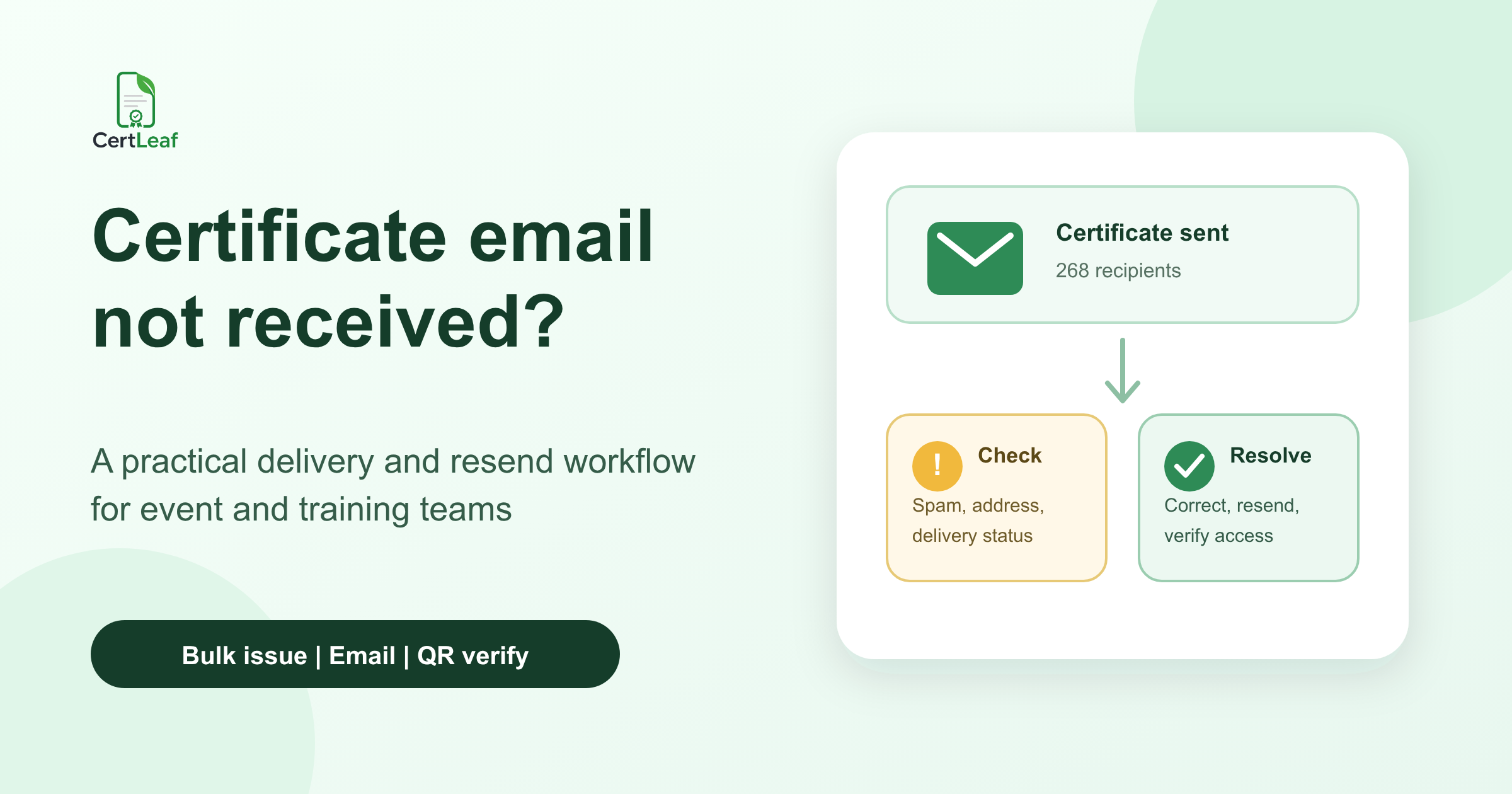
At 7:12 pm, the training coordinator for a three-day employability program in Mysuru sent 214 completion certificates. By 7:25, the WhatsApp group had three messages saying, "Certificate not received." At 7:40, one volunteer had resent two certificates from her own inbox. Another volunteer was checking the registration sheet. A third participant said his friend had received the email, so he assumed the whole batch must have gone out correctly.
The confusing part was that all three missing-certificate messages had different causes. One email was in spam. One registration address ended in gmail.con. The third participant had used a department inbox during registration and was now checking a personal account.
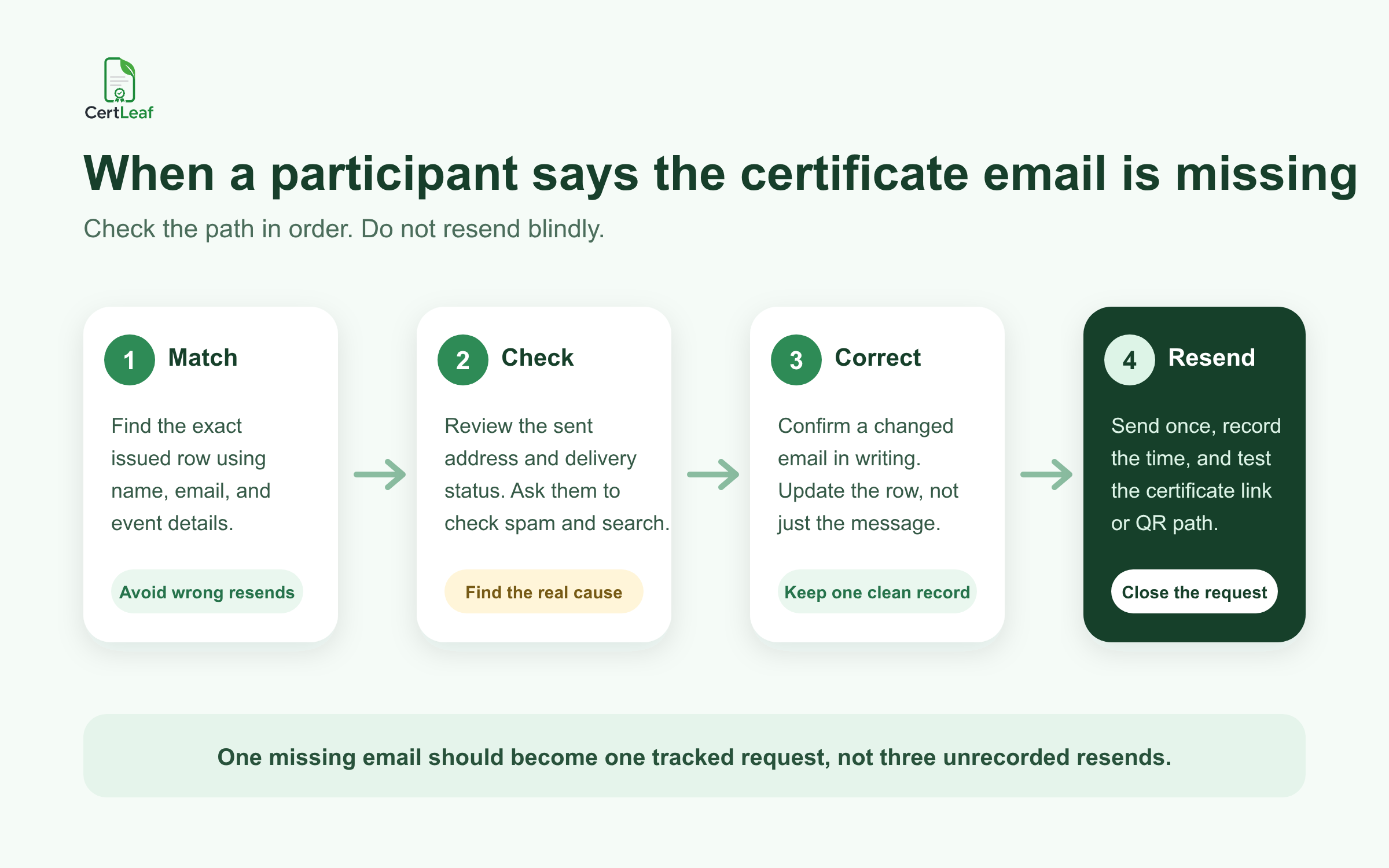
When a certificate email is not received, the quickest-looking response is to send it again. I would resist that for five minutes. A blind resend can repeat the same typo, send a certificate to an unconfirmed address, or leave two volunteers believing they solved the same request.
| What the participant says | Likely place to check | Useful next action |
|---|---|---|
| "Nothing arrived" | Spam, search, and the issued email address | Confirm where the original message was sent |
| "My friend received it" | Recipient row and eligibility list | Check that this person was in the issued batch |
| "Send it to this other email" | Registration details and identity match | Confirm the change before editing the row |
| "The link does not open" | The actual certificate email and access path | Test the same link or QR route yourself |
The goal is not to prove that the organizer pressed Send. The goal is to help the right recipient access the right certificate and leave a record of what happened.
Start by matching the message to the issued row
A participant's WhatsApp display name is not enough to identify a certificate row.
At the Mysuru program, the message "Mine has not come" was from an account named Abhi. The issued list contained Abhinav R., Abhishek M., and Abhilash N. One volunteer almost resent Abhinav's certificate because his was the first matching name in the sheet. The coordinator instead asked for the registered email and training batch. The sender was Abhishek.
Find the exact row used for issuing before checking delivery. Match the registered email first, then use an attendee ID, phone suffix, college, course batch, or another detail the team already collected if the email is uncertain. Do not ask for extra personal information when a normal registration detail will settle the match.
Also check whether the person was included in the final certificate batch. Some "email not received" cases are eligibility questions in disguise. The participant may have registered but missed the attendance threshold, skipped an assessment, or submitted a feedback form after the issuing list closed. That deserves a clear answer, not a resend search.
Check the simple recipient-side causes
Once the row matches, ask the participant to search rather than scroll. A useful reply is:
> Please search your inbox for the event name and check Spam, Promotions, and Updates. The certificate was sent to a***@college.edu at about 7:12 pm. If that is not your current email, reply with the address used during registration and the address you want us to confirm.
Masking most of the address is enough in a group chat. Move the conversation to a private channel before discussing the full email.
Searching by the event name, organizer name, or a distinctive word from the subject often finds a message buried by inbox sorting. Shared college and department inboxes create another common problem: the email arrived, but not in the account the participant is checking. Ask who controls that inbox before sending another copy elsewhere.
Give delivery a reasonable amount of time too. A participant messaging two minutes after a 500-recipient batch started may simply be near the end of the queue. Do not promise an exact delivery time unless you can verify it.
Look for a wrong or unusable email address
If the message is not in spam or search, compare the issued address with the original recipient data character by character.
The obvious errors are worth checking: a missing letter, a space copied into the address, gmail.con, or an old institutional account. Then look for less obvious situations. A student may have registered through a faculty member's email. A training institute may have entered one front-desk address for five learners. A participant may have changed jobs since a long course began.
Do not silently replace an address because a new one arrives over WhatsApp. Confirm that the request belongs to the same person as the issued row. For an ordinary workshop, matching the registered name plus one existing event detail is usually enough. For a formal course completion certificate, the institute may have a stricter internal check.
Once confirmed, correct the source row. Do not only paste the new address into a one-off email. If the team needs to reissue, audit, or contact the participant later, the record should show which address was accepted.
Separate a missing email from a broken certificate path
Sometimes the email arrived. The participant can see it, but the certificate link, download, attachment, or verification route is the problem.
Ask for the exact symptom. "It is not opening" could mean the message has no visible download link on a phone, a browser is blocking a new tab, the PDF has not downloaded, or the QR code leads somewhere unexpected.
Test the same path yourself before writing a long troubleshooting reply. Open the certificate from a normal recipient view. If the certificate includes QR verification, scan the QR code from the downloaded PDF and confirm that the verification page shows the intended recipient and event details.
This check matters after corrections as well. A clean-looking PDF is not enough if the QR path belongs to another row or the recipient cannot access the delivered certificate.
Use one resend log, even for a small event
At a Bengaluru product workshop, four volunteers were helping with 320 certificate emails. A participant received three copies because she contacted the event email, a volunteer on LinkedIn, and the student club on WhatsApp. Each person thought the first message had been missed.
A resend log would have prevented it. Keep it small:
request_id, recipient_name, issued_email, cause, confirmed_email, action, status, resent_at
The useful statuses can be just new, checking, on hold, and closed. One row gives the next volunteer enough context to continue without searching several chats.
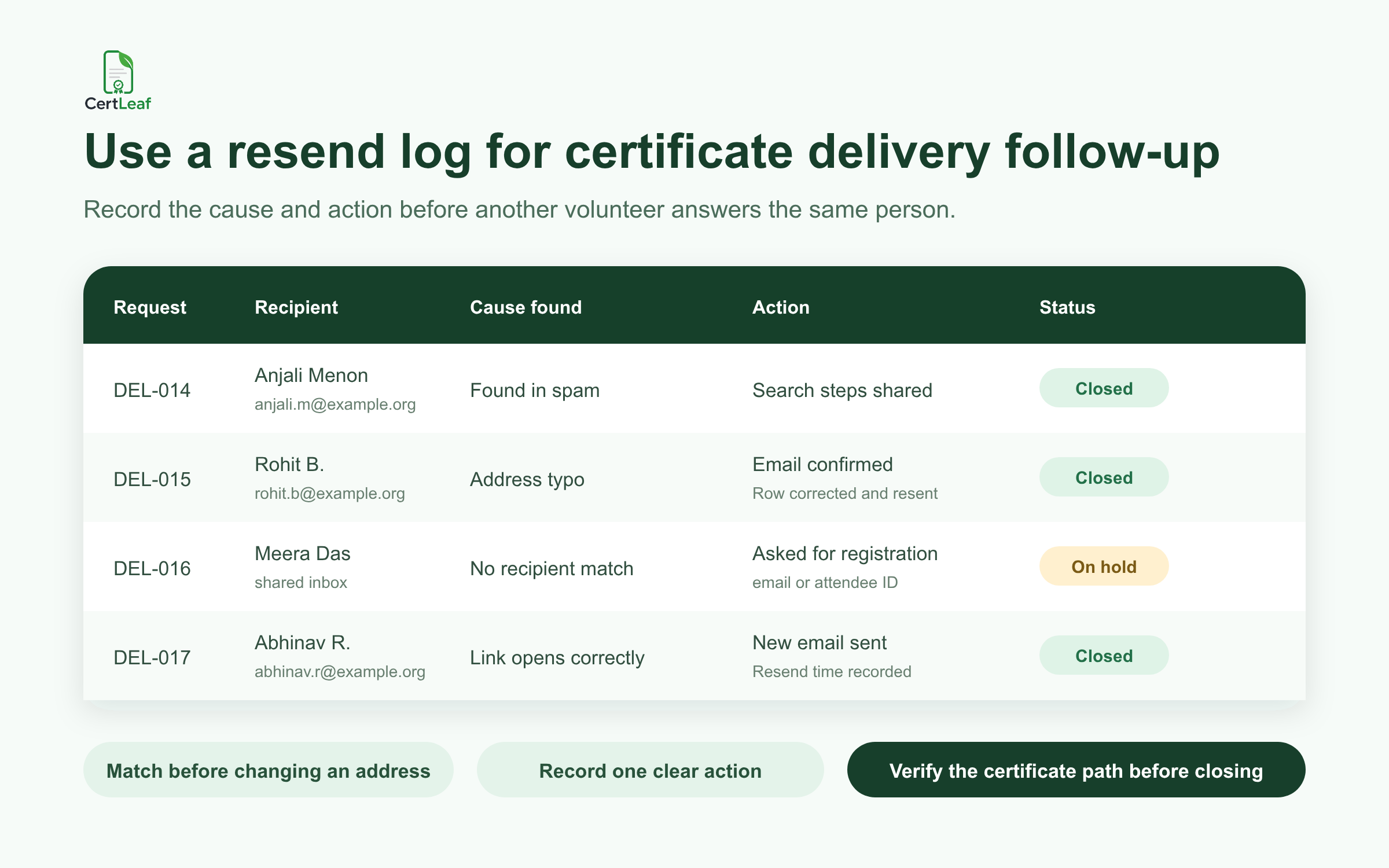
Record what solved the issue. "Closed" alone is weak. "Found in spam," "address corrected and resent," or "not in eligible batch" will help when the same person replies again next week.
Resend once, with a subject the participant can find
After the match and address check, one clear resend is better than a series of informal forwards.
Use a subject such as:
Resent certificate - Mysuru Employability Program
The message can be short:
> Hi Abhishek, > > We have resent your completion certificate to the confirmed email address. Please search for the subject "Resent certificate - Mysuru Employability Program" and check Spam if it is not in your main inbox. > > If you can open the certificate, no reply is needed. If the certificate details or access link are wrong, reply to this email so we can check the issued record.
Record the resend time and close the request only after the participant confirms access or the team has verified the delivery path as far as it reasonably can. Avoid forwarding a certificate from a volunteer's personal inbox. It breaks the record and makes the recipient unsure which message is official.
When several certificate emails are missing
One missing message is a recipient case. Twenty missing messages in ten minutes may be a batch problem.
Pause individual resends and look for a pattern. Are all affected addresses from one college domain? Are they in the same section of the CSV? Did the issue start after a particular row? Were those recipients included in the final issuing file? Did the team use an outdated export?
I would sample three affected rows and three successful rows. Compare their addresses, batch inclusion, certificate access, and event fields. This is faster than resending twenty messages and discovering that the same underlying problem remains.
If a whole group needs another communication, use one planned batch action and explain it plainly. Do not make every participant open a support conversation for an organizer-side mistake.
Where CertLeaf fits
CertLeaf handles the repetitive issuing work after the recipient list is ready. An event team or training institute can use a reusable template, upload a CSV, issue certificates in bulk, and distribute them by email. QR-verifiable certificates add a public verification path that recipients or reviewers can scan later.
For a resend or correction batch, I would first update the confirmed recipient rows, then use the same checked template rather than editing PDFs manually. CertLeaf's pay-as-you-go credits suit event schedules that come in bursts, and there is no monthly subscription to keep running between programs. New accounts receive 20 free credits for testing a small batch.
The tool can reduce manual generation and sending. The organizer still needs the resend log. That log captures the human decisions: who reported the problem, how the row was matched, whether an address changed, and what action closed the request.
Reduce missing certificate messages next time
Before the next event, collect one field labelled certificate_email instead of assuming the registration email is still correct. Show participants the address near the end of the program and give them a short correction window.
Send one test certificate to an inbox the team can open. Check the subject, sender name, message, certificate access, and QR verification path. Save the exact issued CSV. Finally, tell participants when certificates will be sent, what subject to search for, and where to report a missing email.
That last detail saves more time than it seems. "Message any volunteer" creates parallel work. One reply address or one form creates a queue the team can actually finish.
Related certificate workflows
For the original delivery process, review the complete bulk certificate email workflow.
If the recipient data is wrong, log recipient corrections before reissuing.
Frequently asked questions
What should I do when a certificate email is not received?
Match the participant to the exact issued row, confirm the email address used, ask them to search the event name and check spam, then test the certificate access path. Resend only after you know the right recipient and address.
How do I resend a certificate email safely?
Confirm the recipient using existing event details, update a changed address in the source row, send one clearly labelled resend, and record the resend time in a shared log. Avoid forwarding from a volunteer's personal inbox.
Why do bulk certificate emails go missing?
Common causes include address typos, spam filtering, inbox categories, shared registration emails, old institutional accounts, participants checking a different inbox, and recipients who were not included in the final eligible batch.
Should I ask for a new email address in a group chat?
No. Use the group only to direct the participant to a private reply channel. Confirm the new address against the original recipient record before changing it.
How can QR verification help with certificate delivery issues?
QR verification does not deliver the email, but it gives the issued certificate a checkable path. After a resend or correction, scan the QR code and confirm that the verification page matches the intended recipient and event.
Can CertLeaf send certificates by email in bulk?
Yes. CertLeaf supports bulk certificate issuing from CSV, reusable templates, email distribution, and optional QR verification. It uses pay-as-you-go credits rather than a subscription.
The follow-up should leave a record
A missing certificate email is usually a small problem. It turns into a long one when several people resend, nobody checks the original row, and the team cannot explain what happened afterward.
Match first. Check the address and access path. Correct the source data when needed. Resend once and record it. That workflow is calm enough to use after a 200-person workshop and clear enough for another coordinator to pick up the next morning.