CertLeaf
Coaching Certificate Template Guide for Student Achievement
A practical coaching certificate template guide for completion, achievement, attendance, tests, competitions, and student skill milestones.
At 8:15 on a Saturday evening, the coaching center admin still had three lists open. One came from the monthly assessment sheet. Another had competition results. The third was a message thread where parents had asked whether their children would receive recognition for attendance and learning progress.
That is usually the point when a single certificate design turns into six slightly different files. A practical coaching certificate template should reduce that work, not create more of it. The same is true for a coaching center certificate template used across several batches, or a student achievement certificate template prepared after every test cycle: the fixed design should stay consistent while the student details and recognition wording change cleanly.
Here is the simple distinction I would make before opening a design tool:
| Certificate use | What it should confirm | Useful variable fields |
|---|---|---|
| Course completion | A defined course or batch was completed | Student name, program, date |
| Achievement | A result or learning milestone was reached | Student name, achievement, assessment |
| Attendance | The stated attendance rule was met | Student name, program, period |
| Competition | A rank, category, or participation was recorded | Student name, competition, result |
| Test performance | A defined assessment outcome was recognized | Student name, test, performance band |
| Skill milestone | A specific skill stage was demonstrated | Student name, skill, level, date |
The table matters because "good performance" is too vague for a certificate that a parent may keep, share, or later ask the center to explain. Decide what the document confirms first. Then choose the template.
What should appear on a coaching center certificate template?
A coaching center certificate does not need a crowded paragraph. It needs enough information to make sense six months later.
The center name or logo should be visible at the top. The certificate title should tell the reader whether this is completion recognition, achievement, attendance, competition performance, or a learning milestone. The student name needs the strongest visual emphasis, followed by the program, test, subject, or skill being recognized. Add the issue date and an authorized signature area. If the certificate is verifiable, reserve a clean square for the real QR code rather than decorating the base design with a fake one.
I would also leave more room than seems necessary for the student name and program title. The awkward records are the useful test records: a long student name, a two-line course title, and a date format that takes more space than expected. If those fit, the short rows will be fine.
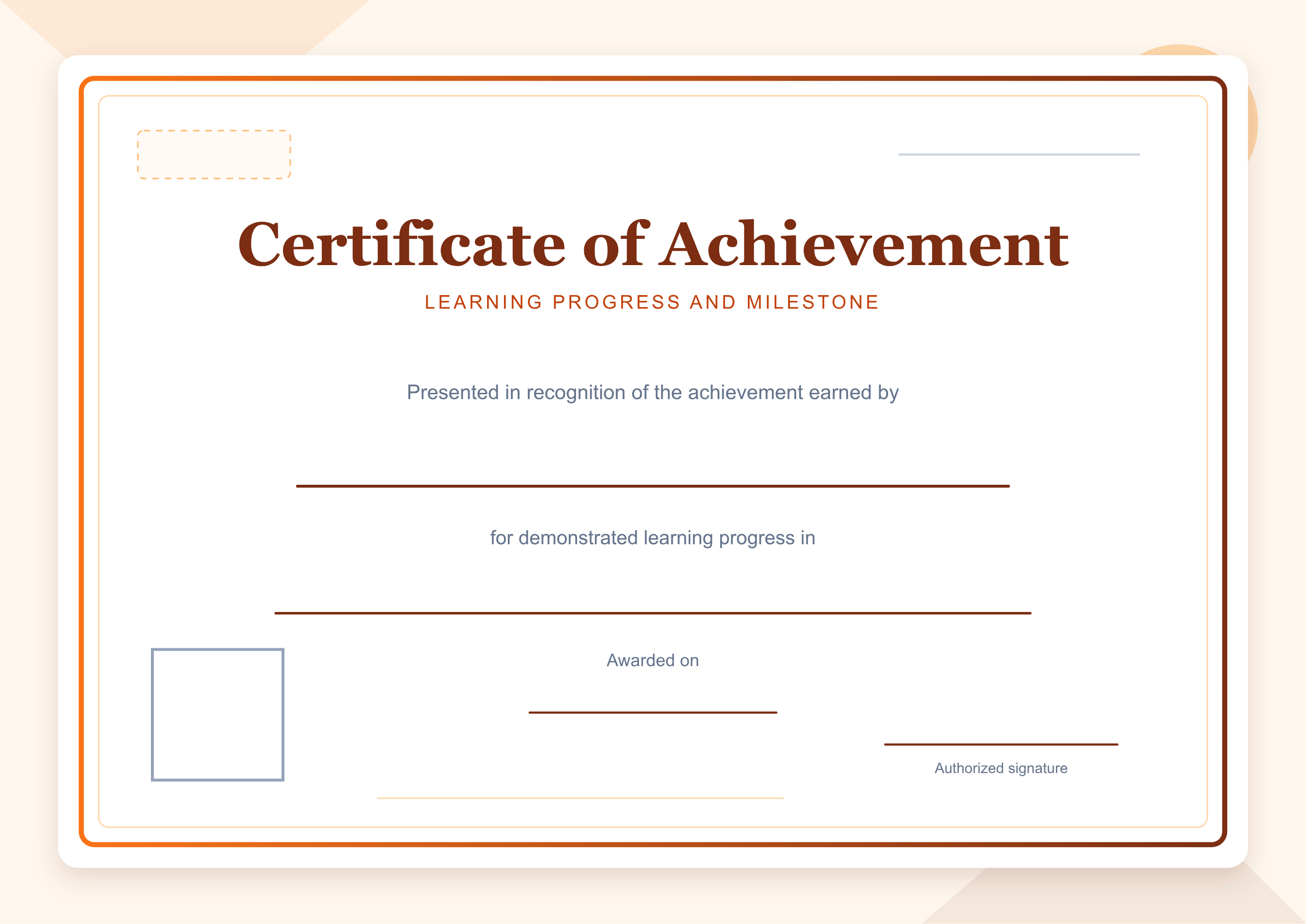
The example below is an app-ready student achievement certificate template. It leaves blank overlay space for the recipient, learning program, date, issuer, signature, and a square QR code. There are no sample names to remove before use.
One base design can support several recognition types
The mistake I see in many certificate folders is that every occasion gets a completely new layout. The monthly test has one border, the quiz competition has another, and course completion uses an older logo because somebody copied last year's file.
A better approach is to create a small template family. Keep the logo placement, border, type hierarchy, signature position, and QR area consistent. Change the title and one short body line to match the evidence behind the certificate.
For completion, the fixed wording could be:
> Presented in recognition of completing the stated learning program.
For achievement:
> Presented in recognition of the learning milestone achieved in the stated assessment.
For attendance:
> Presented for meeting the stated attendance requirement during the learning program.
For a competition or test result:
> Presented in recognition of the assessment performance recorded in the stated category.
For a skill milestone:
> Presented for demonstrating the stated skill milestone at the recorded level.
These lines are deliberately restrained. They do not claim a grade, rank, mastery level, or attendance percentage unless the center's records support it. Put the variable detail in the overlay field or CSV column instead of rewriting the entire certificate body for every student.
Keep the design professional and parent-friendly
Parents usually read a coaching certificate differently from an event poster. They look for the student's name, what was achieved, who issued it, and whether the wording is clear. Decorative elements should help those details stand out.
Use one formal display font for the certificate title if you want, but keep student details and supporting text in a readable typeface. Strong contrast matters more than elaborate backgrounds. A parent viewing the PDF on a phone should not have to zoom in to find the course or achievement.
The wording also needs a clear boundary. "Outstanding excellence" says less than "achievement in the stated assessment." Avoid placing marks or rank on the certificate unless that is intentional and the data has been checked. Some centers may prefer a performance band such as "Level 2 milestone" because it recognizes progress without publishing a score.
There is a practical privacy point here too. Email addresses belong in the issuing data, not on the visible certificate. Internal notes, parent phone numbers, roll numbers, or payment status should stay out of the design unless there is a specific reason to display them.
Prepare student data in CSV before issuing
A clean spreadsheet is where most certificate corrections are prevented. I would not generate the first certificate until one person has checked the final rows against the assessment or attendance source.
Use one row per certificate. At minimum, keep separate columns for recipient_name, email, recognition, program, and date. Add result, level, or attendance_period only when the selected template actually uses that field. If Student A needs both a completion certificate and a competition certificate, use two rows because they produce two separate documents.
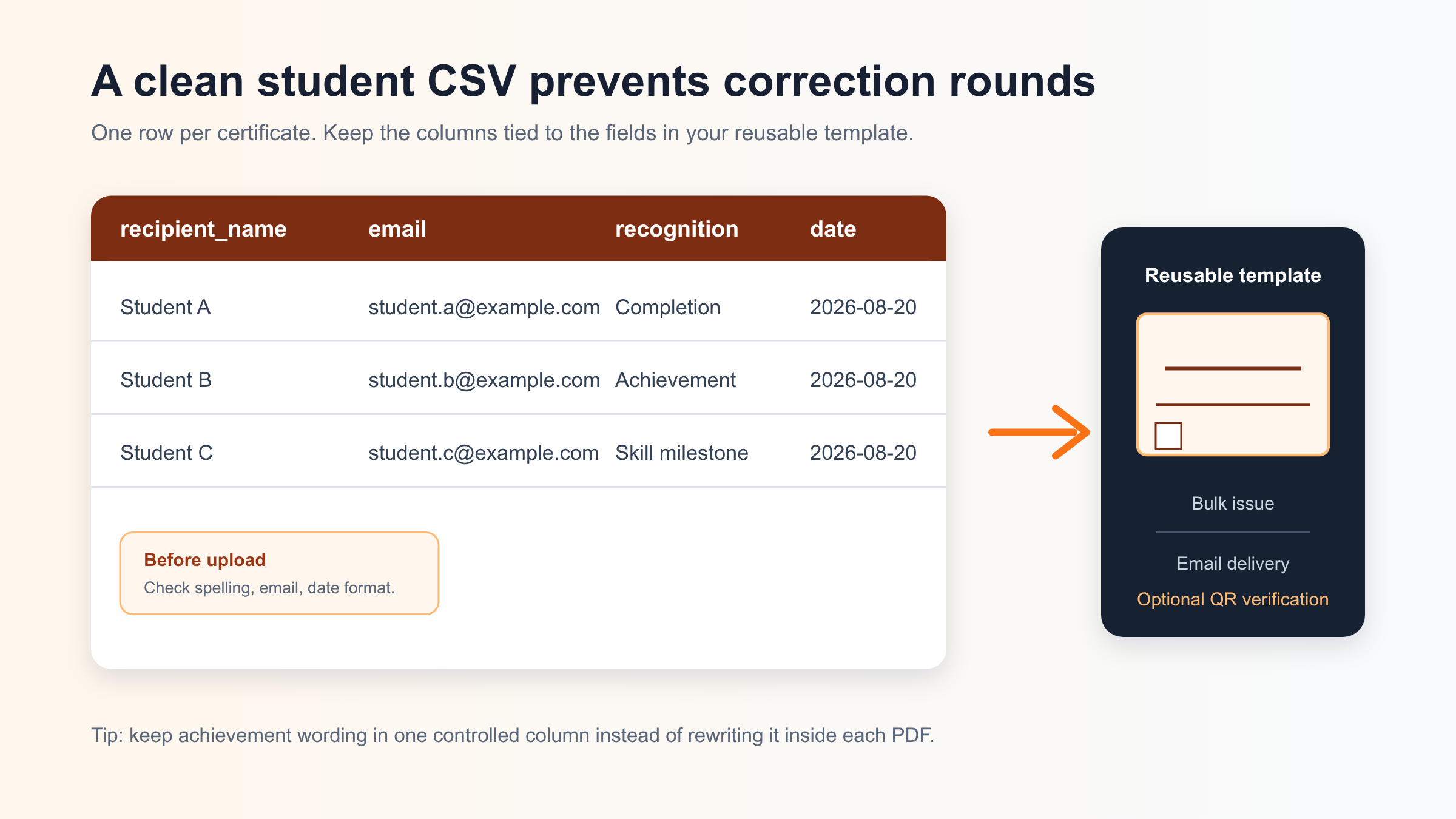
Before upload, check capitalization, spaces around names, email spelling, and date consistency. Watch for duplicates created when a student appears in both a batch list and a test-result export. I also test the design with the longest student name and longest program title in the CSV. That catches layout trouble before the whole batch is generated.
Generic example rows might look like this:
| recipient_name | recognition | program | date | |
|---|---|---|---|---|
| Student A | student.a@example.com | Completion | Program A | 2026-08-20 |
| Student B | student.b@example.com | Achievement | Assessment A | 2026-08-20 |
| Student C | student.c@example.com | Skill milestone | Skill Program A | 2026-08-20 |
The labels are generic on purpose. Replace them with checked student data only in the CSV used for issuing, not inside the reusable base artwork.
When QR verification adds credibility
Not every coaching certificate needs QR verification. A short attendance acknowledgment for an internal activity may only need a clear issuer and signature.
QR verification becomes more useful when the certificate records a result that may be shared outside the center: course completion, competition placement, a skill milestone, scholarship-test performance, or a longer learning program. The QR code gives a parent, institution, or recipient a direct way to check the certificate against a public verification page instead of relying only on an editable PDF.
The design rule is simple: leave an empty square in the base template. When you issue a verifiable certificate through CertLeaf, the real QR code is placed in that reserved area. Do not paste a QR-like decorative pattern into the artwork, and do not use a rounded placeholder that makes the final code harder to position.
Where CertLeaf fits after the template is ready
CertLeaf is useful after the visual decisions have been made. Upload the base certificate design, place the dynamic fields once, and save it as a reusable template. For the next assessment cycle or batch completion, prepare the checked student CSV and use bulk issuing instead of editing a PDF for every row.
Certificates can be sent by email, and QR verification can be added when the recognition needs a stronger proof path. The same saved template can be reused for another batch while the names, programs, dates, and achievement details come from the new CSV.
That fits the way many coaching centers buy software: around a batch, test cycle, or program rather than every month. CertLeaf uses pay-as-you-go credits with no subscription, and new accounts receive 20 free signup credits for testing the workflow.
A final check before the batch goes out
I would review three generated certificates before approving the full set: the longest name, the longest program title, and a certificate with the most detailed achievement wording. Then check one QR code, one email address, and the signature position.
That five-minute review is cheaper than explaining to a parent why a name is clipped or why a competition certificate says "completion." It also gives the admin a repeatable routine for the next cycle.
Related certificate workflows
Before issuing student certificates, use the certificate recipient CSV checklist.
When verification matters, understand what QR-verifiable certificates should confirm.
Coaching certificate template FAQs
Can one coaching center certificate template cover completion and achievement?
Yes, if the design keeps a consistent structure and the title or recognition line can change. I would still save separate reusable variants for completion, achievement, attendance, competitions, tests, and skill milestones so the meaning stays clear.
What should a student achievement certificate template say?
State the learning milestone, assessment performance, or achievement being recognized without exaggerating it. A useful generic line is: "Presented in recognition of the learning milestone achieved in the stated assessment." Add the checked detail through a dynamic field.
Should a coaching certificate template include marks or rank?
Only when the center intends to publish that result and the source data has been checked. A performance band, milestone, or category can be clearer and more parent-friendly than a raw score.
Does every coaching certificate need a QR code?
No. Use QR verification when the certificate may be shared beyond the center or when course completion, competition results, test performance, or skill progress needs an easy verification path.
How do I issue a coaching center certificate template to a full batch?
Create the reusable template, match its dynamic fields to clear CSV columns, review the student data, generate the batch, check a few edge cases, and send the certificates by email. CertLeaf supports that workflow with bulk CSV issuing and optional QR verification on pay-as-you-go credits.
A well-planned certificate template should make the next issuing cycle quieter. The design stays put. The evidence changes. The admin works from one checked student list instead of a folder full of almost-identical PDFs.