CertLeaf
How to Issue Certificates for a Multi-Day Training Program Based on Attendance
A practical way to turn daily attendance and final exercise records into one approved list for bulk, QR-verifiable training certificates.

At 6:20 pm on the final Friday, the coordinator of a five-day data analytics program in Kochi had 74 names in the registration sheet, five daily attendance exports, and 61 final exercises in a shared folder.
The closing session was over. Two trainers were packing cables. Learners were already asking when their certificates would arrive.
The coordinator's first count said 68 people had attended at least four days. Her second count said 66. One learner had joined Day 3 from a personal email instead of the address used for registration. Another had been marked absent because the spelling on the manual sheet did not match the Zoom export. Three learners attended all five sessions but had not submitted the final exercise.
This is the awkward middle of issuing certificates for a multi-day training program. The certificate design may already be approved, but somebody still has to decide who actually met the rule. If that decision is mixed into the bulk issuing step, exceptions get missed and ineligible records slip into the batch.
The cleaner approach is to settle attendance first, create one approved learner list, and only then generate and email the certificates.
| Record | What it can confirm | What needs checking |
|---|---|---|
| Registration sheet | Expected learners and original email | Includes people who never attended |
| Daily attendance | Session presence | Names and emails may change between days |
| Final exercise tracker | Completion of required work | Late submissions need a cutoff |
| Correction messages | Initials, spelling, alternate email | Easy to miss outside the main sheet |
For the Kochi program, the rule was clear once the coordinator wrote it down: attend at least four of five sessions and submit the final exercise by Friday at 8 pm. That one sentence did more useful work than another round of spreadsheet formatting.
Write the certificate rule before counting learners
A training attendance certificate should reflect a rule that the institute can explain later. The rule does not need to be complicated. It does need to be specific.
For one program, attendance at four of five sessions may be enough. A safety workshop may require every practical session. A six-week course may require 80 percent attendance plus a final assessment. A faculty development program may distinguish between participation and successful completion.
I would write the rule in ordinary language before merging any sheets. For example:
> A completion certificate is issued to learners who attended at least four of the five live sessions and submitted the final exercise by 8 pm on 14 August 2026.
That wording settles three points: the attendance threshold, the extra completion requirement, and the deadline. It also gives the coordinator a fair answer when a learner asks why their name is not in the first batch.
Do not quietly change the threshold because the final eligible count looks low. If an exception is approved, record who approved it and why. A learner who missed one day because the institute's attendance link failed is different from someone who registered and never joined.
Build one working attendance sheet
Five separate attendance files are evidence, not an issuing list.
Create one working sheet with one row per learner. Keep the registration name and email, then add a column for each session, the exercise status, and a final eligibility result. Match by email first, but expect to review exceptions manually. People join from alternate addresses, use shortened names, or share a device during an in-person lab.
At the Kochi program, Anita Joseph appeared consistently across all five days. Rahul Menon missed Day 5 but still met the four-session rule and completed the exercise. Sana Iqbal attended every session but had not submitted the exercise by the cutoff. Vivek Rao submitted the work but attended only three sessions.
The resulting eligibility decision was easy to defend because the rule and records were visible in the same place.
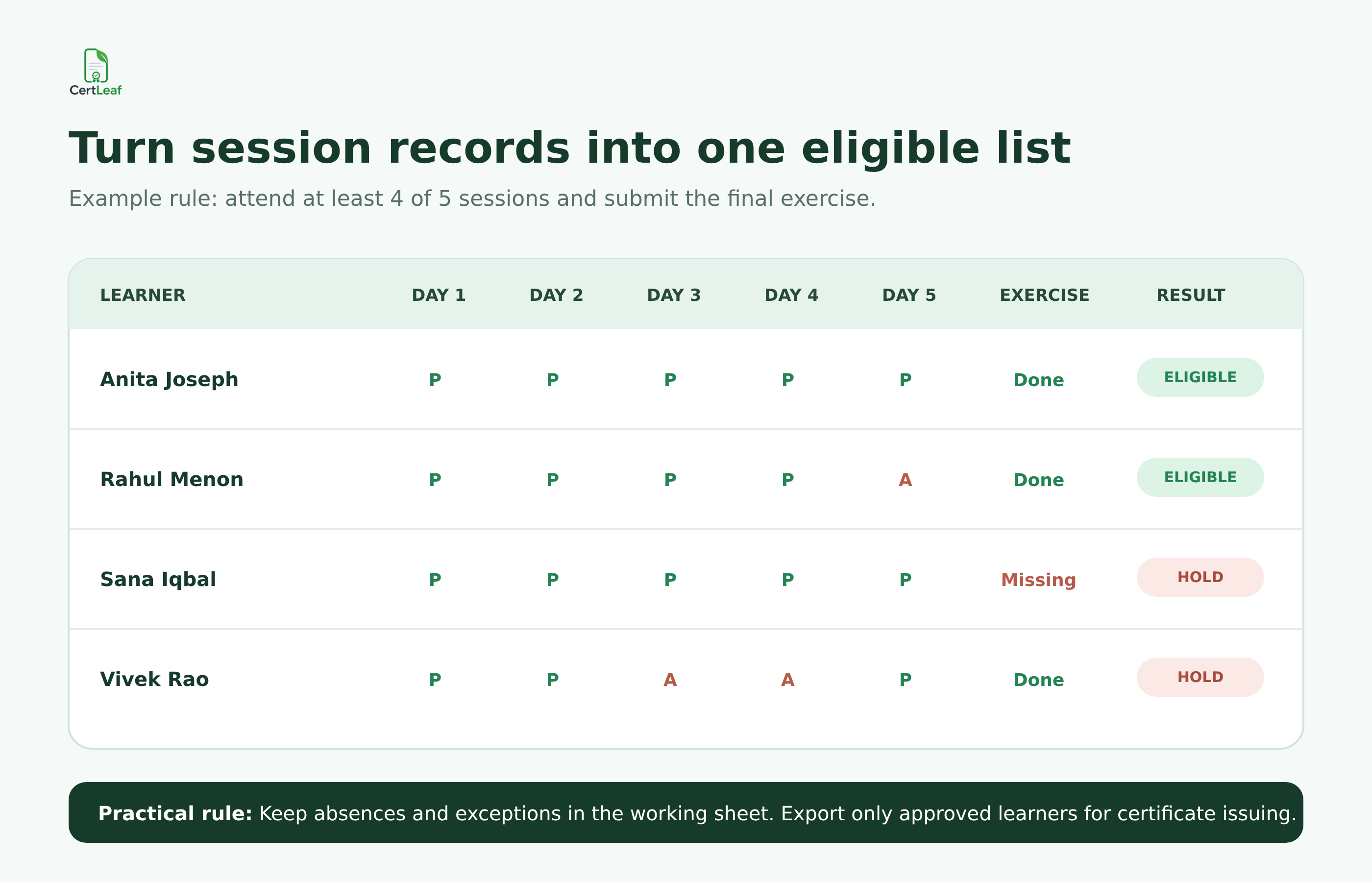
Use simple values such as P, A, Done, and Missing if the team understands them. Avoid adding clever formulas that nobody else can audit. A count formula is useful. A chain of nested conditions that only one coordinator understands becomes a problem when that person is unavailable.
The working sheet can contain internal columns such as attendance_count, exception_note, exercise_status, and approved_by. Those fields help review the decision. They do not all belong in the certificate CSV.
Check identity mismatches before marking an absence
The difficult rows are rarely the clean absences. They are the near matches.
A learner may register as Meera S Nair, join one session as Meera Nair, and submit the final exercise as [email protected]. If the coordinator matches only exact names, that becomes three partial records instead of one eligible learner.
Email is usually the strongest first match, but it is not perfect. College learners sometimes register with an institutional address and join from a personal account. In-person attendance sheets may contain only a name and phone number. A department coordinator may have registered several learners through one shared email.
I review these records in a short exception pass:
Same or similar name with a different email
Same email attached to two names
Initials present in one source but missing in another
A manual attendance entry that resembles a registered learner
A late exercise submitted before the stated cutoff
Keep this list short. The aim is to find identity problems, not to reopen every attendance decision.
At a Bengaluru cloud fundamentals course, one learner was marked absent on two days because the trainer wrote P. Harish while the registration sheet said Pranav Harish. The phone number matched, and the trainer confirmed the learner. That correction belonged in the working sheet before any certificate was issued.
Separate participation from completion
Multi-day programs often use the words participation and completion as if they mean the same thing. They may not.
If the program promises a participation certificate for attending at least one session, that is one certificate rule. If a completion certificate requires four sessions and an exercise, that is another. Do not issue a completion certificate to everyone simply because the design is already called course_completion_final.png.
The certificate wording should match the evidence. "Participated in the five-day program" is appropriate for an attendance-based participation certificate. "Successfully completed the five-day program" implies that the learner met whatever completion criteria the institute published.
When both certificate types are needed, create two approved lists and two clearly named batches. That is safer than keeping a certificate_type column full of mixed values and hoping every row maps to the correct template.
Export an approved certificate CSV, not the whole tracker
Once eligibility is settled, create a clean export containing only the people who should receive the certificate.
A useful CSV for bulk training certificates may be as small as:
full_name,email,program_name,start_date,end_date,certificate_type
Keep attendance counts and exception notes in the working file unless they must appear on the certificate. The issuing CSV is a controlled handoff, not a copy of the institute's entire training record.
Before exporting, ask a second person to check the eligible count and a few exceptions. For the Kochi batch, the program lead checked the three missing exercises and the two alternate-email matches. That review took less than ten minutes. It also meant the issuing coordinator was not making every judgment alone at the end of a long week.
Save the approved file with a useful name such as kochi-data-program-completion-approved-2026-08-14.csv. Keep it unchanged after issuing. If a learner is approved later, add them through a documented correction or supplementary batch rather than silently replacing the original file.
Test the certificate with the awkward records
A multi-day training certificate often contains more text than a one-day event certificate. Program titles are longer. Date ranges need more space. Organizer and training-partner names may both appear.
Do not preview only the first learner. Test the longest name, the longest program title, a name with initials, and the full date range. If the certificate has a QR code, scan it from a normal phone screen and confirm that the verification page shows the right learner and program.
The Kochi template looked balanced with Anita Joseph. It did not look balanced with A. Mohammed Shahul Hameed, whose name pushed close to the signature area. The coordinator reduced the name font slightly and tested again before generating the full batch.
This is also the right moment to check whether the certificate says participation or completion, whether the dates cover the whole program, and whether the trainer or institute name is current. Data can be perfectly clean and still produce the wrong document if the template is stale.
Issue and email the approved batch
After the approved CSV and template have passed review, the operational part should be uneventful.
CertLeaf can take the clean recipient CSV, map its fields to a reusable certificate template, generate the batch, and support email distribution. For programs where employers, colleges, or partners may later check the credential, a QR-verifiable certificate can link to a public verification page.
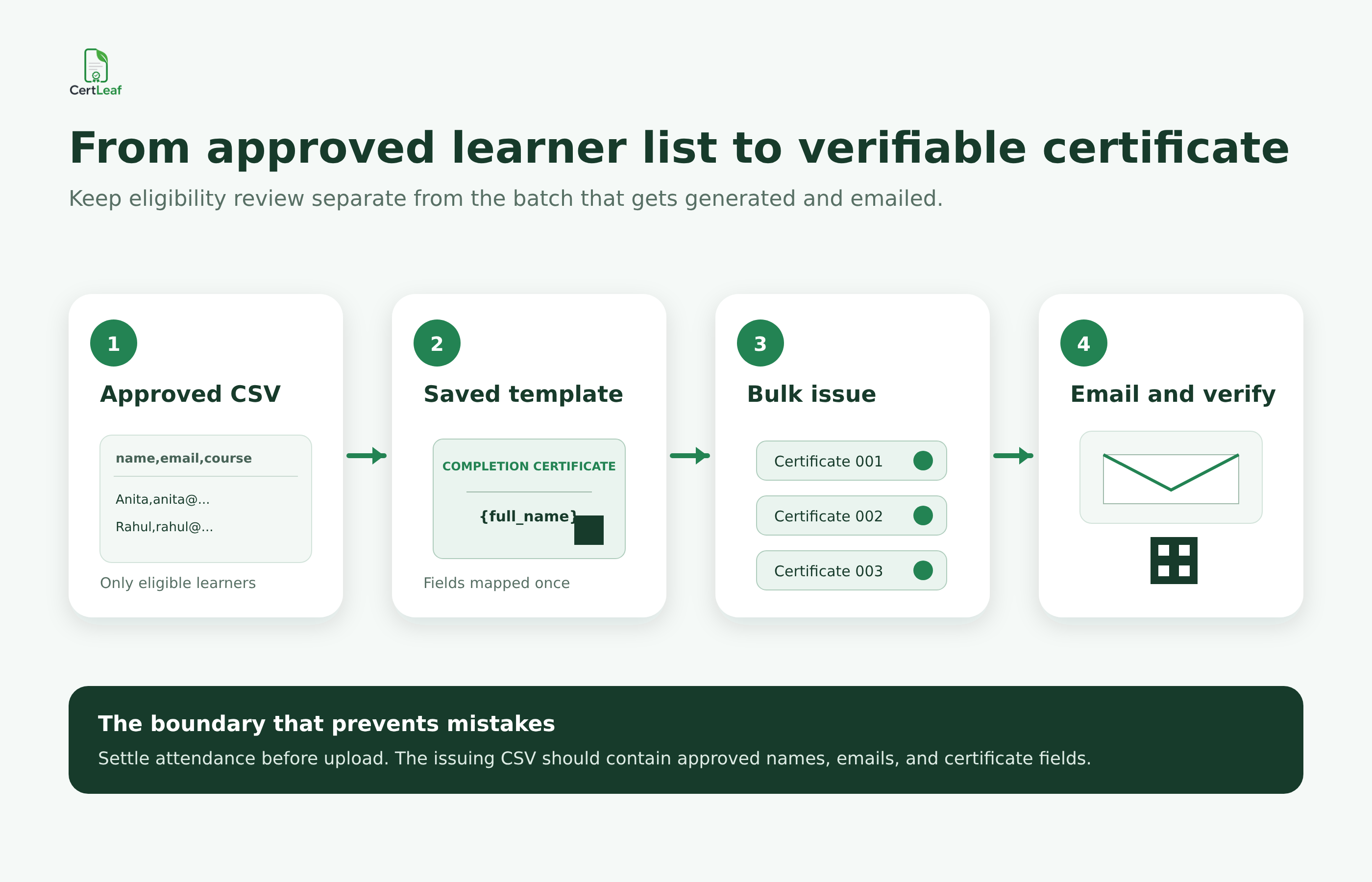
The boundary matters. CertLeaf handles issuing, delivery, and verification after the institute approves the learner data. It does not decide whether a learner attended enough sessions or whether a late exercise should count. That decision remains with the coordinator who understands the program rules.
For a training institute running several batches a year, reusable templates prevent the team from rebuilding the certificate layout each time. Pay-as-you-go credits also fit programs that run in bursts; there is no subscription to keep active between cohorts. New accounts receive 20 free credits, which can be used to test a small batch before issuing the full list.
Send one test certificate to an address the team can open. Check the recipient name, subject line, download flow, PDF, QR code, and verification details. Then process the approved batch and tell learners which email address was used.
Keep a small exception queue after the first send
Even a checked batch may produce follow-up questions. Someone may ask to add an initial. A learner may say they used a different email. A trainer may approve a late exercise after the original cutoff.
Do not edit the original approved CSV in place. Keep a correction log with the learner, original value, requested change, evidence, approval, and reissue date. Group approved changes into a small supplementary batch when practical.
This keeps the first issue record intact. It also stops the familiar confusion where three files all claim to be final and nobody can say which one generated the certificate currently being shared.
Related certificate workflows
After applying the attendance rule, issue the approved course completion certificates in bulk.
Before the next cohort, prepare a reusable training certificate template.
FAQ about multi-day training certificates
How do I create certificates for a multi-day training program?
Set the attendance and completion rule, combine daily records into one working sheet, resolve identity mismatches, approve the eligible list, and export a clean certificate CSV. Test the longest names and program details before bulk generation and email delivery.
Can a certificate be based on attendance percentage?
Yes. Define the percentage or session count before the program ends and apply it consistently. Keep the attendance calculation in the working sheet, then export only approved learners for issuing.
What should a training attendance certificate include?
Include the learner name, program name, institute or organizer, date range, and wording that accurately describes participation or completion. Add a certificate ID or QR verification when it supports the institute's process.
Should learners who miss one session receive a certificate?
That depends on the published rule. A five-day course may allow one absence, while a safety or practical program may require every session. Decide this before reviewing individual cases.
Can I generate bulk training certificates from a CSV?
Yes. A bulk certificate platform can map approved learner data from a CSV into a reusable template. CertLeaf supports bulk CSV issuing, email distribution, and optional QR verification.
How should late exercise submissions be handled?
Use the deadline stated in the certificate rule. If the program lead approves a late submission, record the exception and include the learner in a documented supplementary batch rather than changing the original issued list silently.
Are QR-verified training certificates useful?
They are useful when learners share certificates with employers, colleges, clients, or program partners. The QR code gives the reviewer a direct verification path instead of requiring an email to the training institute.
The rule is the real starting point
The Kochi coordinator sent 64 certificates on Monday afternoon. Two more learners were added later after documented exercise reviews. The original batch stayed unchanged, and the supplementary issue had its own approved CSV.
What made the process manageable was not a complicated attendance system. The team wrote one certificate rule, resolved the uncertain identities, and kept the eligibility tracker separate from the issuing file.
That is the workflow I would repeat for the next multi-day training program: decide, check, approve, then issue. The certificate batch becomes much easier once it is no longer carrying unresolved attendance questions.