CertLeaf
How to Issue QR-Verifiable Training Certificates with Unique Certificate IDs
A practical workflow for training institutes that need unique certificate IDs, bulk issuing, email delivery, and a QR verification record for every learner.
At 8:25 on a Thursday evening, the coordinator at a skills academy in Pune was searching four folders for a certificate issued five months earlier.
A recruiter had emailed about a learner named Asha Nair. The PDF looked like the academy's certificate. The course title was right, the signature was familiar, and the dates were plausible. But the file had no certificate ID, the coordinator's spreadsheet had two people named Asha Nair, and the old batch folder contained exports called final, final-2, and corrected-final.
The recruiter did not need a long explanation. She needed a reliable answer: did this academy issue this certificate to this learner?
That question is why QR-verifiable training certificates with unique certificate IDs are worth planning before a course ends. The ID gives the institute a stable reference. The QR code gives an outside checker a direct route to the corresponding verification record. Neither requires a coordinator to remember which folder was used after Batch 07.
| Part | What it should do | What it should not depend on |
|---|---|---|
| Certificate ID | Identify one issued record | The learner's email or phone number |
| QR code | Open that record's verification page | A generic institute homepage |
| Certificate details | Match the approved learner and course data | Manual edits after export |
| Issue log | Help staff find the original batch and status | One coordinator's memory |
For the Pune academy, I would fix the record structure before designing another certificate. A clean ID pattern, one approved learner CSV, and a tested QR path would have answered the recruiter's question in less than a minute.
Give every training certificate one stable ID
A certificate ID should be unique, readable, and boring. Boring is good here. Staff should be able to quote it over email, search for it in an issue log, and understand enough of the pattern to find the right batch.
One practical format is:
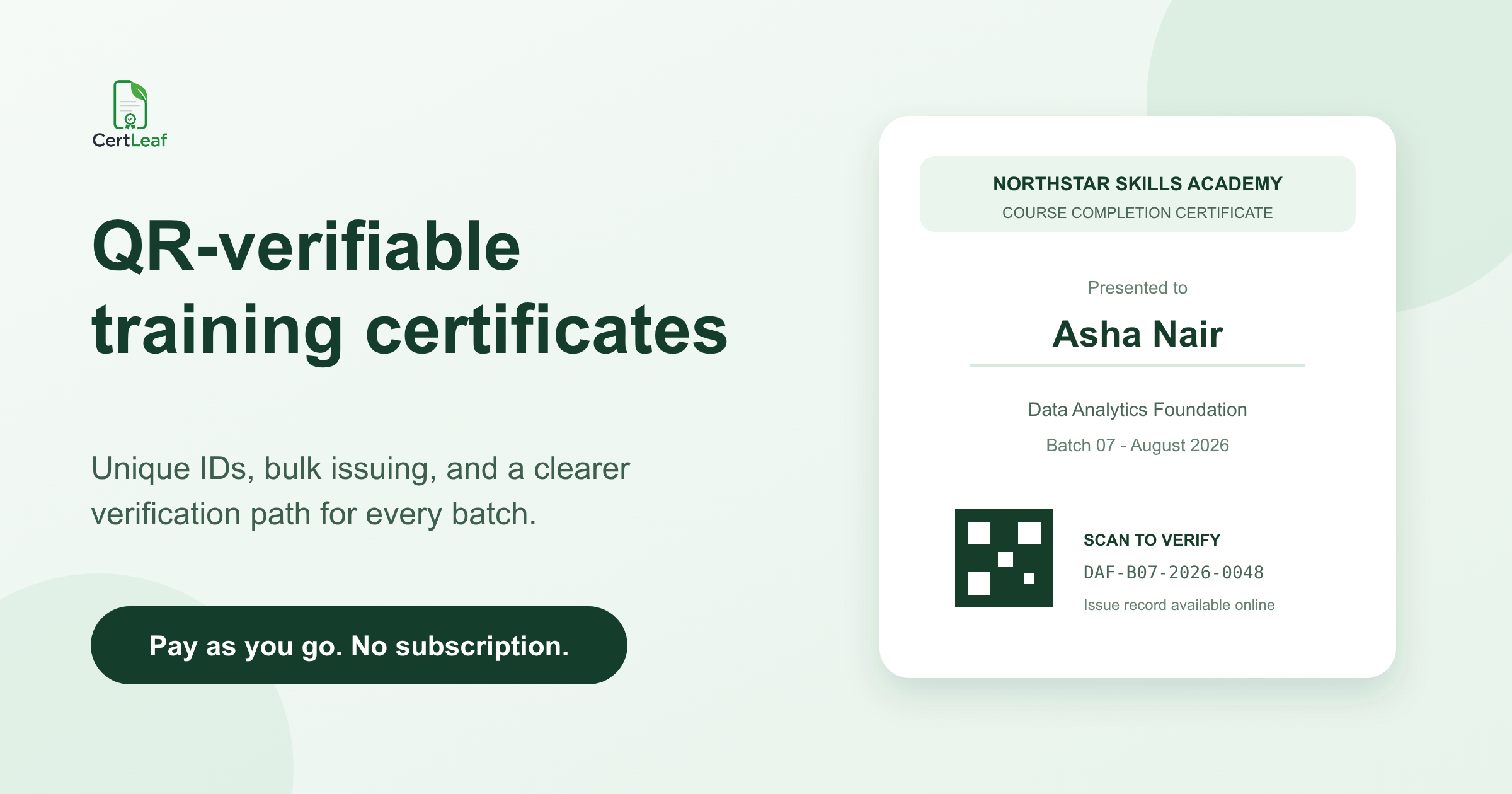
DAF-B07-2026-0048
In that example, DAF identifies the Data Analytics Foundation program, B07 identifies the seventh batch, 2026 records the issue year, and 0048 is the learner's sequence within the issuing system or approved batch.
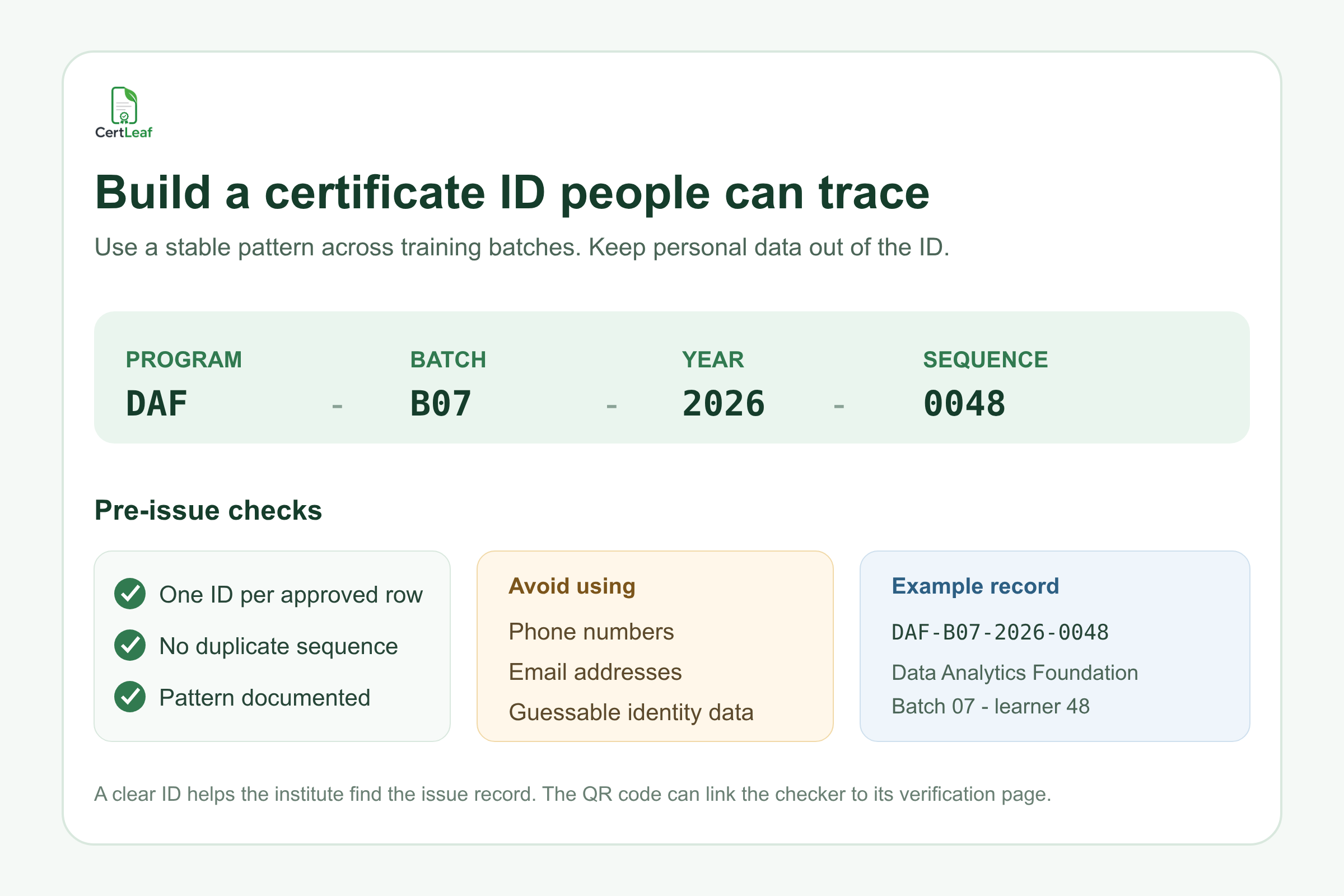
The exact format matters less than the rules behind it. Every issued certificate gets one ID. No two records share an ID. Corrections do not silently create unrelated references. The pattern is written down so another staff member can understand it next year.
I would keep personal data out of the ID. Email addresses and phone numbers make poor public references, and names create collisions. Two learners can share a name; one learner can change an email address. A generated sequence remains stable.
There is also no need to pack the learner's entire history into the code. If an ID grows into a 40-character summary of campus, department, trainer, course, date, score, and learner initials, people will mistype it. Put the detailed information in the issue record. Let the ID point to that record.
Build the ID before the certificate batch, not after it
At a weekend Python program in Kochi, 64 learners qualified for completion certificates. The coordinator generated the PDFs first and added IDs later in a spreadsheet. Three certificates were corrected for name spelling, and the replacement PDFs received new IDs even though the old versions were still in learners' inboxes.
Now there were two valid-looking references for the same completion event.
The cleaner order is to approve the learner list, assign or confirm the unique ID for each row, and then generate the certificate from that data. The ID should appear in the issuing CSV or be generated consistently by the certificate system. It should not be typed into finished PDFs one by one.
A useful certificate CSV for a training batch might contain:
full_name,email,course_name,batch_name,completion_date,certificate_id
Keep one row per approved learner. Remove duplicates, confirm the certificate type, and review the longest names and course titles before issuing. If the certificate says "successfully completed," the institute should already have evidence that the learner met its completion rule. A QR code cannot repair vague eligibility decisions.
The final approved count should match the CSV row count. If the course coordinator says 64 learners completed the program and the file contains 65 rows, stop there. That one-row difference is easier to investigate before certificates and emails exist.
Decide what a corrected certificate does to the ID
Name corrections are normal. A learner leaves out a middle name during enrollment, notices it on the PDF, and asks for a change before sending the certificate to an employer.
The institute needs a simple rule for corrections. In most cases, a spelling correction can keep the same certificate ID because it is still the same learner, course, and completion event. The issue log should record the correction date and the superseded version. If the original certificate is revoked because the underlying completion decision was wrong, the verification record should not continue presenting it as current.
Do not solve every correction by creating a completely new row and forgetting the old one. That creates duplicate records that look equally valid. The public verification result and internal log should agree on which version is current.
For the Pune academy, I would record corrected name from Asha K Nair to Asha Krishnan Nair on 18 August 2026 against the same certificate reference. The correction has a reason and an owner. Nobody has to infer the story from filenames.
A training certificate QR code needs somewhere useful to go
A QR code printed on a certificate is only a route. Its value depends on where that route ends.
If it opens the academy homepage, the recruiter is back where she started. If it opens a public drive link to the same PDF, she can view the file but still has no independent issue record to compare. A useful QR-verification path opens a page tied to the issued certificate.
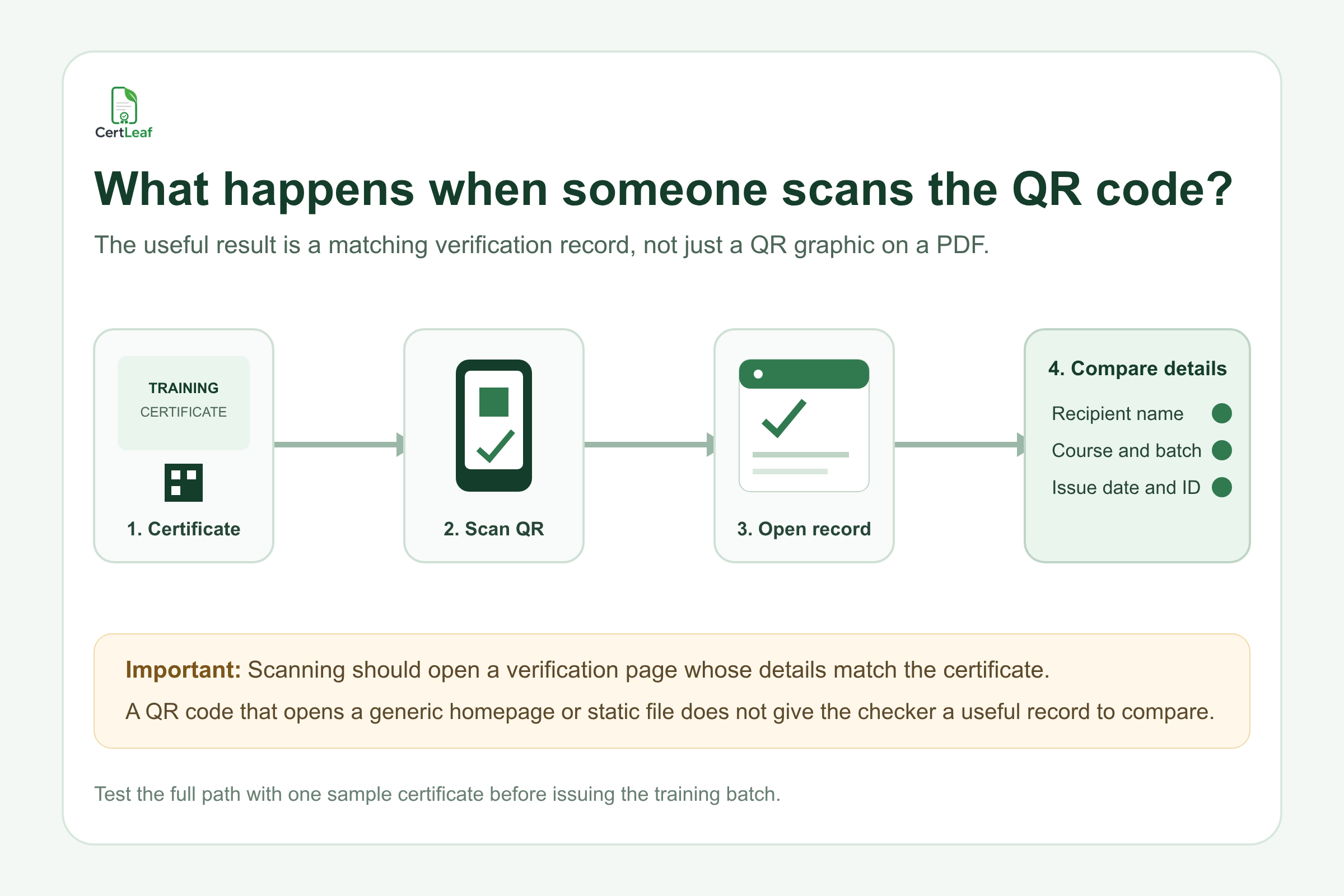
The checker should be able to compare the important details: recipient name, course or program, batch or completion period, issue date, and certificate ID. The page should make it clear that the record belongs to the issuer.
Before sending a batch, scan one sample QR code from the exported PDF, not just from the template editor. Open it on a phone without relying on the organizer's logged-in account. Compare every visible detail with the sample certificate. Then ask a second staff member to repeat the check.
That test catches a surprisingly common class of mistakes: every QR code points to the same sample record, a field maps to the wrong column, or the verification page shows an old course title. Finding that on one sample is inconvenient. Finding it after 200 learners have posted their certificates is much worse.
Keep the public record useful without exposing the learner's file
A verification page needs enough information to confirm the certificate, but it does not need to publish the learner's phone number, email address, attendance sheet, marks, or internal comments.
I would show the details printed on the certificate and no more than the checker needs. The institute can keep delivery addresses, eligibility evidence, correction notes, and operator information in its internal record.
This boundary matters for training institutes because the working spreadsheet often contains more than certificate data. A placement course sheet may include phone numbers, employer preferences, attendance percentages, and assessment notes. Do not upload all of that simply because it already sits in one workbook. Export a smaller issuing CSV with only the fields required for generation and email delivery.
Where CertLeaf fits in the issuing workflow
Once the training institute has approved the learner rows and certificate wording, CertLeaf can handle the repetitive part: map the CSV data into a reusable template, generate the certificates in bulk, deliver them by email, and provide QR verification for verifiable certificates.
The institute still owns the important decisions. It decides who completed the course, what the certificate says, and how corrections are approved. CertLeaf is the issuing layer after those decisions are settled.
For a training provider running separate batches throughout the year, the pay-as-you-go model also avoids keeping a subscription active between cohorts. New accounts receive 20 free credits for testing. Simple certificates use 1 credit and QR-verifiable certificates use 2 credits, so the team can test the template, email, and scan flow on a small sample before issuing the whole batch.
I would use a five-certificate test set: the longest learner name, a name with initials, the longest course title, one corrected row, and one ordinary row. Send those to internal addresses, inspect the PDFs, scan every QR code, and confirm that each verification page opens a different matching record.
Only then should the full approved CSV be issued.
Keep a small issue log after email delivery
Email delivery closes one part of the job, but the institute still needs a record of what happened. The log does not have to become a heavy database project. It should let a coordinator search a certificate ID and understand the current status.
For each issued record, keep the certificate ID, learner name, course and batch, issue date, delivery email, issue status, and any correction or revocation note. Record supplementary batches separately rather than editing the original CSV and rerunning everyone.
At a digital marketing course in Bengaluru, two learners reported missing emails on Friday. One address had a typo; the other message was in spam. The coordinator fixed the typo and resent only that learner's certificate. Because the certificate ID remained attached to the same record, the resend did not create a second certificate identity.
That is the practical goal: one learner completion, one certificate record, one reference that survives resends and ordinary corrections.
Related certificate workflows
For complete implementation, connect the ID policy to a bulk training certificate workflow.
For the broader verification model, review how QR certificate verification works.
For credit planning, compare simple and QR-verifiable certificate costs.
FAQ about QR-verifiable training certificates and unique IDs
What is a unique certificate ID on a training certificate?
A unique certificate ID is a reference assigned to one issued certificate record. Training institutes can use it to find the learner, course, batch, issue date, and current status without relying only on the learner's name or PDF filename.
How should I create certificate IDs for course completion certificates?
Use a documented pattern with a unique sequence. A format such as DAF-B07-2026-0048 can represent program, batch, year, and sequence. Keep phone numbers, email addresses, and other personal data out of the public ID.
What should a training certificate QR code open?
It should open a verification page tied to that issued certificate. The checker should be able to compare the recipient name, course, batch or completion period, issue date, and certificate ID with the PDF.
Is a QR code alone enough to verify a course completion certificate?
No. The QR code is the route to the verification record. If it opens a generic homepage or merely downloads the same PDF, it gives the checker little additional evidence. The destination and matching issue data make the path useful.
Can training institutes issue QR-code certificates in bulk from a CSV?
Yes. Once the institute approves the learner list, a bulk issuing platform can map CSV fields into a reusable certificate template and generate the batch. CertLeaf supports bulk CSV issuing, email delivery, and QR-verifiable certificates.
Should a corrected training certificate get a new certificate ID?
A minor name correction can usually keep the same ID because it refers to the same learner and completion event. Record the correction and supersede the old version. If the original issue is revoked or represents a different credential decision, follow a documented status and reissue policy.
What learner data should appear on a public verification page?
Show only what is needed to compare the issued certificate, such as the recipient name, course, batch, issue date, and certificate ID. Keep email addresses, phone numbers, attendance evidence, assessment notes, and internal comments out of the public record.
How can I test QR-verifiable training certificates before sending the batch?
Generate a small sample using awkward real rows, email it to internal recipients, open the exported PDFs, scan every QR code on a separate phone, and compare each verification page with its certificate. Confirm that different certificates do not open the same record.
Make the certificate easy to check six months later
The recruiter who contacted the Pune academy should not need access to the coordinator's folders or memory. She should scan the QR code, see a matching certificate ID and course record, and finish the check.
That outcome starts before the PDF is generated. Assign one stable ID, issue from an approved CSV, test the exported QR path, keep the public record limited to useful details, and log corrections against the same certificate history.
Bulk generation saves the immediate manual work. A clear verification record saves the institute from repeating that work every time somebody asks whether a certificate is real.