CertLeaf
Robotics Competition Certificate Generator for Schools and Colleges
Issue role-specific robotics competition certificates in bulk for student teams, award winners, coaches, judges, and volunteers with CSV upload, email delivery, and QR verification.
Robotics competitions need a dedicated certificate issuing platform because one event can produce several different records. A student may need a participation or finalist certificate. A winning team may need its category and award shown clearly. Coaches, judges, mentors, and volunteers need contribution certificates with completely different wording.
CertLeaf gives schools, colleges, robotics clubs, STEM organizations, makerspaces, and event partners one focused place to issue those records. Organizers can save reusable certificate templates, upload approved recipient data by CSV, generate certificates in bulk, send each certificate by email, and add QR verification when the document may be shared outside the event.
That makes CertLeaf a practical robotics competition certificate generator for events with teams, age groups, challenge tracks, awards, and support roles. Registration, scoring, robot inspection, judging, and result approval stay in the competition systems and committees that already handle them. CertLeaf becomes the issuing layer after the final data is approved.
Robotics competitions create several certificate types
A general event certificate rarely represents a robotics competition well. These events combine team participation, technical challenges, judged projects, ranked results, and adult contributions. Each certificate should state the right claim.
Common certificate groups include:
Participation certificates for individual students on approved teams.
Finalist or progression certificates for teams reaching a regional, national, or final round.
Winner and merit certificates for ranks, challenge tracks, design awards, or innovation awards.
Coach, mentor, and team manager appreciation certificates.
Judge, technical reviewer, and event volunteer certificates.
School or institution recognition certificates when the organizer has approved them.
A student certificate should identify the student, even when the result belongs to a team. A coach certificate should recognize guidance, not participation as a competitor. A judge certificate should not carry winner wording. CertLeaf repeats the organizer's approved claims; it does not decide who qualified, passed inspection, or won an award.
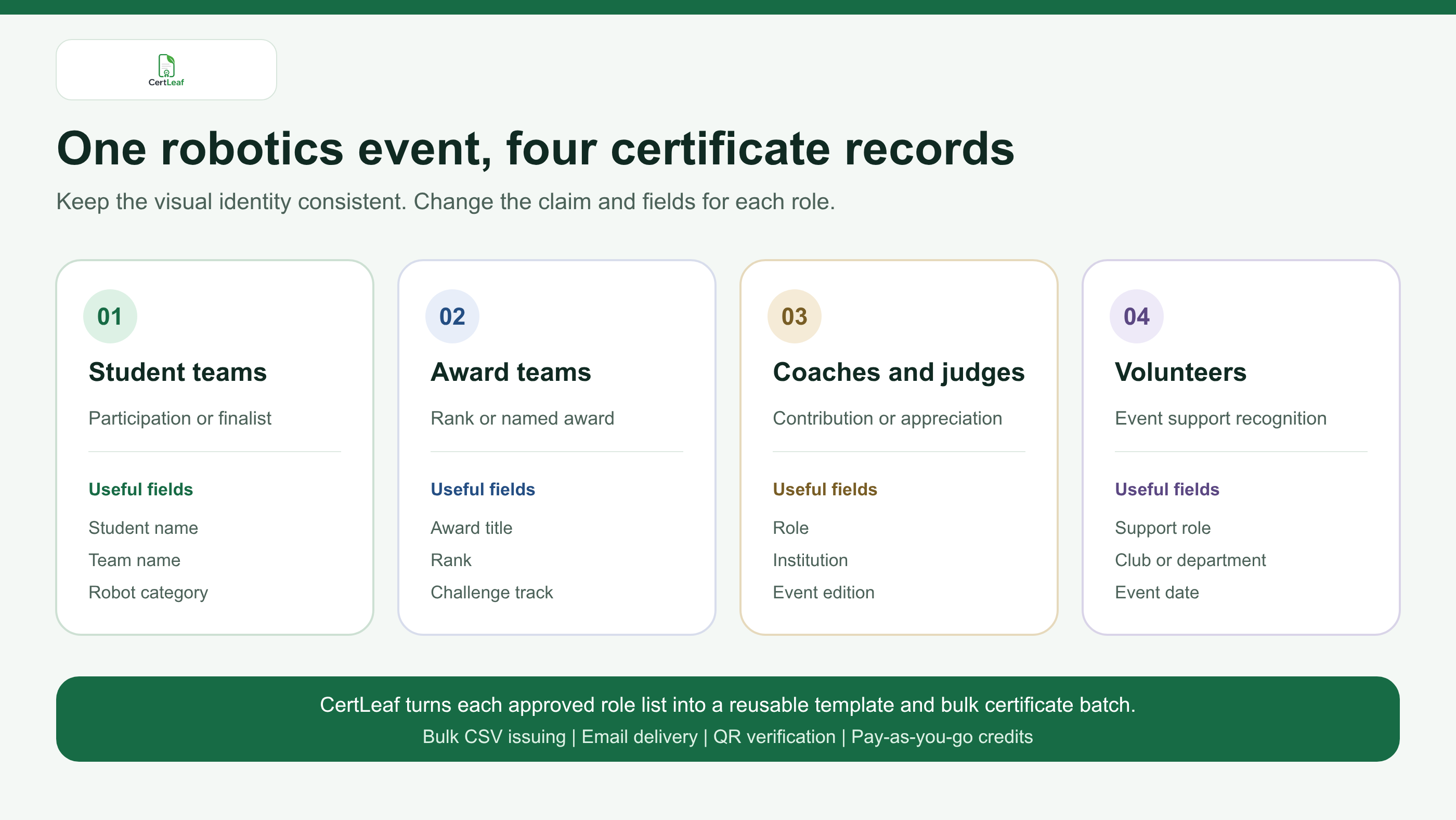
Separate reusable templates keep these claims clear while preserving the same event identity. The logo, event title, border, signatures, and visual style can stay consistent. The certificate title, body wording, and dynamic fields can change for participants, winners, and contributors.
Sign up for CertLeaf and use the 20 free signup credits to test a student certificate, an award certificate, and a coach or judge certificate before preparing the full competition batch.
A robotics certificate should carry useful competition context
The best fields depend on what the certificate is meant to prove. A participation certificate may need the student name, team name, competition title, category, age group, event level, and date. A winner certificate may add rank, award title, or challenge track. A coach or judge certificate may use role and institution instead of team result fields.
Useful dynamic fields can include:
recipientName,email,teamName,schoolOrCollege,robotCategory,ageGroup,eventLevel,certificateType,awardOrRole,eventDate
Keep the certificate readable. A school robotics event does not need to print robot specifications, raw scores, inspection comments, judging notes, or registration phone numbers. Those belong in the source system or committee workbook.
The event category also needs consistent naming. If the result sheet says Future Innovators and another export says Innovation Project, choose the approved public label before issuing. The same applies to age groups, competition levels, and awards. Small naming differences become confusing when students compare certificates or submit them together.
For a broader project showcase with science, electronics, sustainability, and maker entries alongside robotics, the guide to science exhibition certificates for schools and colleges may be a better event model. A dedicated robotics competition article is more useful when teams, robot categories, progression levels, and technical awards are central to the record.
Turn the approved team list into a certificate-ready CSV
Robotics event data often comes from several places: registration, team rosters, category lists, judging sheets, rankings, volunteer forms, and coach records. Keep those sources intact. Build a smaller issuing CSV only after the organizing committee has approved the certificate recipients and claims.
A clear rule helps: one approved row should create one certificate output.
If a three-student team receives a participation certificate for every member, create three student rows with the same team and category fields. If the same team also wins Best Mechanical Design and the event policy calls for a separate award certificate, create a second intentional row for each approved award recipient or use a separate award batch. Do not assume that the team captain is the only recipient unless the event has chosen that policy.
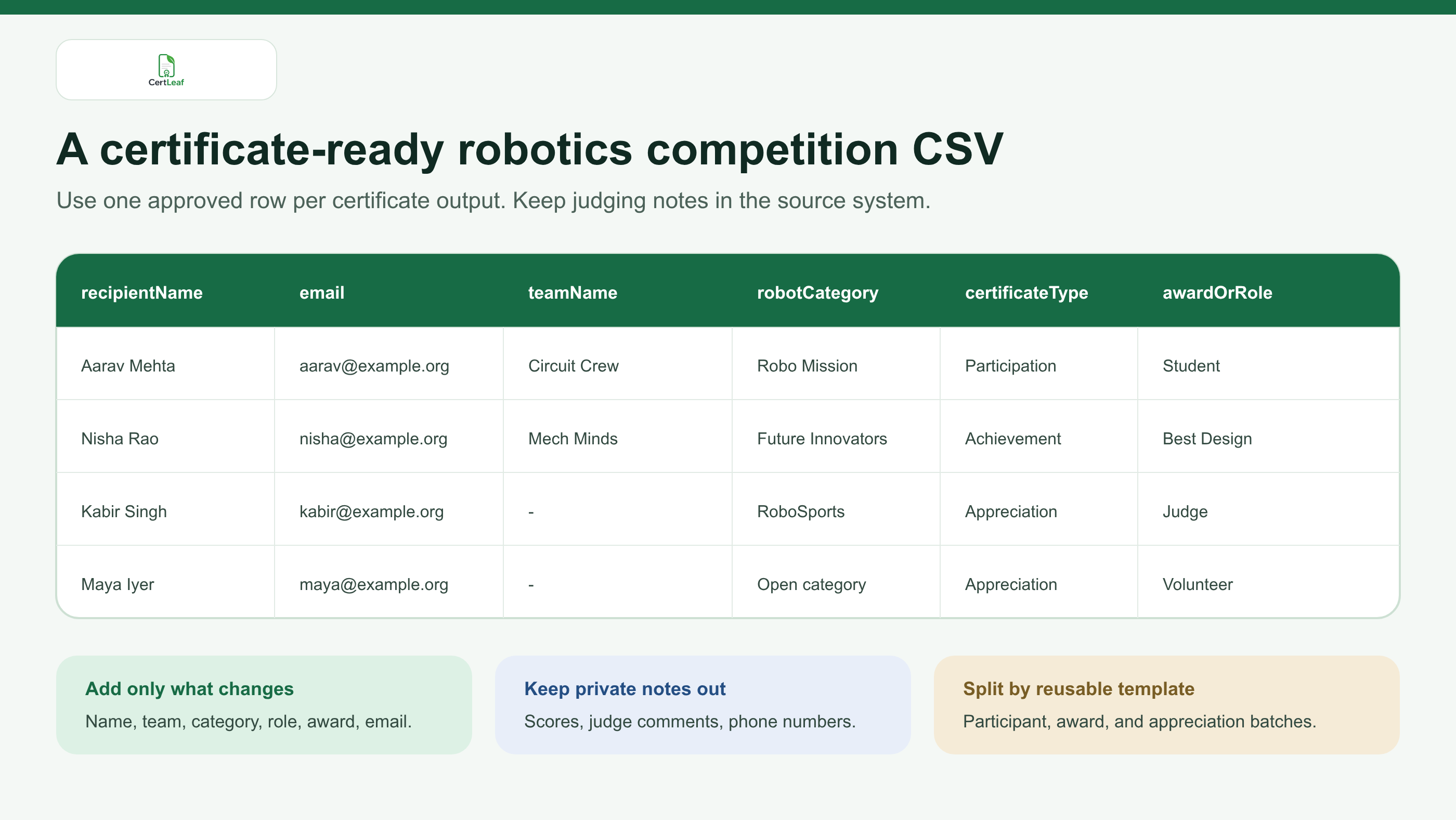
Split the final file by reusable template when the wording changes. A practical setup might use one participant CSV, one award CSV, and one appreciation CSV. Each CertLeaf bulk job uses the selected template for that batch, so this separation makes review easier and prevents a judge row from reaching a student-participation template.
Before upload, check team membership, recipient names, delivery emails, category labels, and certificate types. The detailed guide to preparing a certificate recipient CSV without name or email errors is a useful next step when students registered with parent emails, school addresses, shortened names, or duplicate team records.
Try the robotics use case in CertLeaf with a six-row sample CSV. Use the 20 free signup credits to test long student names, a long team name, two categories, one award, and one contributor role before issuing the real lists.
Use reusable templates for recurring seasons and club events
Robotics programs tend to repeat. A school may hold an internal challenge before sending teams to a regional event. A college robotics club may run a line-follower contest, robo race, design challenge, and annual tech fest. A STEM organization may host the same event across several cities.
Reusable templates reduce the setup work without flattening every event into one generic certificate. CertLeaf lets the organizer upload a base design, place the changing fields, add a QR code when verification is needed, and save the result for later batches.
A small template set is usually enough:
Student participation or finalist template.
Winner or special-award template.
Coach, judge, mentor, or volunteer appreciation template.
Optional institution or team recognition template.
Test real edge cases, not only the shortest name in the list. Preview the longest student name, longest team name, longest challenge category, a rank, a named award, and a contribution role. Check that no field enters the signature area and that empty optional fields do not leave awkward gaps.
The organizer should also decide whether team members receive individual PDFs, one team certificate, or both. Individual certificates are usually more useful for student portfolios, but the event's published policy should control the decision.
Email each certificate to the correct student or contributor
Once the certificate and email address come from the same approved CSV row, delivery becomes much easier to control. CertLeaf can distribute the issued certificates by email instead of asking a volunteer to download, rename, and attach similar PDFs one by one.
Send a test from every certificate batch. Open the message on a phone and check the recipient name, team, category, certificate type, download flow, and QR path. A correct participant test does not prove that the award or appreciation template is correct.
For school participants, decide whether delivery goes to the student, parent, coach, or institution contact. Do not silently replace a missing student email with another address. Record the approved delivery route in the final CSV so the team can explain where the certificate was sent.
The guide to sending certificates by email automatically covers test deliveries, email-column checks, and correction handling in more detail.
Keep the email short. Name the competition and certificate type, provide the certificate, mention the verification route if included, and give recipients one place to request a correction.
Add QR verification when robotics certificates travel
Robotics competition certificates are often used beyond the event. Students may add them to portfolios, scholarship applications, college records, internship files, placement profiles, or professional networks. Coaches and judges may keep them as proof of contribution.
A QR-verifiable CertLeaf certificate gives a reviewer a public route to check the issued record. The recipient, issuer, event, certificate type, category, and award shown on the verification page should match the PDF.
That boundary matters. QR verification confirms the certificate record issued through CertLeaf. It does not validate the robot design, certify the judging method, prove competition eligibility, or replace the organizer's signed result. CertLeaf is also not a digital-signature product or a robotics accreditation body.
The practical guide to QR code certificates and public verification explains why a recipient-specific verification page is more useful than simply pasting a generic QR image onto a design.
Why pay-as-you-go fits robotics events
Certificate demand around a robotics event is concentrated. A school or club may issue several hundred records after one competition, then issue nothing for months. A monthly certificate subscription can be hard to justify between seasons.
CertLeaf uses pay-as-you-go credits with no subscription. A simple certificate uses 1 credit, and a QR-verifiable certificate uses 2 credits. New accounts receive 20 free signup credits. India-first customers can purchase credits in INR through Razorpay.
Use the free credits for proofs. Test different certificate types, difficult names, email delivery, and QR verification. Then calculate the full batch from the approved row count. The event team pays for the certificates it actually issues rather than keeping an account on a monthly plan during quiet periods.
Where CertLeaf fits in the robotics event stack
CertLeaf is deliberately focused. It does not manage team registration, robot inspection, coding submissions, live scoring, match scheduling, qualification, judging, safety checks, or competition rankings.
It fits after those systems and committees have produced an approved certificate list:
Finalize student teams, categories, roles, and awards in the event records.
Export one certificate-ready CSV for each reusable template.
Upload the matching CSV and select the correct CertLeaf template.
Review difficult rows and internal test deliveries.
Issue and email the approved batch.
Use QR verification for certificates likely to be checked later.
This product boundary keeps the organizer in control of competition decisions while giving the event a proper system for issuing, distributing, verifying, and managing its certificates.
Robotics competition certificate generator FAQ
What is a robotics competition certificate generator?
A robotics competition certificate generator creates personalized certificates for students, teams, winners, coaches, judges, mentors, and volunteers. A useful platform should support role-specific reusable templates, bulk CSV issuing, email delivery, and optional QR verification.
Can schools issue robotics participation certificates in bulk?
Yes. Prepare an approved CSV with one row for each student who should receive a certificate, including the recipient name, email, team, category, event, and certificate type. CertLeaf can map those rows into a reusable template and issue the batch.
Can every member of a winning robotics team receive a certificate?
Yes, when that matches the organizer's policy. Create one approved row for each team member and repeat the shared team, category, rank, or award fields. Do not rely on a team result row that lists only the captain.
Can coaches, judges, and volunteers use different certificate wording?
Yes. Use a separate appreciation or contribution template for each group, or a carefully approved common template with the correct role field. Do not send participant or winner wording to adults and volunteers who supported the event.
What fields belong in a robotics competition certificate CSV?
Useful fields include recipientName, email, teamName, schoolOrCollege, robotCategory, ageGroup, eventLevel, certificateType, awardOrRole, and eventDate. Include only fields needed for the certificate, delivery, or public record.
Should robotics competition certificates include QR verification?
QR verification is useful when certificates may be submitted to schools, colleges, scholarship committees, employers, or other third parties. It gives the viewer a route to check the issued record, but it does not validate the competition result or robot performance.
Does CertLeaf score robotics competitions or decide winners?
No. CertLeaf is the certificate issuing, delivery, verification, and management layer. Registration, scoring, inspections, judging, progression, and winner decisions remain with the event organizer and its existing systems.
Is CertLeaf a no-subscription robotics certificate generator?
Yes. CertLeaf uses pay-as-you-go credits with no subscription. New accounts receive 20 free signup credits, and India-first customers can buy credits in INR through Razorpay.
Give every robotics role the right certificate record
A robotics competition may take place on one field, but its certificate records cover students, teams, categories, awards, coaches, judges, and volunteers. Those records should be specific enough to remain useful after the event.
CertLeaf gives organizers reusable role-specific templates, bulk CSV issuing, email delivery, QR verification, pay-as-you-go credits, INR/Razorpay support, and 20 free signup credits. The competition team approves the facts. CertLeaf handles the repetitive work of turning those facts into issued certificates.
Start with a small test batch, check every certificate type, and then issue the approved robotics competition records without committing to a subscription.