CertLeaf
Certificate Generator Without Subscription: Pay Only When You Issue Certificates
A practical guide to choosing pay-as-you-go certificate issuing for occasional events, workshops, training batches, seminars, competitions, and courses.
Picture a familiar composite scene. At 8:15 pm, the coordinator of a one-day skills workshop in Mysuru is trying to close the event accounts. The venue has been paid. The speaker invoice is ready. The participant sheet shows 120 eligible names.
Then she reached the certificates.
The team needed a certificate tool for this batch, perhaps another seminar in November, and nothing in between. A monthly plan felt hard to explain to the department: why keep paying through September and October when no certificates would be issued?
That is the real use case for a certificate generator without subscription. Colleges, training institutes, event organizers, coaching centres, and course creators often issue in bursts. A workshop finishes. A competition closes. A training cohort completes its assessment. The certificate workload arrives all at once, then disappears for a while.
A pay-as-you-go model can match that schedule better than a recurring plan. But it is not automatically the right choice for every team.
Pay-as-you-go or monthly: the quick decision
| Question | A monthly plan may fit | Pay-as-you-go may fit |
|---|---|---|
| How often do you issue? | Every week or month | Around occasional events or batches |
| Is volume predictable? | Fairly stable | Uneven across the year |
| What does the budget need? | A recurring software line | A one-time event or cohort cost |
| What is the main job? | Ongoing credential operations | Bulk issuing, email delivery, and optional verification |
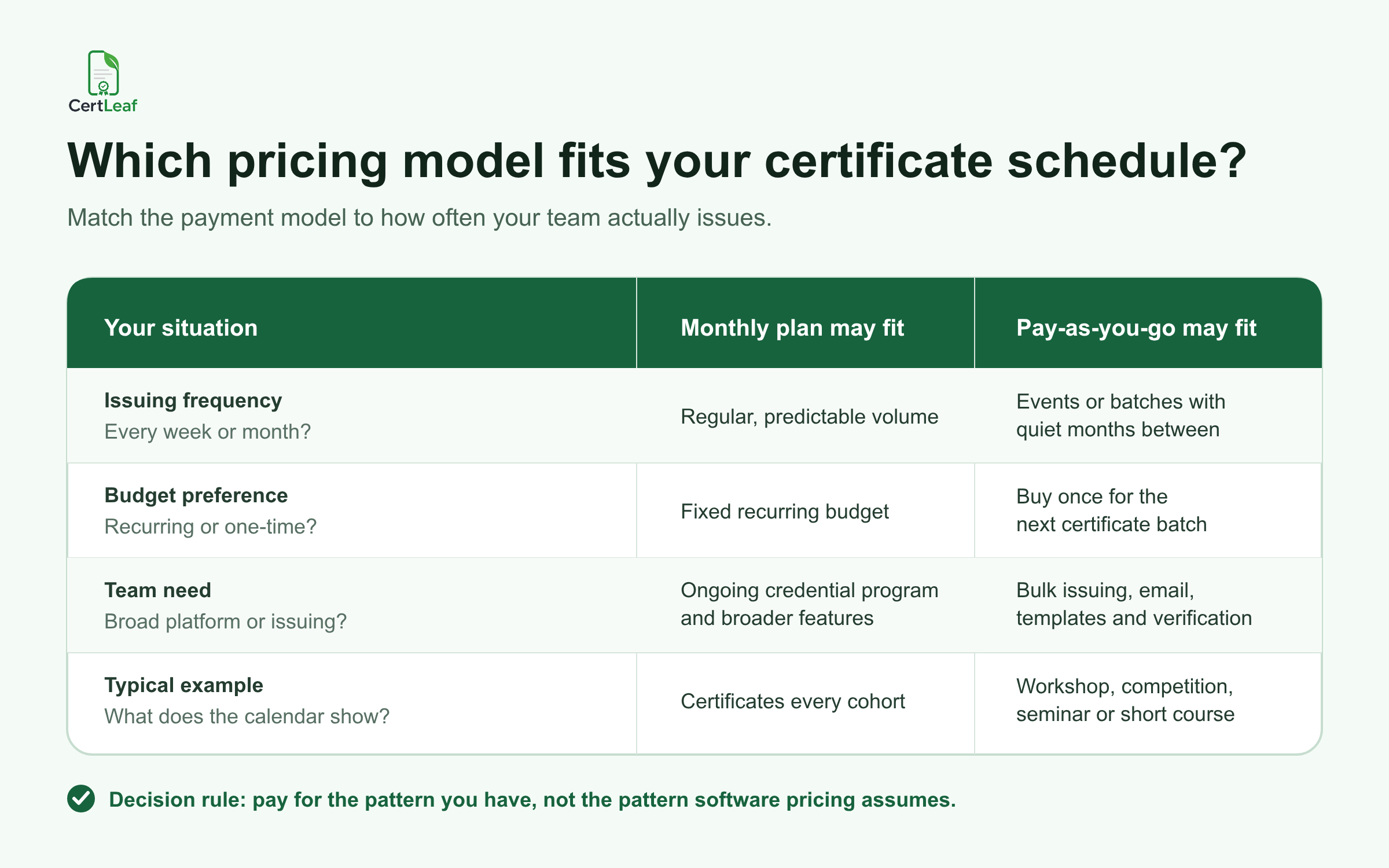
My rule would be simple: look at the calendar before looking at the feature list. If your team issues certificates every month and needs broader credential management, a subscription may be perfectly reasonable. If the calendar shows three workshops, two competitions, and long quiet gaps, buying credits for each batch is easier to connect to the work being done.
When a certificate generator without subscription is a better fit
Pay-as-you-go works best when certificate volume follows events rather than the calendar month.
A college department might need 180 seminar certificates in August and no certificates during exams. A coaching centre might issue achievement certificates after each test series, with different batch sizes each time. A course creator may open enrolment four times a year. A training institute may have one large placement batch followed by six quiet weeks.
In each case, the certificate cost can sit beside the event, course, or batch budget that created it. The team buys what it needs, completes the issuing work, and returns when the next list is ready.
This model is also practical when the person approving the expense wants a clear answer to a clear question: how many certificates are we issuing in this batch? A one-time credit purchase is easier to map to 120 participants than a recurring payment whose value depends on future usage.
There is one caution. Pay-as-you-go does not remove the need to plan. The organizer still has to know the recipient count, choose between simple and QR-verifiable certificates, and leave room for test rows or corrections.
Plan credits from the approved recipient list
The credit calculation in CertLeaf is deliberately straightforward:
A simple certificate uses 1 credit.
A QR-verifiable certificate uses 2 credits.
For the Mysuru workshop, 120 simple certificates would use 120 credits. If the department wanted every certificate to include QR verification, the same batch would use 240 credits.
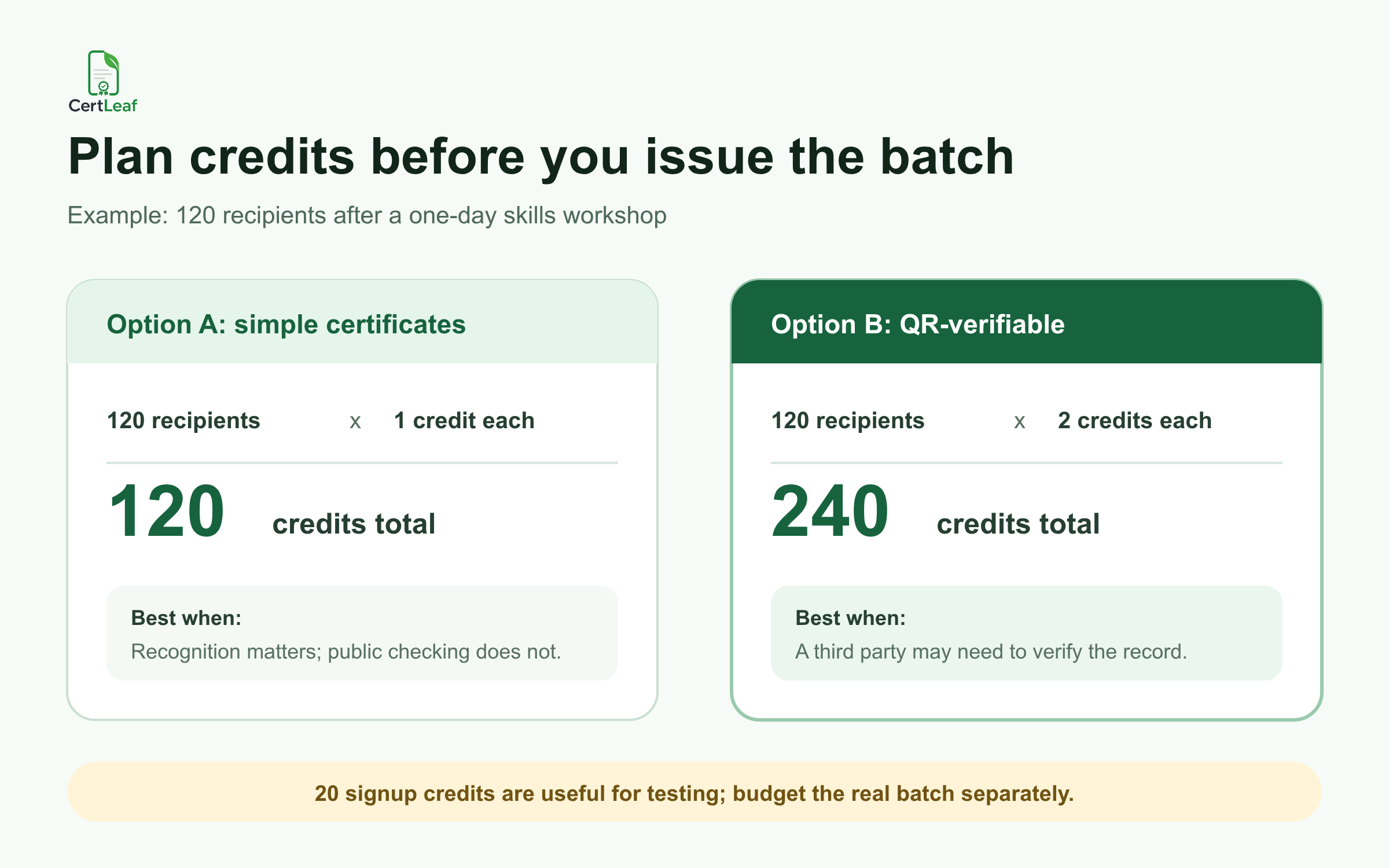
That choice should come from how the certificate will be used, not from a desire to add more features. A simple certificate can be enough for internal recognition or a low-stakes activity. A QR-verifiable certificate is more useful when a student, learner, or participant may share it with a college, employer, client, or another third party that needs a public verification route.
New CertLeaf accounts receive 20 free signup credits. I would use those credits to test the awkward rows: the longest name, a name with initials, the longest course title, and the email address your team can open immediately. Free credits are useful for proving the workflow. They should not become the main budget plan for a real event batch.
Before buying a pack, freeze the eligible recipient list. A registration export is not always the issuing list. Remove no-shows, resolve duplicate rows, and confirm the email column. This practical recipient CSV preparation guide covers the checks that prevent name and delivery errors before a bulk job begins.
What CertLeaf includes without a monthly plan
A no-subscription price is only useful if the tool still completes the issuing job.
CertLeaf lets an organizer upload a base certificate design, place dynamic fields, and save the result as a reusable template. For the next event or cohort, the team can keep the layout and change the recipient data, event title, date, or other mapped fields.
The approved recipient list can be uploaded as a CSV for bulk issuing. Certificates can then be distributed by email, rather than downloaded, renamed, attached, and sent one at a time.
When verification matters, the organizer can issue QR-verifiable certificates linked to a public verification page. The distinction is important: a QR code pasted onto a design is not automatically a verifiable certificate record. If your team is deciding whether the extra verification layer is useful, read the guide to QR code certificates for workshops and training programs.
For India-first customers, CertLeaf supports INR payments through Razorpay. Credit packs are one-time purchases, not recurring subscriptions. Check the current pricing page before the event budget is approved, since pack prices and promotions can change.
A practical issuing sequence for occasional batches
The best pay-as-you-go workflow begins before anyone buys credits.
First, decide who qualifies. A seminar may issue certificates to everyone marked present. A six-week course may require a completion score. A competition may need separate certificates for participants, finalists, and winners. Put that decision into the working sheet before certificate generation starts.
Next, create or reopen the reusable template. Test it with the names most likely to stretch the layout. In that example, one participant's 31-character name pushes too close to the signature line. Fixing that in the template takes two minutes. Finding it after 120 emails would create a correction batch.
Then calculate credits from the final row count and certificate type. Buy the pack that fits the approved batch, upload the CSV, review samples, and issue. Once the certificates are ready, use email delivery so each recipient gets the correct record. For the delivery side of the job, this bulk certificate email workflow explains what to test before sending the full list.
Finally, keep the issued CSV and template. The next workshop should begin with a reusable system, not a search for last semester's PDF and a spreadsheet called final_v7.
When a monthly plan may still be the sensible choice
A certificate generator without subscription is not a universal answer.
If your organization issues credentials every week, has predictable recipient volume, or needs broader program features such as advanced integrations, analytics, role controls, or enterprise support, a recurring platform may be a better operational fit. The monthly cost may be easier to justify when the system is used continuously by a dedicated team.
The same applies when certificates are part of a large, ongoing credential program rather than the final step of occasional events or courses. In that situation, evaluate the complete platform, support requirements, and annual recipient model - not only the price shown for the first month.
For very small one-off needs, a manual workflow may also be enough. If you are issuing five certificates once and nobody needs verification, a spreadsheet and design tool may be reasonable. The point is to avoid paying for more process than the job requires, in either direction.
The budget question to ask before the next event
Do not ask, "Which certificate tool has the longest feature list?"
Ask, "How does our team actually issue certificates?"
If the answer is in occasional batches after workshops, competitions, seminars, training programs, coaching cycles, or course completions, a pay-as-you-go certificate generator can keep the cost attached to real issuing work. With CertLeaf, that means reusable templates, bulk CSV issuing, email delivery, optional QR verification, one-time credit packs, and no subscription.
The useful outcome is not free certificates. It is a predictable way to pay only when certificates need to be issued.
FAQ
Is there a certificate generator without subscription for bulk batches?
Yes. CertLeaf uses one-time pay-as-you-go credit packs rather than a monthly subscription. It supports reusable templates, CSV-based bulk issuing, email delivery, and QR-verifiable certificates.
How many credits does one certificate use in CertLeaf?
A simple certificate uses 1 credit. A QR-verifiable certificate uses 2 credits. Calculate the required credits from the final approved recipient count and leave a small allowance for testing or corrections.
Are the 20 free signup credits enough for an event?
They may cover a very small batch, but they are better used to test the template, CSV mapping, email delivery, and QR flow. Budget a real workshop, course, or competition batch separately.
When is pay-as-you-go better than a monthly certificate plan?
It is usually a better fit when issuing is occasional, batch sizes vary, and there are quiet months between events or cohorts. A monthly plan may fit teams with regular credential volume or broader ongoing platform needs.
Can I send certificates by email without a subscription?
Yes. CertLeaf supports certificate email delivery as part of its pay-as-you-go issuing workflow. Prepare the recipient email column carefully and test one delivery before sending the full batch.
Can Indian colleges and training institutes pay in INR?
Yes. CertLeaf supports INR payments through Razorpay for India-first customers. Check current credit-pack pricing before approving the event or cohort budget.