CertLeaf
Cybersecurity Awareness Certificate Generator for Colleges and Training Teams
Issue cybersecurity awareness participation and completion certificates in bulk with reusable templates, email delivery, QR verification, and no subscription.
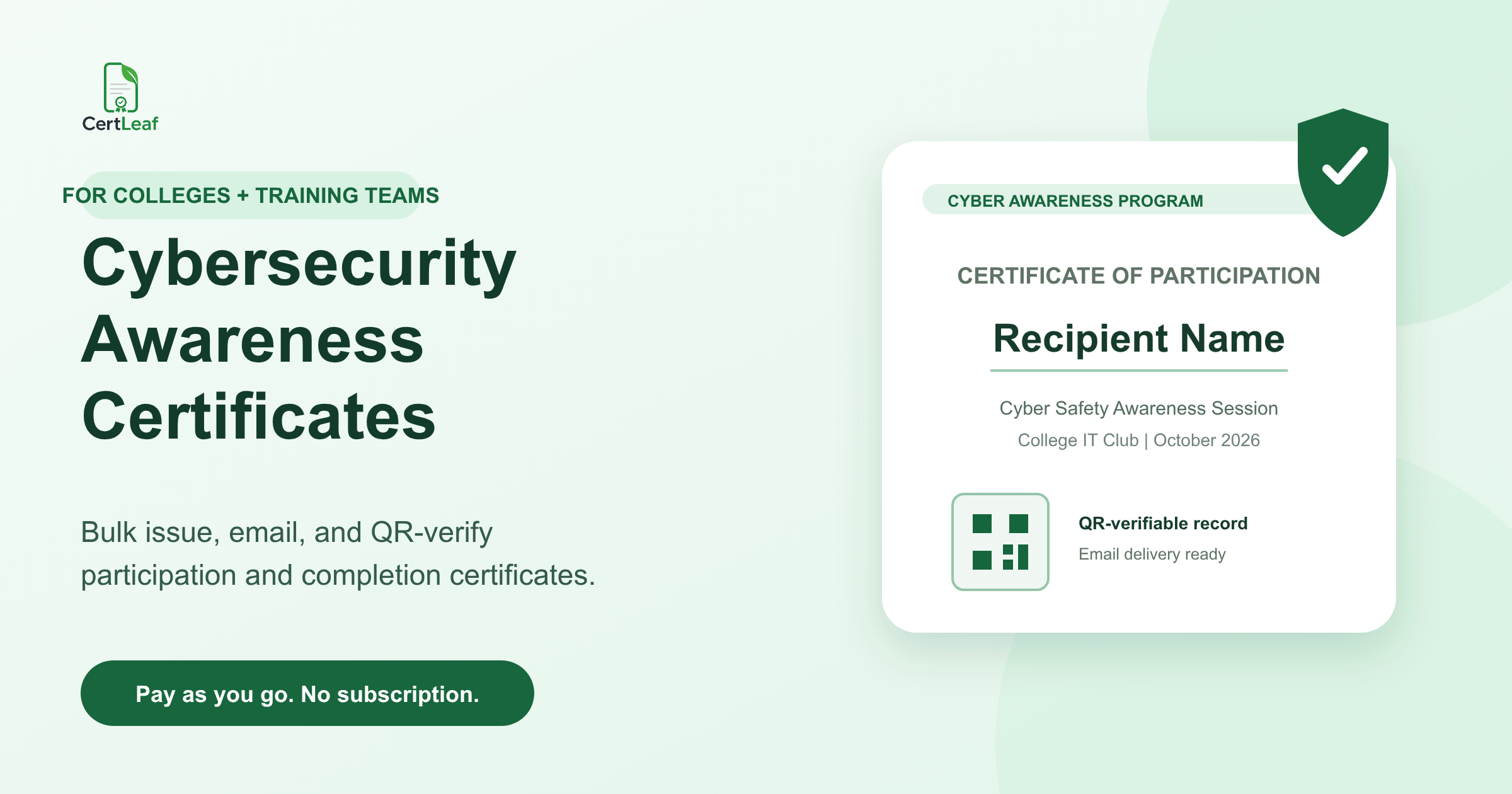
Cybersecurity awareness programs produce certificates for several audiences, often in the same campaign. A dedicated issuing platform keeps the templates, recipient data, email delivery, and verification records in one place.
A college IT club may run a cyber safety session for first-year students. A computer science department may host a five-day faculty development program. A training provider may deliver phishing-awareness sessions to several small organizations. A community group may organize a digital safety workshop for parents or senior citizens. Each program ends with different people, roles, wording, and certificate expectations.
CertLeaf gives these teams one focused place to create reusable certificate templates, issue personalized certificates in bulk from an approved CSV, email each certificate to the right recipient, and add QR verification when the certificate may be shared outside the program. There is no monthly subscription. New accounts receive 20 free signup credits to test the use case.
CertLeaf is the certificate issuing layer. It does not deliver cybersecurity training, test technical ability, award industry credentials, manage incidents, or decide who completed a program. The organizer keeps those decisions. CertLeaf turns the approved records into consistent certificates.
Cybersecurity awareness programs need more than one certificate type
A single campaign can involve attendees, learners, speakers, volunteers, quiz finalists, and organizers. Giving everyone the same generic certificate makes the record less useful.
An awareness talk usually needs a participation certificate. A multi-session workshop or faculty program may need completion wording if the organizer has defined and applied a completion rule. A cyber quiz or capture-the-flag event may need separate participant, finalist, and winner certificates. Guest experts, mentors, and student coordinators may need contribution or appreciation certificates.
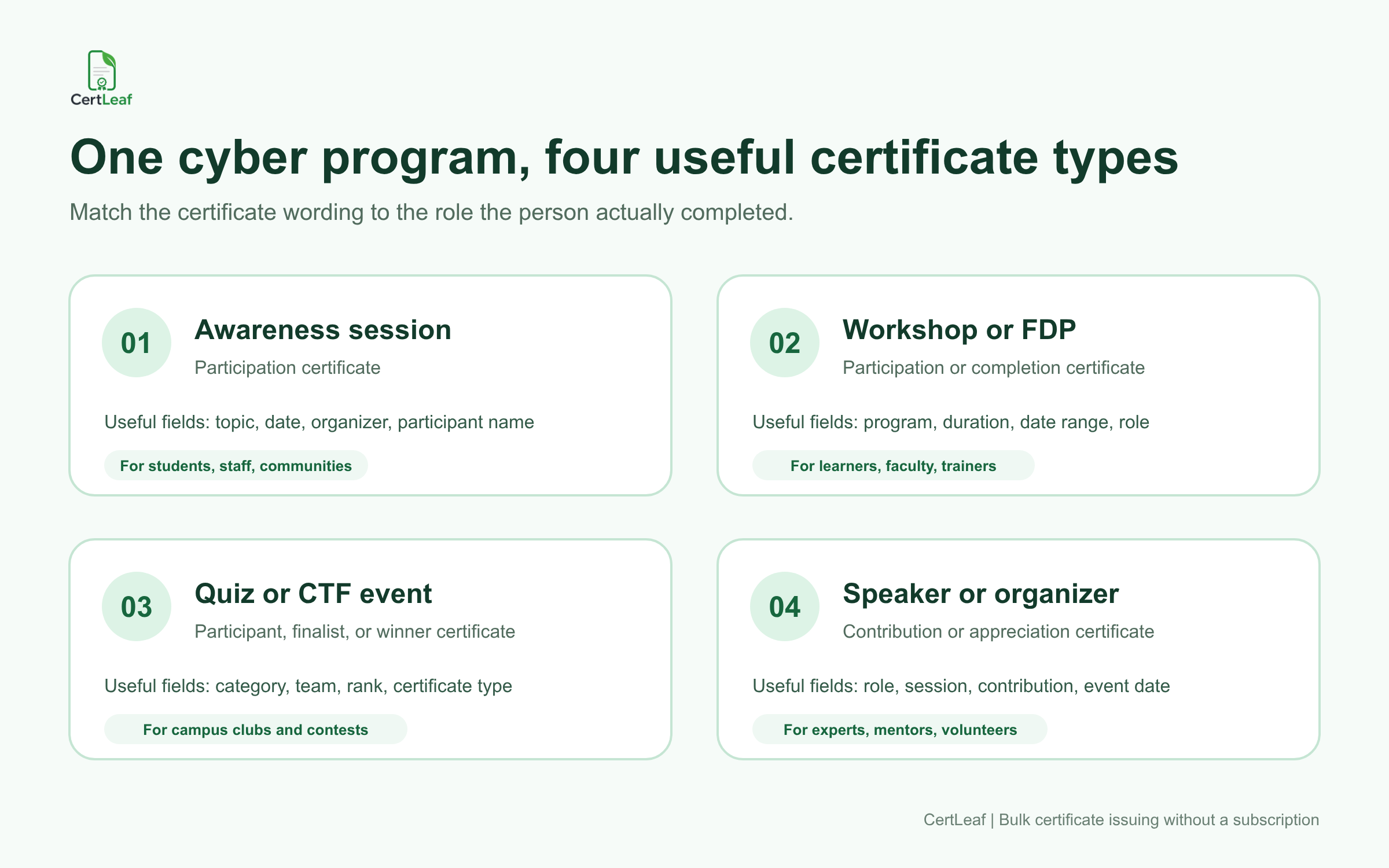
CertLeaf lets the team save separate reusable templates or map a certificate type field from the recipient file. The wording stays tied to what the person actually did instead of being stretched into a bigger claim.
A practical set may include:
Certificate of participation for an awareness session
Certificate of completion for an approved workshop or training cohort
Winner or finalist certificate for a cyber quiz or CTF event
Certificate of appreciation for a speaker, mentor, volunteer, or organizer
If you already have the program design and recipient list, see the broader guide to issuing workshop certificates in bulk for the template and batch-issuing setup.
Want to test this for your next program? Sign up for CertLeaf and use the 20 free credits to issue a small set of cybersecurity awareness certificates before preparing the full batch.
Where CertLeaf fits for colleges and training teams
For colleges, the likely users are computer science departments, information technology departments, cyber clubs, placement cells, innovation cells, faculty development coordinators, and student event teams. They may issue certificates after guest lectures, awareness campaigns, Cybersecurity Awareness Month activities, faculty programs, cyber quizzes, or hands-on workshops.
For training providers, the same platform can support public awareness sessions, employee awareness batches for smaller clients, short courses, community programs, and trainer-led workshops. The provider can keep a branded template for each program type and replace the recipient data for the next cohort.
CertLeaf supports the parts that repeat across these programs:
Upload a base certificate design and turn it into a reusable template
Place dynamic fields for recipient name, program name, role, date, duration, or certificate type
Upload an approved recipient CSV for bulk issuing
Generate simple or QR-verifiable certificates
Distribute certificates by email
Buy pay-as-you-go credits in INR through Razorpay without keeping a subscription active
This focus matters for occasional programs. A college cyber club may run two major events in a semester. A trainer may issue a large batch after an October campaign and then have no certificate work for several weeks. Paying when certificates are issued fits that calendar better than carrying a monthly tool through quiet periods.
Use certificate wording that respects the program boundary
A cybersecurity awareness certificate should say exactly what the organizer can support.
If someone attended a 90-minute session on phishing and account safety, call it participation in a cybersecurity awareness session. If a learner completed a documented multi-day course and met the provider's completion standard, completion wording may be appropriate. If someone won a campus cyber quiz, name the event and category.
Do not turn an attendance certificate into a claim of professional cybersecurity competence. Avoid wording such as "certified cybersecurity professional" unless the issuer actually runs an appropriate certification program and has the authority and evidence to make that statement. CertLeaf does not provide that authority.
Useful certificate fields may include:
Recipient name
Program or campaign name
Certificate type
Role or category
Session topic
Program date or date range
Duration, when the organizer wants it recorded
Issuing department or training provider
Certificate ID
QR code for a verifiable certificate record
A certificate can be specific without becoming crowded. Keep internal attendance notes, assessment answers, incident details, or client security information out of the design.
Prepare a small, certificate-ready recipient file
Cybersecurity programs can produce several data sources: registration forms, attendance exports, quiz results, feedback responses, volunteer lists, and speaker details. The certificate file should not become a copy of all of them.
Build a smaller approved CSV containing only the fields needed for personalization, email delivery, and the certificate record. For a basic awareness program, that could be:
full_name,email,program_name,certificate_type,role_or_category,issue_date
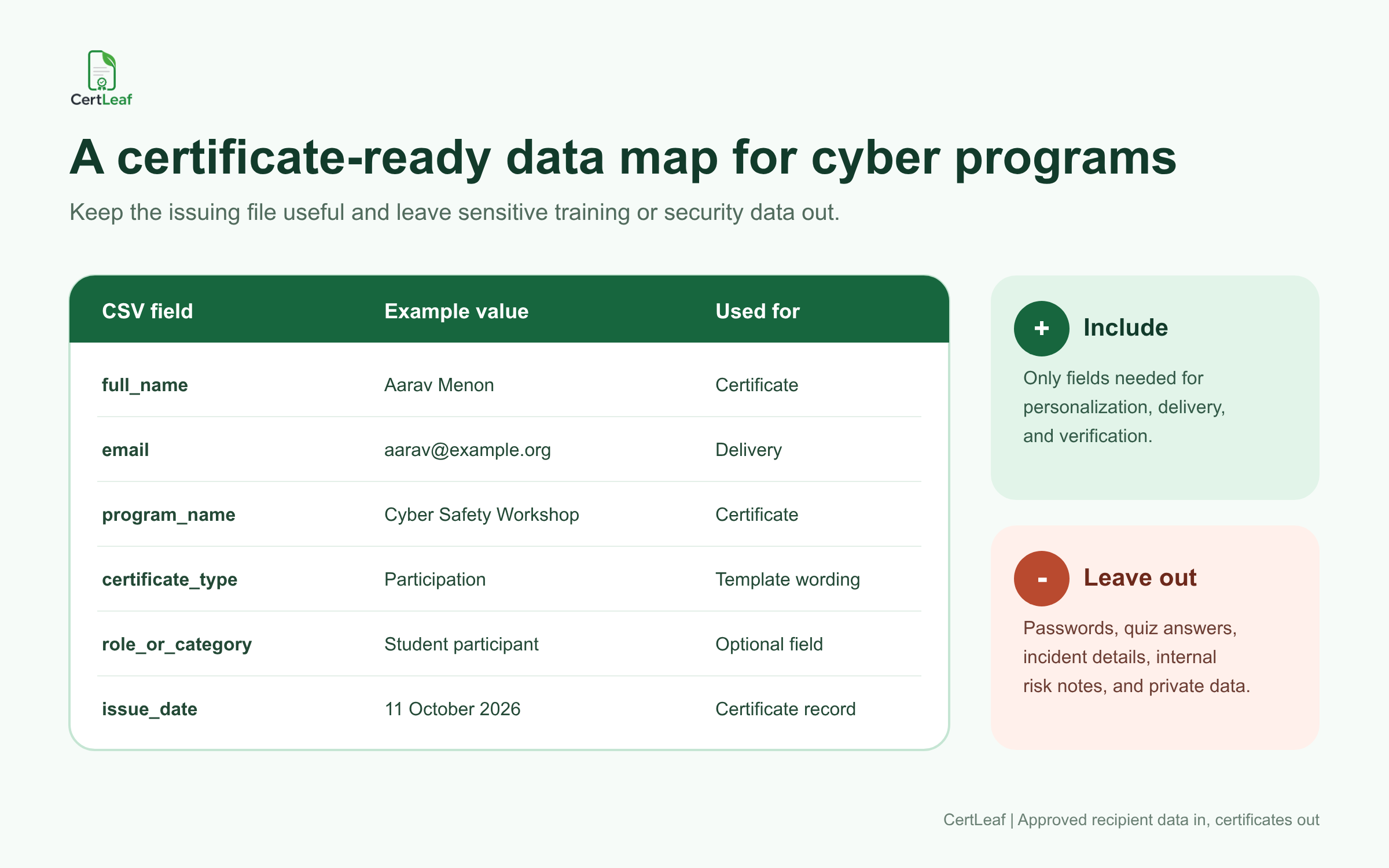
Passwords, quiz answers, incident reports, internal risk ratings, and unrelated personal details do not belong in a certificate CSV. If the training team needs those records for another purpose, keep them in the appropriate restricted system and export only the approved certificate fields.
For a quiz or CTF, add fields such as team_name, category, rank, or certificate_type only when they appear on the certificate. For a workshop, duration and completion_date may be more useful. A speaker or mentor file may need session_title and contribution_role.
CertLeaf uses the final approved rows for issuing. The platform should not be treated as the place where a coordinator decides whether a learner attended enough sessions or whether a quiz result is correct.
Try this with your next cyber awareness event: create one CertLeaf template, upload five approved sample rows, and use the 20 free signup credits to check names, email delivery, and QR verification before issuing the complete list.
Reusable templates help a cyber program stay recognizable
Cyber awareness programs often repeat under one department, club, training brand, or annual campaign. Reusable templates keep the visual identity stable while the recipient names, topics, roles, and dates change.
A college cyber club can keep one participation template for awareness talks, one award template for competitions, and one appreciation template for guest experts. A training provider can keep separate templates for awareness attendance and documented course completion. The base design, logo, signatures, and fixed wording remain in place; the recipient fields come from the approved batch data.
Test the template with realistic rows. Long department names, long session titles, initials, and multi-part names can expose spacing problems that a short sample name will not. Check a PDF at ordinary viewing size before the batch is sent.
This is where CertLeaf differs from a general design tool. The design is only the starting point. CertLeaf is built to issue the personalized records, send them, and keep verification available when required.
Add QR verification when the certificate will travel
A participation certificate may later appear in a student portfolio, faculty activity record, job application, LinkedIn post, or training file. In those cases, a QR-verifiable certificate gives the viewer a direct route to the issued record instead of asking them to trust a screenshot alone.
The QR code should lead to the matching certificate verification page. It should not be presented as proof that the recipient has broad cybersecurity expertise. It confirms the certificate record issued by the organizer.
A useful public record can show the recipient name, program, issuer, date, certificate ID, and current certificate status. It should not expose the recipient's email address, quiz answers, attendance evidence, employer security details, or internal notes.
For a deeper implementation guide, read how to issue QR-verifiable training certificates with unique certificate IDs. The same principles apply to cybersecurity workshops and awareness cohorts.
Email delivery keeps the certificate tied to the right recipient
Downloading a folder of PDFs still leaves the team with a distribution job. For a 200-person campaign, manual attachments create room for missed recipients and wrong-file mistakes.
CertLeaf can send issued certificates to the email address in each approved row. That is useful for campus events with mixed departments, online faculty programs with participants from several institutions, and training providers serving multiple cohorts.
Keep the delivery message short. Name the program, identify the organizer, explain that the certificate is attached or available, and mention QR verification only when the issued certificate includes it. Send one test to an address the team controls before starting the full batch.
If a recipient reports a spelling mistake, correct and reissue that record rather than rebuilding every certificate. If the email address is wrong, update the delivery detail and resend the intended certificate. The goal is a controlled correction, not another complete export.
Pay-as-you-go pricing suits campaign and cohort schedules
Cybersecurity Awareness Month creates a clear October campaign window, but colleges and training teams also run cyber safety programs throughout the year. The issuing pattern is usually uneven: a campaign week, a faculty program, a quiz, then a quiet period.
CertLeaf uses credits rather than a monthly subscription:
Simple certificate: 1 credit
QR-verifiable certificate: 2 credits
New account: 20 free signup credits
A team issuing 100 simple participation certificates needs 100 credits. The same number of QR-verifiable certificates needs 200 credits. Use the free credits for sample records and checks, then size the paid pack from the approved recipient count.
Teams that issue only around selected events can learn more about pay-as-you-go certificate issuing without a subscription. CertLeaf also supports INR payments through Razorpay for India-first customers.
A useful setup for common cyber program formats
College cyber awareness session
Use a participation template with recipient name, session title, department or club, date, and optional QR verification. Keep the wording focused on participation in the awareness activity.
Cybersecurity workshop or faculty development program
Use participation or completion wording based on the organizer's documented rule. Add the program title, date range, duration if useful, issuer, certificate ID, and QR verification when recipients may need to present the record later.
Cyber quiz or CTF event
Keep participant, finalist, winner, and organizer records separate. Map category, team, rank, or certificate type from the approved results file. CertLeaf issues the certificates after the event team has confirmed those results; it is not a scoring or CTF platform.
Community digital safety program
Use accessible wording that names the actual topic, such as phishing awareness, safe digital payments, account protection, or social media safety. The program organizer owns the educational content. CertLeaf handles the certificate template, batch issue, email delivery, and optional verification.
Guest speaker and volunteer recognition
Use contribution or appreciation certificates rather than learner completion wording. A separate template makes the role clear and avoids mixing speaker, organizer, and attendee records.
FAQ about cybersecurity awareness certificate generators
What is a cybersecurity awareness certificate generator?
A cybersecurity awareness certificate generator helps organizers create and issue certificates for cyber safety sessions, workshops, faculty programs, quizzes, and related events. CertLeaf adds reusable templates, bulk CSV issuing, email delivery, and optional QR verification.
Can colleges issue cyber awareness certificates in bulk?
Yes. A college department or student club can prepare an approved CSV with recipient names, emails, program details, and certificate types, then use CertLeaf to generate and email the batch.
Can I create different certificates for attendees, winners, speakers, and volunteers?
Yes. You can use separate reusable templates or map fields such as certificate type, role, category, and rank from the approved recipient file. The certificate wording should reflect the person's actual role.
Does a cybersecurity awareness certificate prove professional competence?
Not automatically. A participation certificate records involvement in a named program. A completion certificate records completion under the organizer's stated rule. Neither should be presented as an industry certification unless the issuer has the authority and evidence to make that claim.
Can cybersecurity workshop certificates include QR verification?
Yes. CertLeaf can issue QR-verifiable certificates linked to a public certificate record. The QR path verifies the issued record; it does not independently assess cybersecurity knowledge or skill.
What data should be included in the certificate CSV?
Include only what is needed for personalization, delivery, and verification, such as recipient name, email, program name, certificate type, role, date, duration, or certificate ID. Leave out passwords, quiz answers, incident details, internal security notes, and unrelated personal data.
Is CertLeaf a cybersecurity training or certification platform?
No. CertLeaf does not teach cybersecurity, run assessments, score competitions, or award industry credentials. It is software for issuing, distributing, verifying, and managing digital certificates after the organizer approves the records.
Is there a subscription for issuing cybersecurity awareness certificates?
No. CertLeaf uses pay-as-you-go credits. Simple certificates use 1 credit, QR-verifiable certificates use 2 credits, and new issuers receive 20 free signup credits.
Issue the certificate batch without building another manual system
Cybersecurity awareness teams already have enough program work: speakers, learning material, attendance, questions, results, and follow-up. Certificate issuing should not become another collection of design files, spreadsheet versions, downloaded PDFs, and manual emails.
CertLeaf keeps that job focused. Save the right templates. Upload the approved recipient rows. Issue the certificates in bulk. Email each record. Add QR verification when the certificate needs a public check. Pay for credits when the program needs them, not every month.
Sign up for CertLeaf, use the 20 free credits to test your cyber awareness certificate templates, and decide whether the setup fits before issuing the full program batch.