CertLeaf
Fire Safety Training Certificate Generator for Trainers and Institutions
Issue fire safety training certificates in bulk for courses, awareness sessions, and evacuation drills with reusable templates, email delivery, QR verification, and no subscription.
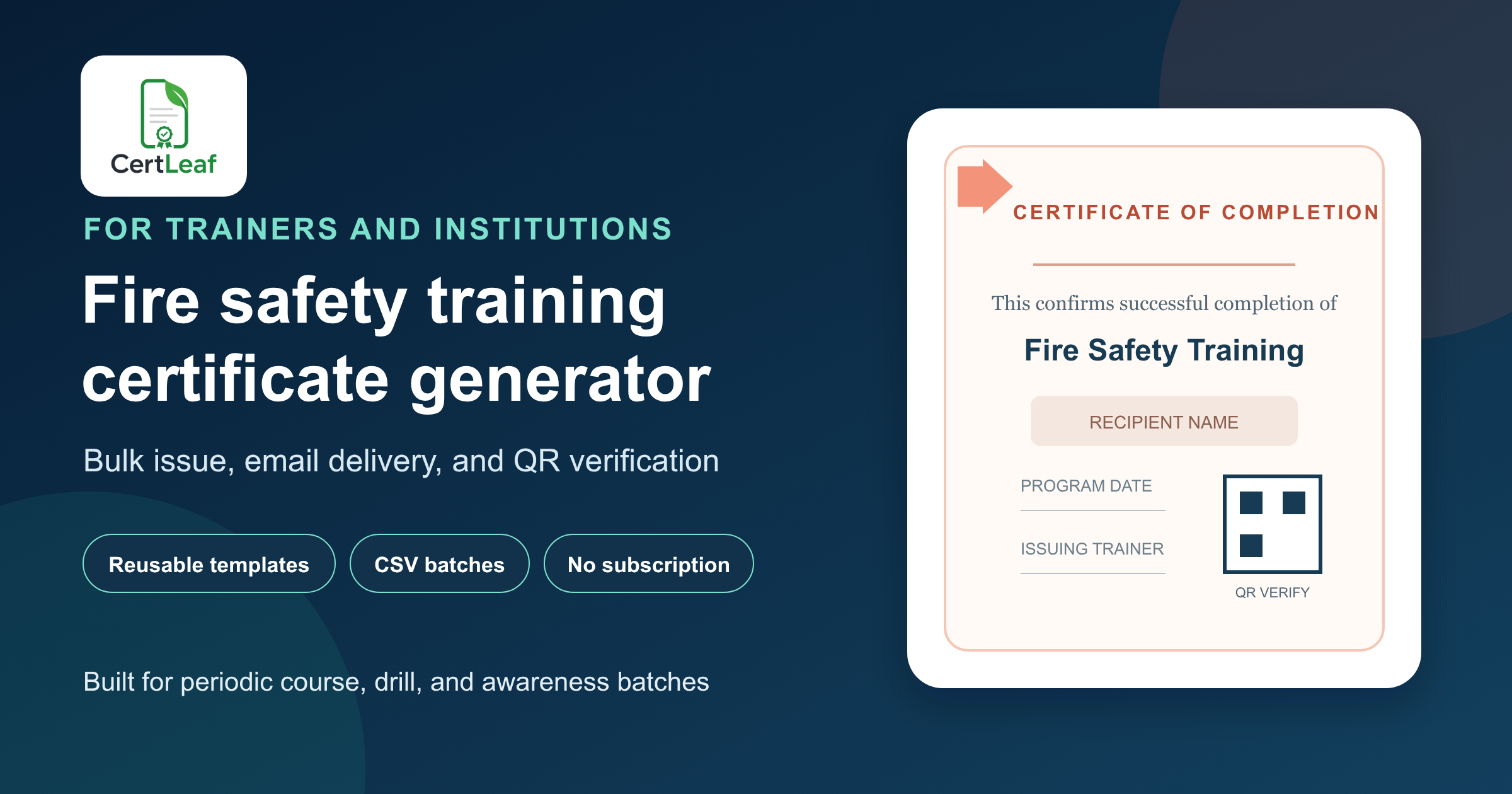
Fire safety trainers and institutions need certificate software that fits the way their programs actually run: periodic batches, several certificate types, client-specific details, and records that may be checked months later. A generic design tool can produce one attractive PDF. It does not solve repeated personalization, email delivery, or verification for a full training batch.
CertLeaf is a fire safety training certificate generator for the issuing work that starts after the trainer or institution has approved the recipient list. Create reusable templates, issue personalized certificates from a CSV, send each certificate by email, and add QR verification when an outside reviewer needs to check the record. Credits are pay-as-you-go, so there is no subscription to keep active between programs.
This fits independent fire safety trainers, safety consultancies, training institutes, hospitals, schools, hospitality teams, housing communities, and smaller workplaces. CertLeaf does not deliver the training, assess competence, approve a fire safety plan, issue a fire NOC, or certify regulatory compliance. The responsible trainer or institution controls those decisions and the wording printed on the certificate.
One fire safety program can need several certificate types
A short awareness session, an evacuation drill, and a multi-day fire safety course should not automatically produce the same document. The certificate needs to state what the recipient actually completed or contributed to.
An awareness attendee may receive a certificate of participation. A person who took part in an evacuation drill may need a drill participation record. A learner who completed a defined course under the provider's approved requirements may receive a certificate of completion. Trainers, guest instructors, fire wardens, and coordinators may need separate appreciation or contribution certificates.
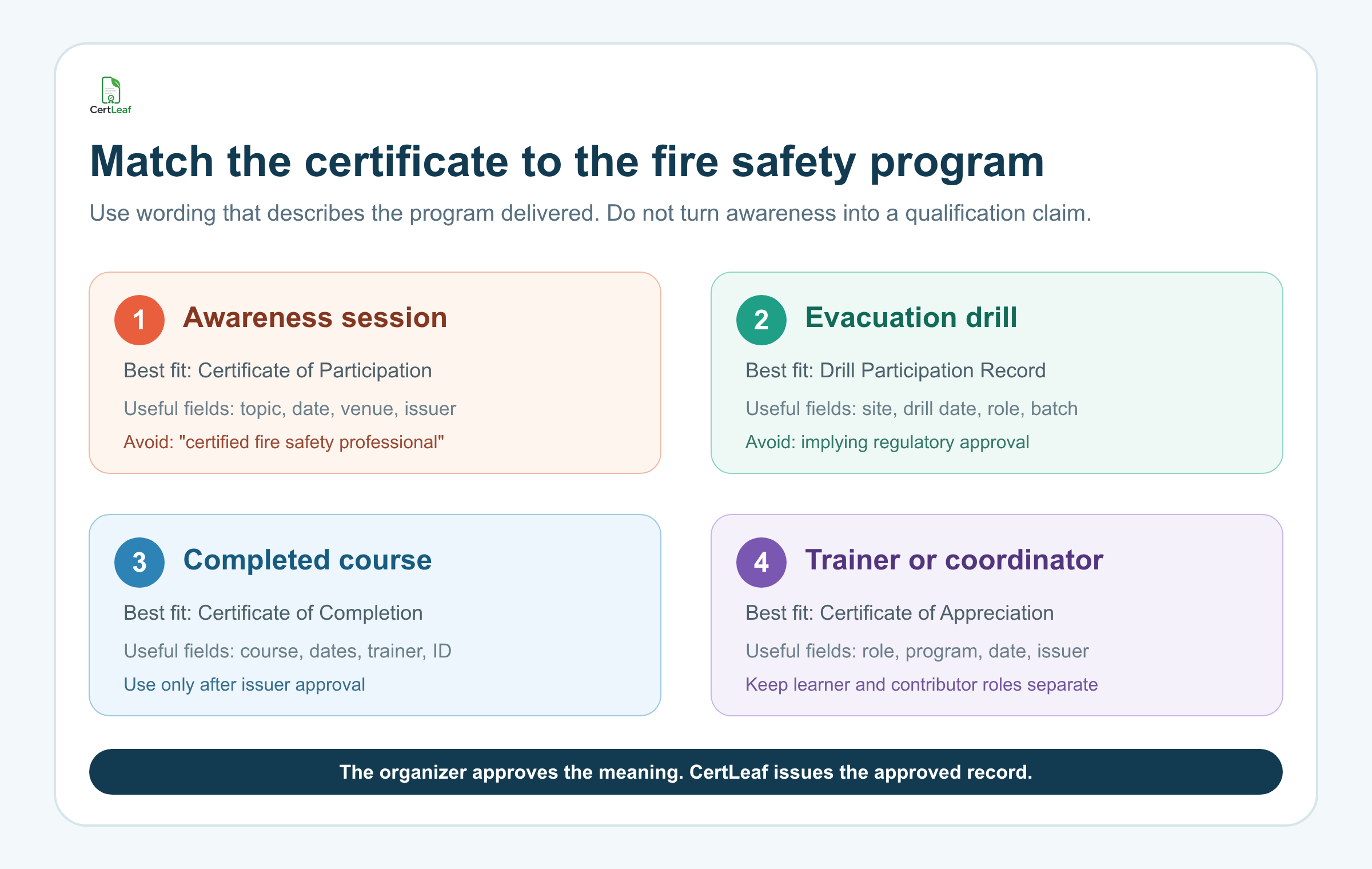
Keeping those types separate protects the meaning of the record. It also makes the certificate easier to understand when a learner shares it with an employer, college, client, or another training provider.
A practical set of reusable templates could include:
Fire Safety Awareness - Participation
Evacuation Drill - Participation Record
Fire Safety Course - Completion
Fire Warden Program - Participation or Completion, as approved by the provider
Trainer, Speaker, or Coordinator - Appreciation
The template title should follow the program, not the other way around. Do not describe a brief awareness talk as a professional qualification. Do not print an accreditation, validity period, compliance statement, or government-recognition claim unless the issuer has the authority and records to support it.
Running a fire safety course, drill, or awareness session soon? Sign up for CertLeaf and use the 20 free signup credits to test your certificate wording, longest names, email delivery, and QR placement before issuing the full batch.
CertLeaf fits recurring programs without rebuilding the design
Fire safety training is often delivered across different clients and locations. A trainer may run a hospital staff session this week, a school evacuation orientation next week, and a public course later in the month. The provider identity may stay the same while the client name, venue, program title, dates, trainer, and certificate type change.
In CertLeaf, the issuer can upload an approved base design and place dynamic fields over it. The same template can then be reused for another approved batch. A useful fire safety certificate may include:
recipient name
program or course title
certificate type
client or institution name
program date or date range
venue or branch
trainer name, when approved
batch reference or certificate ID
QR code for a verifiable certificate
Leave enough room for realistic values. "Fire Safety and Emergency Evacuation Awareness for Hospital Support Staff" is much longer than a placeholder such as "Safety Course." Test the actual certificate with the longest program title, institution name, and recipient name before issuing the full list.
For providers that run several subjects, fire safety can sit inside a broader bulk certificate process for recurring training batches. Keep the fire safety wording and fields specific while using a familiar issuing approach across the training business.
Build a certificate-ready recipient CSV
The issuing CSV should be a narrow, approved file. It is not the place for incident reports, practical assessment notes, medical details, employee records, emergency contact data, or building-safety findings.
One row should represent one approved certificate. A practical header could be:
learnerName,email,programType,programDate,certificateType,batchRef
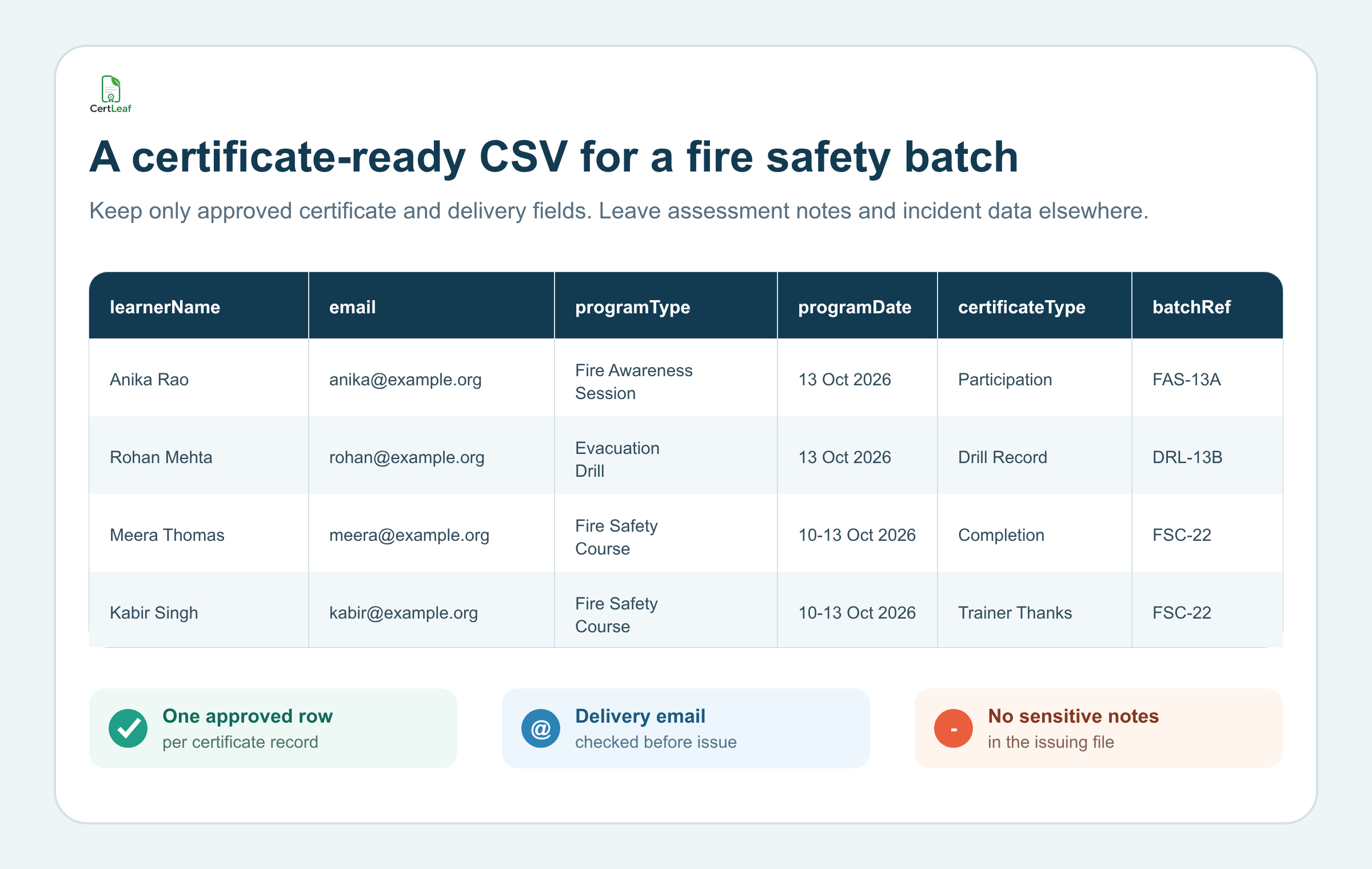
If the same program includes learners, trainers, and coordinators, either separate them into purpose-specific batches or use a carefully reviewed certificate type field. Do not let one copied value turn every recipient into a course completer.
The training provider should settle completion rules and approve the final rows before upload. CertLeaf uses those rows to generate the certificates; it does not decide who attended a drill, passed an assessment, completed practical instruction, or met an external standard.
Check spelling, email addresses, program titles, dates, client names, and certificate types. Remove duplicate rows. Send a small internal sample first. A five-row test with the longest name, longest course title, one contributor record, one drill record, and one ordinary completion row is usually more useful than a perfect-looking sample with short placeholder text.
Issue and email the approved batch
After the template and recipient rows are ready, CertLeaf can generate the batch and send each certificate to the email address mapped to that record. This removes the separate task of downloading a folder, matching filenames to inboxes, and attaching PDFs one by one.
The delivery message should identify the provider and program in plain language. If recipients can request name corrections, give them one route to do that. For a client-sponsored batch, confirm whether certificates should go directly to learners, to a training coordinator, or through another approved channel before uploading addresses.
This is particularly useful for trainers serving multiple clients. Each batch can carry the right client, venue, program date, and certificate type without rebuilding the design or mixing recipient files.
Want to see whether CertLeaf fits your next fire safety batch? Try CertLeaf with 20 free signup credits, issue a small internal sample, and check the PDF, recipient email, and QR destination before using paid credits.
Add QR verification when the record may travel
Fire safety training certificates may be shared with an employer, site administrator, training partner, school, hospital department, or future client. A QR-verifiable certificate gives that reviewer a public route to check the record created by the issuer.
The verification page can help the reviewer compare the recipient, program, issuer, date, and certificate reference with the PDF. It confirms that the issuer created the certificate record. It does not prove that a workplace is compliant, that a building passed an inspection, that the learner is professionally licensed, or that CertLeaf evaluated the training.
Certificate IDs are useful when a provider runs many similar batches. A stable reference such as FST-HYD-2026-0042 can help the provider find the issue record without using an email address as a public identifier. The guide to QR-verifiable training certificates with unique certificate IDs explains how to keep the ID, PDF, and verification record aligned.
Before sending the full batch, scan the QR code from an exported sample PDF on a separate phone. Confirm that it opens the matching record and that different samples do not point to the same page. Keep private assessment notes, internal safety findings, phone numbers, and delivery addresses out of the public record.
Pay-as-you-go credits suit periodic training calendars
Many fire safety trainers do not issue the same number of certificates every month. One client may have 35 participants, another may have 180, and the next few weeks may have no certificate batch at all.
CertLeaf uses pay-as-you-go credits instead of a monthly subscription. New accounts receive 20 free signup credits. Simple certificates use 1 credit and QR-verifiable certificates use 2 credits. India-first customers can purchase credits in INR through Razorpay when a real batch is ready.
That pricing model keeps certificate software separate from the provider's training fees, assessment process, client contracts, and regulatory responsibilities. The trainer pays for issuing capacity when certificates need to go out, rather than carrying another monthly tool through quiet periods.
Practical uses for different fire safety issuers
Independent trainers and safety consultancies
Save branded templates for awareness, drill participation, course completion, and appreciation. Use client and venue fields to personalize each batch without redesigning the certificate.
Providers that also teach first aid can apply the same careful boundary to their first aid and CPR training certificates: the issuer owns the course claim, while CertLeaf handles the approved certificate records.
Hospitals and healthcare training teams
Use a certificate title that matches the program delivered to staff, support teams, contractors, or volunteers. Keep patient information, incident details, internal audit findings, and department notes outside the issuing CSV and public verification page.
Schools, colleges, and training institutes
Fire awareness talks, laboratory safety orientations, hostel drills, and staff training may involve different groups. Separate participant, learner, trainer, and coordinator records so the document does not overstate the activity.
Hospitality, housing, and small workplace teams
A hotel, restaurant group, apartment association, office, or small industrial unit may run periodic awareness sessions or drills. Use institution-approved wording. A participation record should not be presented as a legal clearance, fire NOC, inspection report, or professional licence.
FAQ about fire safety training certificate generators
What is a fire safety training certificate generator?
It is software for creating personalized fire safety training certificates from approved recipient records. CertLeaf supports reusable templates, bulk CSV issuing, email delivery, and optional QR verification.
Can CertLeaf issue fire safety course certificates in bulk?
Yes. A trainer or institution can prepare an approved CSV, map its fields to a reusable certificate template, generate the batch, and email each recipient. The issuer remains responsible for the training, assessment, recipient approval, and certificate wording.
Can I create certificates for evacuation drills and awareness sessions?
Yes. Use wording that accurately describes the activity, such as participation in an evacuation drill or fire safety awareness session. Do not label participation as course completion unless the issuer's approved program supports that claim.
Does a CertLeaf certificate prove fire safety compliance or professional competence?
No. CertLeaf verifies the issuer's certificate record. It does not inspect premises, approve fire plans, issue a fire NOC, accredit courses, assess professional competence, or determine legal compliance.
Which fields belong in a fire safety certificate CSV?
Common fields include recipient name, email, program title or type, date, client or institution, certificate type, trainer name, and batch reference. Include only fields needed for the certificate, delivery, or approved verification record.
Can fire safety certificates include QR verification and certificate IDs?
Yes. CertLeaf can issue QR-verifiable certificates linked to public verification pages. A certificate ID can provide a stable reference for the issuer and reviewer, provided it is unique and does not expose unnecessary personal data.
Is CertLeaf suitable for Indian fire safety trainers?
Yes. CertLeaf supports pay-as-you-go credits, no subscription, INR purchases through Razorpay, bulk CSV issuing, email delivery, and QR-verifiable certificates. New accounts receive 20 free signup credits for testing.
Keep the certificate claim clear and the issuing work focused
A fire safety certificate is useful when it accurately records the program delivered and remains easy to find, send, and check. The trainer or institution should own the learning claim, completion rule, and compliance responsibilities.
CertLeaf handles the narrower operational job: reusable templates, approved CSV batches, personalized certificate generation, email delivery, QR verification, and pay-as-you-go credits. Sign up, use the 20 free credits for a small test batch, and check the complete recipient experience before the next program goes live.