CertLeaf
Quiz Competition Certificate Generator: Issue Participation and Winner Certificates in Bulk
A practical workflow for quiz committees that need to organize participant, winner, runner-up, team, judge, and volunteer data before issuing certificates in bulk.
At 6:20 pm, the final tie-breaker was over, but the quiz committee still had four unfinished lists.
The registration sheet held 168 participant names. The scoring workbook listed teams by code. The results tab had winners and runners-up. A separate form held email IDs, while corrections were arriving in the event group from students who had registered with shortened names.
The quiz itself had a clear result. The certificate list did not.
I have seen this after college and school competitions: the room is being cleared, the trophy photos are already circulating, and one coordinator is trying to work out whether every member of a winning team appears in the participant sheet. That is the real job a quiz competition certificate generator needs to support. Designing a certificate is one part. Turning several quiz records into the right certificates, then sending them to the right people, is the larger part.
| Quiz record | What it tells you | What can go wrong |
|---|---|---|
| Registration sheet | Names, class or department, original email | Includes no-shows and duplicate registrations |
| Team list | Team membership and team label | Uses team codes instead of certificate-ready names |
| Results sheet | Winner, runner-up, finalist, or rank | May list only the team captain |
| Volunteer or judge list | Non-participant roles | Gets mixed into participation wording |
| Correction messages | Preferred spelling or updated email | Never reaches the final issuing file |
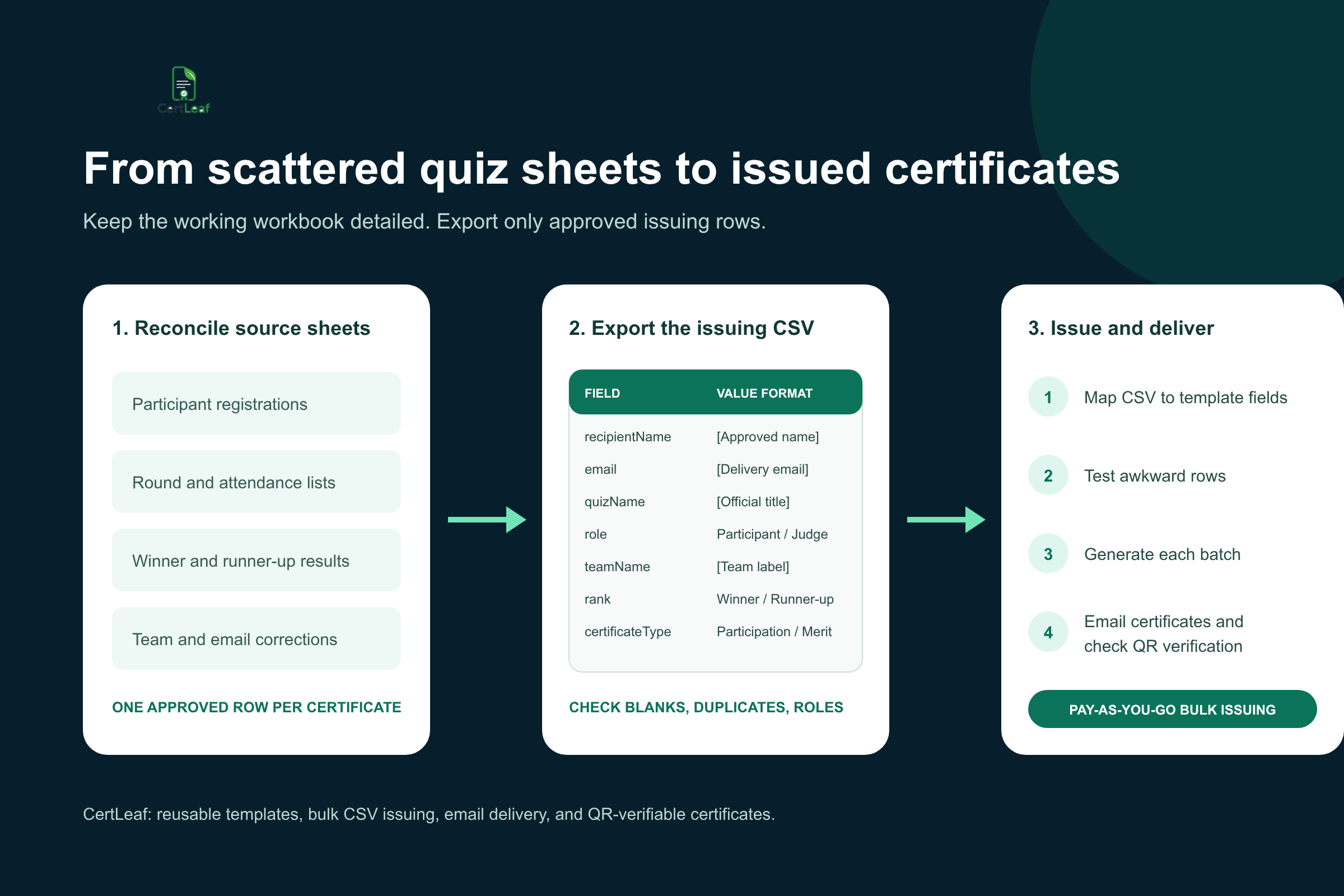
The clean approach is to preserve those source records, reconcile them in a working workbook, and export one approved certificate CSV. Do not issue directly from the first sheet called final.
Decide what each quiz certificate means
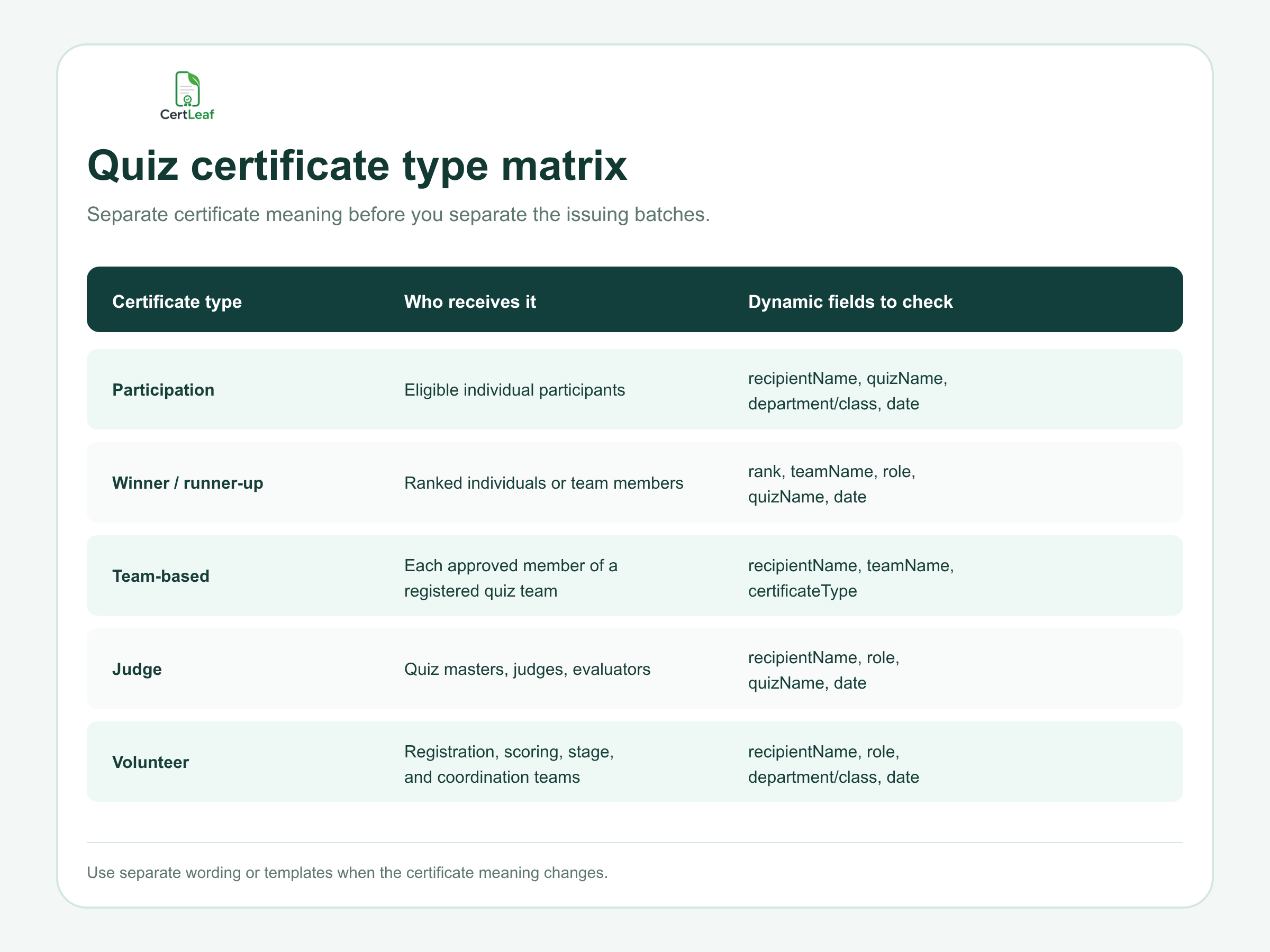
A participation certificate should confirm participation. A winner certificate should record an achievement. A judge certificate should recognize a contribution. If all three use the same wording with only the name changed, the certificates will be technically generated and still be wrong.
For most quizzes, I would decide the certificate categories before touching the design:
Participation certificates for eligible individual participants
Winner and runner-up certificates for ranked individuals or teams
Team-based certificates for every approved member of a quiz team
Judge or quiz master certificates
Volunteer and committee certificates where the organizers have approved them
The awkward case is a team result. The scoreboard may say that Team 12 won, but a certificate belongs to a person. Confirm the final member list and decide whether each member receives an individual certificate showing the shared team name and rank. Do not issue only to the captain unless that was the stated rule.
This is also where quiz certificates differ from pure template intent. You may use one visual base for several categories, but the issuing data and certificate language still need to reflect what happened. A winner label cannot be inferred from a decorative gold border. It must come from the approved result.
Build one working workbook before the final CSV
The source sheets should not be deleted or forced into a tiny file too early. Keep a working workbook with enough information to review the quiz properly. That might include registration status, attendance, round reached, team code, scoring notes, correction status, and approval initials.
Then decide what one row in the issuing CSV means. My preferred rule is: one approved row equals one certificate for one recipient.
That makes duplicates easier to reason about. If a participant also served as a volunteer and the committee has approved both certificates, two rows may be intentional because the certificate types differ. If the same participant appears twice with the same certificate type because two registration forms were merged, that is a duplicate to resolve.
A practical CSV structure for a quiz competition is:
recipientName,email,quizName,role,teamName,rank,department/class,date,certificateType
Here is a field-by-field pattern without invented people, institutions, or event names:
| Field | Example format | Why it is useful |
|---|---|---|
| `recipientName` | `[Approved certificate name]` | Printed on the certificate |
| `email` | `[Recipient delivery email]` | Used for certificate delivery |
| `quizName` | `[Official quiz title]` | Keeps the event wording consistent |
| `role` | `Participant`, `Judge`, or `Volunteer` | Controls contribution wording |
| `teamName` | `[Registered team label]` | Connects team members to a result |
| `rank` | `Winner`, `Runner-up`, or `[Approved rank]` | Records the achievement |
| `department/class` | `[Department or class]` | Useful for school and college records |
| `date` | `[Approved event date]` | Fixes the event record in time |
| `certificateType` | `Participation`, `Merit`, or `Appreciation` | Selects the right batch or template |
If a field is fixed for the whole batch, it can stay in the reusable template. If it changes by recipient, team, or certificate category, keep it in the CSV. The detailed guide to preparing a certificate recipient CSV without name or email errors is worth using before the upload, especially when the same student appears under two emails or two versions of a name.
Reconcile team, round, and result data carefully
A quiz often produces more operational data than a normal attendance event. Participants move through preliminaries, quarter-finals, semi-finals, and finals. Teams may be renamed at the registration desk. A substitute may replace a listed member before the first round. The result sheet may show only a team code.
I would reconcile in this order:
Start with the approved registration or attendance list.
Match team codes to every individual member.
Add the final result or rank from the signed-off results sheet.
Apply name and email corrections.
Mark the certificate type for each approved row.
Review winners and runners-up separately before export.
The review of ranked certificates deserves its own pause. Check that every member has the same approved team label and rank. Confirm whether winner and runner-up certificates replace or accompany participation certificates. There is no universal rule, so the committee must decide and document it.
A two-minute decision before issuing is better than explaining later why one team received both certificates and another received only one.
Use reusable templates without flattening every role
A reusable template saves time when the quiz committee runs competitions each term or each academic year. The logo, border, signature positions, and fixed issuer text can remain on the base design. Dynamic fields can supply the recipient name, quiz title, team name, date, role, and rank.
Reuse does not mean one template must carry every possible sentence. Participation, merit, and appreciation certificates often need different titles and wording. Keep a small set of approved templates or separate batches. That is easier to test than building one overloaded layout with too many conditional fields.
Before the full batch, generate the awkward rows:
The longest recipient name
The longest team name
A winner row with rank and team fields
A judge or volunteer row with different wording
A row with a department or class value
Read the resulting PDF at normal size. Check that the name does not enter the signature area, the team label is not clipped, and the rank is unmistakable. If QR verification is enabled, scan the code and compare the verification page with the certificate.
Where QR verification helps quiz winners
Quiz certificates are often used outside the competition. A winner may add the certificate to a student portfolio, scholarship file, club report, internship application, or professional profile. A forwarded PDF gives the next person little context about who issued it.
A QR-verifiable certificate provides a route to a public verification page for that issued record. The useful part is the record behind the code, not the appearance of a QR square pasted into the design. The verification details should match the recipient, quiz, certificate type, and achievement shown on the PDF.
Use careful language. QR verification does not mean the PDF is digitally signed, and it does not prove the underlying scoring decision was correct. The quiz committee still owns the result. The verification page helps someone check that the certificate record was issued with those details.
For a deeper explanation of what the verification page should confirm, use the guide to QR code certificates and public verification. Although that article focuses on workshops and training, the same check is useful for quiz winner and runner-up certificates.
Send quiz certificates without matching PDFs by hand
Email delivery becomes risky when certificate types are mixed. A folder may contain participation, winner, judge, and volunteer PDFs with similar file names. Attaching each file manually creates plenty of opportunities to send the wrong document.
Once the final CSV and templates are approved, the issuing workflow should map each certificate to the email address in the same row. Send a test to an inbox the committee can open. Check the subject, certificate access, displayed name, certificate type, and QR path. Then send the approved batches.
Keep the message short. Say which quiz the certificate relates to, what type of certificate it is, and where recipients should request corrections. The bulk certificate email delivery workflow covers the test-send and recipient experience in more detail.
After delivery, keep the exact issued CSV and a correction log. If a team member was omitted or an email bounced, issue a small follow-up batch rather than reopening the main list and quietly replacing the record.
How CertLeaf fits the quiz certificate workflow
CertLeaf is built for the repetitive work after the committee has approved the data. You can upload a base certificate design, create reusable templates, import the reviewed CSV, issue certificates in bulk, and distribute them by email. For certificates that need a public check, CertLeaf can issue QR-verifiable certificates linked to a verification page.
The pricing model suits event-based teams. There is no subscription. Credits are pay-as-you-go, new accounts receive 20 free signup credits, and India-first organizers can buy credits in INR through Razorpay. That lets a college club, school committee, department, or occasional event organizer test a small batch without paying during months when no certificates are being issued.
The product boundary matters: CertLeaf will not decide who won the quiz, which substitute was eligible, or whether a team member should receive both participation and merit certificates. The organizers approve those facts. CertLeaf turns the approved rows into consistent certificates and handles the issuing, delivery, and verification steps.
Quiz competition certificate generator FAQ
What should a quiz competition certificate generator support?
It should support more than certificate design. Look for bulk CSV issuing, reusable templates, separate certificate types, email delivery, and QR verification when recipients may need public proof of the issued record.
Can I issue participation and winner certificates from the same CSV?
Yes, if each row clearly includes the recipient's certificate type, role, and rank where relevant. In practice, separate batches or templates for participation, merit, and appreciation wording are easier to review.
How should team-based quiz certificates be prepared?
Create one approved row for each team member who should receive a certificate. Keep the same team name and rank across those rows, then verify the member list against the official registration and result records.
What fields belong in a quiz certificate CSV?
A useful structure is recipientName, email, quizName, role, teamName, rank, department/class, date, and certificateType. Remove fields that do not affect the certificate or delivery, and add only fields the committee can verify.
Should quiz winner certificates include QR verification?
QR verification is useful when winners or participants may share the certificate outside the event, such as in portfolios, applications, reports, or professional profiles. A simple certificate may be enough for informal internal recognition.
Can quiz certificates be sent by email in bulk?
Yes. After the committee prepares an approved CSV, CertLeaf can issue certificates in bulk and distribute them to the email addresses in the recipient rows.
Is CertLeaf a subscription quiz certificate generator?
No. CertLeaf uses pay-as-you-go credits rather than a subscription. New accounts receive 20 free credits, and Indian customers can purchase credits in INR through Razorpay.
Finish the result record before opening the certificate tool
The cleanest quiz certificate batch begins with a quiet administrative decision: one approved row, one certificate meaning, one delivery email.
Keep the raw registration, team, round, and result sheets. Reconcile them in a working workbook. Export only the final issuing columns. Then test the difficult rows, issue each certificate category in bulk, email recipients, and verify the QR path where it matters.
That workflow is less dramatic than fixing certificates in the event group after midnight. It is also much more dependable.