CertLeaf
Dance Competition Certificate Generator for Schools, Colleges, and Academies
Issue dance competition certificates in bulk for soloists, group performers, winners, judges, instructors, and event teams with CertLeaf.
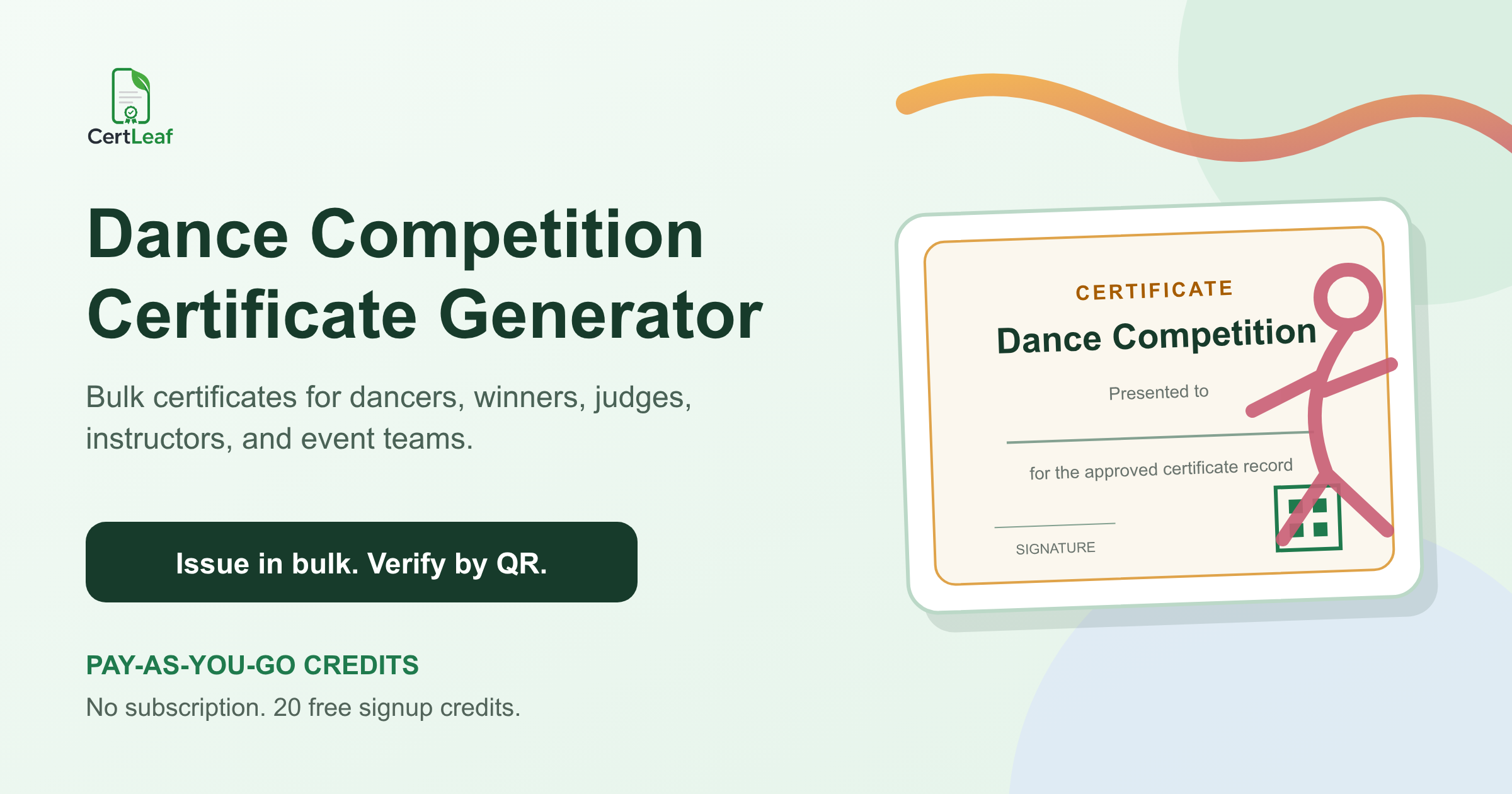
Dance competitions need a dedicated certificate issuing platform because the event record is more detailed than a winner list. A solo performer may need a participation certificate. Every dancer in a group entry may need an individual record. Winners need the exact dance form, age division, category, and placement. Judges, choreographers, instructors, accompanists, coordinators, and volunteers need recognition that does not describe them as competitors.
CertLeaf gives schools, colleges, dance academies, cultural associations, and festival teams one place to issue those records. Organizers can save reusable templates, upload an approved recipient CSV, generate certificates in bulk, send them by email, and add QR verification when the document may be shared outside the event.
That makes CertLeaf a practical dance competition certificate generator for inter-school contests, college cultural festivals, academy competitions, classical and folk dance events, solo and group categories, and recurring annual programs. Registration, music submission, scheduling, stage management, judging, scoring, and result approval stay with the organizer. CertLeaf handles the certificate issuing layer after the final records are approved.
One dance event can create several certificate records
A dance competition usually needs more than participation and winner certificates. The right set depends on how the event is structured, but four groups cover most cases:
Performer certificates for solo dancers and individual members of group entries
Merit certificates for winners, runners-up, finalists, and special jury awards
Appreciation certificates for judges, choreographers, instructors, gurus, and accompanists
Contribution certificates for hosts, coordinators, stage teams, and volunteers
The wording should match the approved record. A participation certificate must not imply a placement. A group winner certificate should not omit dancers simply because the results sheet names only the troupe. A judge should receive an appreciation record, not a certificate that looks like a competitive award.
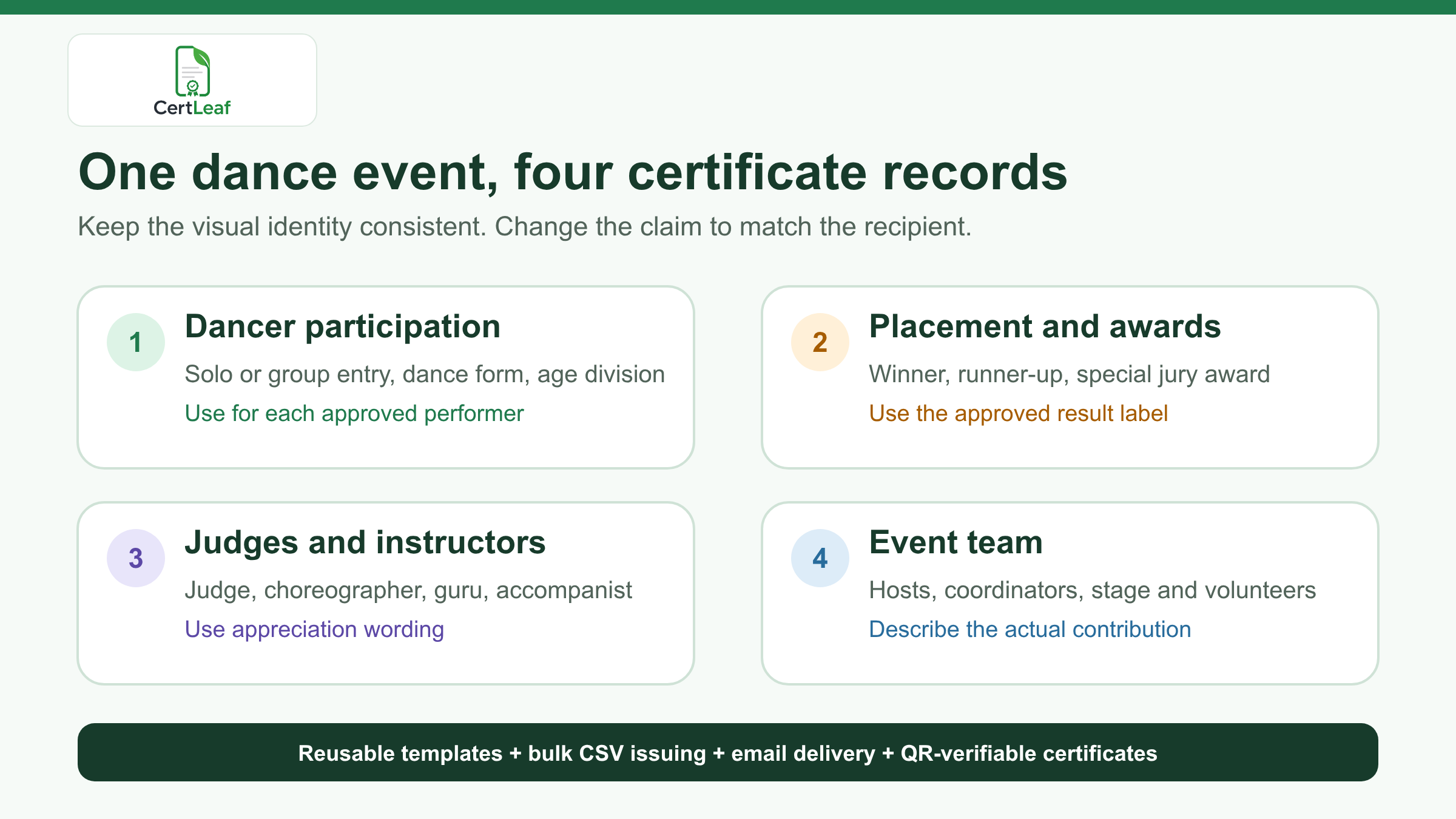
CertLeaf lets the organizer keep one visual identity across related templates while changing the title, body wording, category, award, and role. The event logo, border, colors, signature positions, and issuer details can remain consistent.
Sign up for CertLeaf and use the 20 free signup credits to test performer, winner, and judge certificates before preparing the full competition batch.
CertLeaf fits schools, colleges, academies, and cultural festivals
Dance competitions happen inside several reachable communities, and each has a slightly different issuing need.
A school cultural program may divide entries by age group, house, solo or group format, and dance form. A college fest may run classical solo, western group, folk, and theme-based events under one cultural committee. A dance academy may recognize recital participation, competition placements, instructors, and guest judges. A cultural association may run regional rounds before a final event.
CertLeaf can support all of them without pretending to replace the systems they already use. Keep the registration form, audition notes, music files, schedules, score sheets, and signed-off results where the event team manages them. Export only the approved certificate data.
When dance is one activity within a larger campus program, the guide to a bulk certificate workflow for a college fest is a useful companion. The dance-specific batch can remain precise while the central committee manages certificates for the rest of the fest.
Decide whether the certificate belongs to a dancer or a team
Group entries create the most important certificate decision: is the issued record for the troupe, or for every performer?
If every dancer should receive an individual certificate, create one approved row per dancer and repeat the shared group details such as troupe name, category, dance form, and placement. This gives each performer a document with their own name while preserving the common result.
If the organizer issues one certificate to the group, use the registered troupe name and make sure that policy was clear before the competition. Do not place a long comma-separated list of performers into a field designed for one recipient. The text becomes hard to read, and one spelling correction can force the whole group certificate to be reissued.
For younger participants, decide where delivery should go. The approved email may belong to a parent, academy, school coordinator, or team manager rather than the dancer. Keep the recipient name and delivery email as separate fields so the certificate describes the performer while the message reaches the right inbox.
Use dance-specific fields without crowding the certificate
A dance competition certificate should make sense when viewed without the event poster beside it. Useful fields can include:
Recipient name
Competition name and edition
Solo or group entry type
Dance form or category
Age group or level
Troupe, school, college, or academy when relevant
Certificate type, placement, award, or contribution role
Event date, organizer, and approved signatories
Certificate ID and QR verification when a public check is useful
Not every field belongs on every certificate. A solo participation certificate may need the dance form and age division. A special award certificate needs the exact approved award label. A judge certificate needs the contribution role, but not the competitor category.
Keep raw scores, ranking formulas, judge comments, contact numbers, consent records, music links, and private student details out of the certificate. Those belong in the organizer's source records.
The same restraint applies to wording. If the result says Special Jury Award - Group Folk, do not shorten it to Winner because the design has less space. The certificate should reproduce the approved claim, not upgrade it.
Build a certificate-ready dance competition CSV
The final certificate CSV should be smaller than the event workbook. It only needs the fields used for personalization, delivery, and the approved public certificate record.
A practical header set is:
recipientName,email,competitionName,entryType,danceForm,ageDivision,groupName,certificateType,awardOrRole,eventDate
For an individual group member, repeat the group fields and change the recipient name and email. If the same dancer receives a participation certificate and a separate placement certificate, two rows can be intentional. If the same participation row appears twice because registration and backstage check-in files were merged, resolve the duplicate before upload.
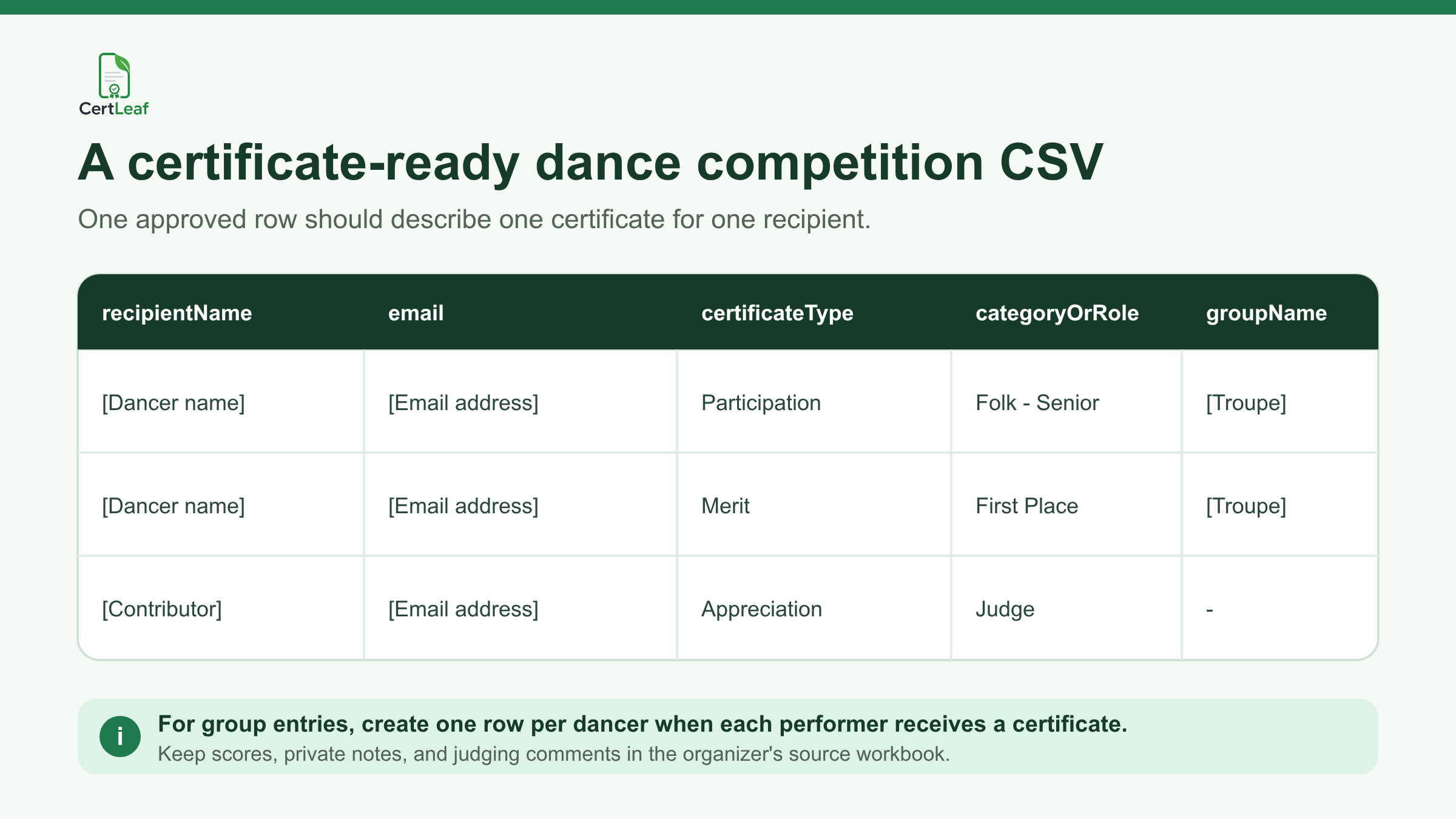
Use the guide to prepare a certificate recipient CSV without name or email errors when performer names, troupe lists, and result sheets use different spellings. It also explains why two rows can be valid when one person is meant to receive two different certificate types.
Try the dance competition use case in CertLeaf with a small sample CSV. The 20 free signup credits let the team check long dancer names, group labels, award wording, email delivery, and QR verification before issuing the real list.
Reuse a small family of templates
Most organizers do not need a unique design for every category. They need a related template family with clear claims.
One template can cover performer participation across solo and group categories. A second can handle placements and special awards. A third can recognize judges, instructors, choreographers, and accompanists. A fourth can cover volunteers and the organizing team.
The visual system can stay consistent across all four. The certificate title and body copy should not. A dancer, winner, judge, and stage volunteer did different things, and the document should say so plainly.
Schools and college committees that want the design to survive future events can adapt the advice in the reusable college event certificate template guide. Leave enough room for long names, multi-word dance forms, age divisions, group names, signatures, and a square QR area.
Before the full issue, preview the awkward records: the longest recipient name, the longest troupe name, a detailed category, a special award, and a contribution role. Read the exported certificate at normal size. The name and result should remain clear of borders, signatures, and the QR code.
Email dance certificates without matching PDFs by hand
Manual delivery creates a second administrative problem after the results are already approved. A folder can contain performer, placement, judge, instructor, and volunteer PDFs with very similar file names. Attaching each file one by one makes omissions and incorrect matches more likely.
CertLeaf keeps the delivery email connected to the same CSV row used to generate the certificate. Organizers can issue the approved batches and send each certificate to the matching inbox without manually pairing files.
Run a test from every template type. Open the message on a phone and laptop. Check the recipient name, competition title, category, placement or role, correction contact, and download experience. If QR verification is enabled, scan the code from the delivered certificate and compare the public record with the PDF.
Add QR verification when the certificate will travel
Dance certificates often move beyond the event. Students may add them to portfolios, school activity records, scholarship applications, college admissions material, or professional profiles. Instructors and judges may keep them as contribution records.
A QR-verifiable CertLeaf certificate gives a viewer a public route to check the issued record. The verification details should agree with the recipient, issuer, competition, certificate type, category, award or role, and date on the PDF.
Keep the claim narrow and accurate. QR verification confirms that the organizer issued a CertLeaf certificate record with those details. It does not validate the judging method, prove a score was correct, certify a dancer's skill level, or replace an accreditation body.
For another creative competition with distinct entrant, merit, jury, and volunteer records, see the photography competition certificate workflow. The event details differ, but the need to separate participation, achievement, and contribution claims is similar.
Pay-as-you-go suits seasonal competitions
Schools, colleges, academies, and cultural associations often issue certificates around a few concentrated events. They may run one annual competition, one cultural week, or several rounds over a short season. A recurring software bill is difficult to justify during quiet months.
CertLeaf uses pay-as-you-go credits with no subscription. A simple certificate uses 1 credit, and a QR-verifiable certificate uses 2 credits. New accounts receive 20 free signup credits. India-first customers can buy credits in INR through Razorpay.
Use the free credits on realistic proofs rather than easy placeholder rows. Test a long dancer name, a group winner, a detailed dance category, a judge certificate, an email delivery, and a QR scan. Then calculate the full batch from the approved certificate row count.
Dance competition certificate generator FAQ
What is a dance competition certificate generator?
A dance competition certificate generator helps organizers create and issue personalized certificates for soloists, group performers, winners, judges, instructors, volunteers, and event teams. A useful platform supports reusable templates, bulk CSV issuing, email delivery, and optional QR verification.
Can CertLeaf issue certificates for every member of a dance group?
Yes. When each performer should receive an individual certificate, create one approved CSV row per dancer and repeat the shared troupe, category, dance form, and placement fields.
What fields should a dance competition certificate include?
Common fields are the recipient name, competition name, entry type, dance form or category, age division, group or institution, certificate type, event date, organizer, and signatories. Winner certificates can include the exact approved placement or award.
Can participation and winner certificates use the same design?
They can share the same visual identity, but the title and wording should distinguish participation from achievement. Separate templates or batches are usually easier to review.
Can judges, choreographers, and instructors receive certificates?
Yes. Use an appreciation template with the exact approved contribution role. Do not use performer participation or winner wording for judges, instructors, choreographers, gurus, or accompanists.
Does CertLeaf manage dance registrations or judging?
No. CertLeaf is the certificate issuing, email delivery, verification, and management layer. Registration, scheduling, music submission, scoring, judging, and result approval remain with the organizer and its existing tools.
Should dance competition certificates include QR verification?
QR verification is useful when performers or contributors may share the certificate with schools, colleges, scholarship committees, employers, or other third parties. It provides a route to check the issued record, but it does not validate the competition result.
Is CertLeaf a no-subscription dance certificate generator?
Yes. CertLeaf uses pay-as-you-go credits with no subscription. New accounts receive 20 free signup credits, and India-first customers can purchase credits in INR through Razorpay.
Give every dance contribution the right record
A dance competition may happen on one stage, but its certificate records cover soloists, group performers, placements, special awards, judges, instructors, accompanists, coordinators, and volunteers. Those distinctions make the documents useful after the applause ends.
CertLeaf gives organizers reusable templates, bulk CSV issuing, email delivery, QR verification, pay-as-you-go credits, INR/Razorpay support, and 20 free signup credits. The competition team approves the performers, results, and roles. CertLeaf handles the repetitive work of turning those approved records into issued certificates.
Start with a small sample, check every certificate type, and then issue the approved dance competition batch without committing to a subscription.