CertLeaf
Hybrid Event Certificate Generator: Merge Online and In-Person Attendance
A practical hybrid event certificate workflow for reconciling online and in-person attendance, removing duplicate recipients, and issuing one checked certificate batch.
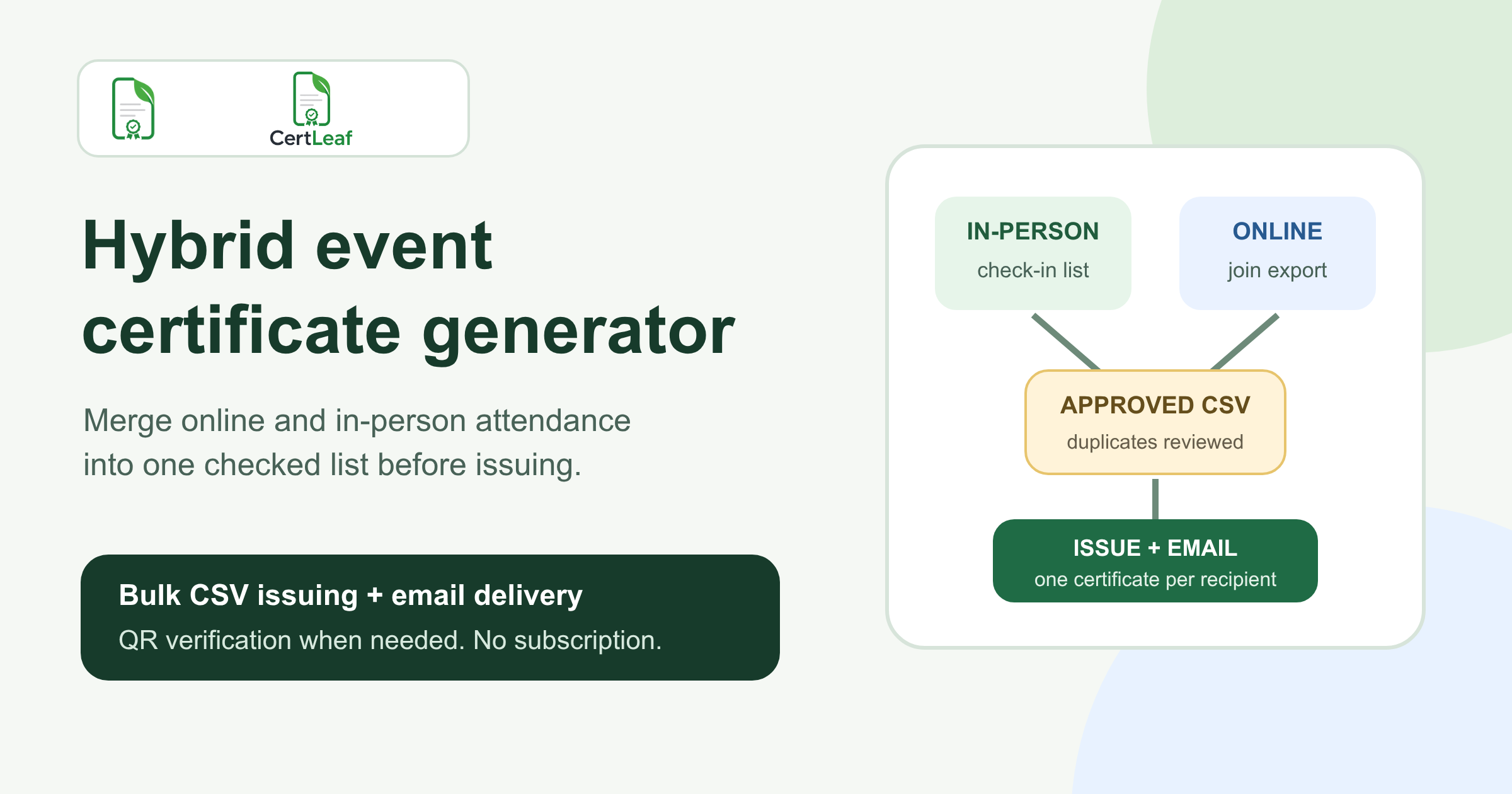
At 6:35 pm, the last speaker at the Pune Learning Exchange was answering questions from people in the auditorium while the online host was closing the webinar room. The event had 148 people check in at the venue and 96 join online. The organizer expected roughly 244 certificate rows.
The first combined spreadsheet had 257.
Thirteen people had used both modes. A few arrived late, scanned the desk QR code, and had already joined the opening session from their phones on the way. One faculty member checked in as Dr Kavita Menon but joined online as Kavita M. A student used his college email for registration and a personal email on the webinar platform.
This is the awkward part a hybrid event certificate generator cannot decide on its own. Before anyone generates PDFs, the team has to work out which records belong to the same person, which attendance rule applies, and where the final certificate should be sent.
| Record | Useful evidence | Common problem |
|---|---|---|
| Registration list | Name, preferred email, event choice | Includes no-shows |
| Venue check-in | Confirms arrival on-site | May use a short name or phone number |
| Online attendance export | Join email and time in session | Display names and alternate emails vary |
| Correction messages | Preferred certificate name | Easy to lose across WhatsApp and email |
For the Pune event, I would not issue from any of these sources directly. I would reconcile them into one approved list, keep uncertain identities in a short review queue, and generate the certificate batch only after the row count makes sense.
Write one certificate rule for both attendance modes
A hybrid event needs one rule that does not accidentally reward or penalize a mode.
Suppose the event promised participation certificates to attendees who joined at least 75 percent of the program. An on-site participant might prove that through a check-in and check-out record. An online participant might prove it through minutes attended. Someone who moved between modes may need both records added together.
Write the rule in ordinary language before reviewing exceptions:
> A participation certificate will be issued to registered attendees who complete at least 90 minutes of the Pune Learning Exchange, whether they attend in person, online, or across both modes.
That sentence answers the important question. The certificate recognizes participation in the event, not loyalty to a particular attendance channel.
If the in-person desk recorded arrival but not departure, do not pretend it proves 90 minutes. Use the evidence the team actually collected. The same applies online: a display name in a platform export does not automatically identify the registered person.
For a broader starting point on eligibility, templates, and batch issuing, the event participant certificate workflow is the useful hub. The hybrid-event problem begins one step earlier, when two attendance systems must become one recipient list.
Merge the attendance sources without creating duplicate certificates
Start with the registration list because it usually contains the name and email the attendee intended to use. Add fields for in_person_status, online_email, online_minutes, attendance_mode, and review_status in a working sheet.
Match exact registration emails first. Then review the remaining records using details the organizer already has, such as phone suffix, registration ID, college, session timing, or an on-site volunteer's record. Avoid collecting extra personal data just to make a spreadsheet easier.
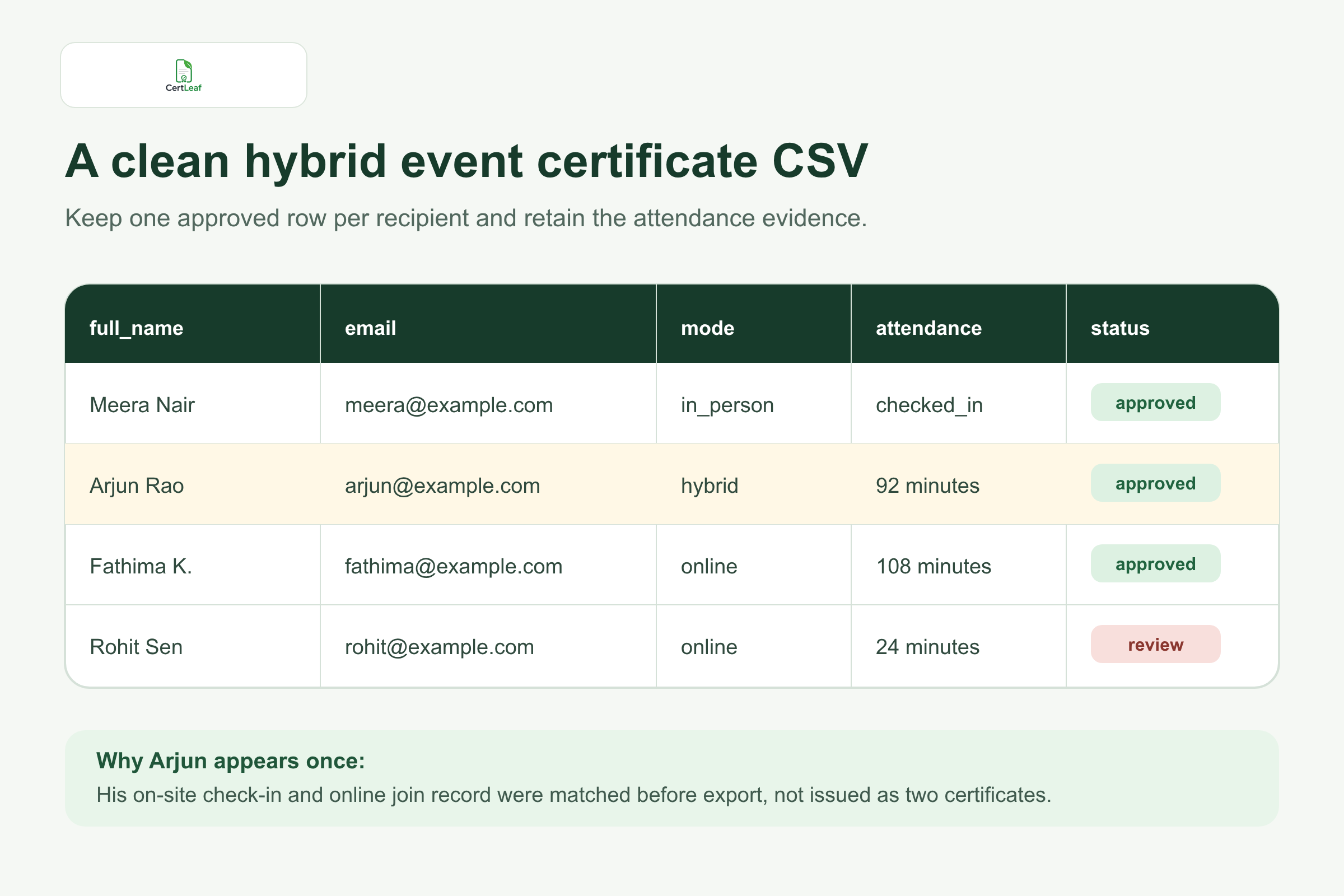
At the Pune event, Arjun Rao checked in at the venue at 2:10 pm. His online record showed 38 minutes under the same email because he watched the first session from a bus. Those were not two eligible people and not two certificates. They were two pieces of attendance evidence for one recipient.
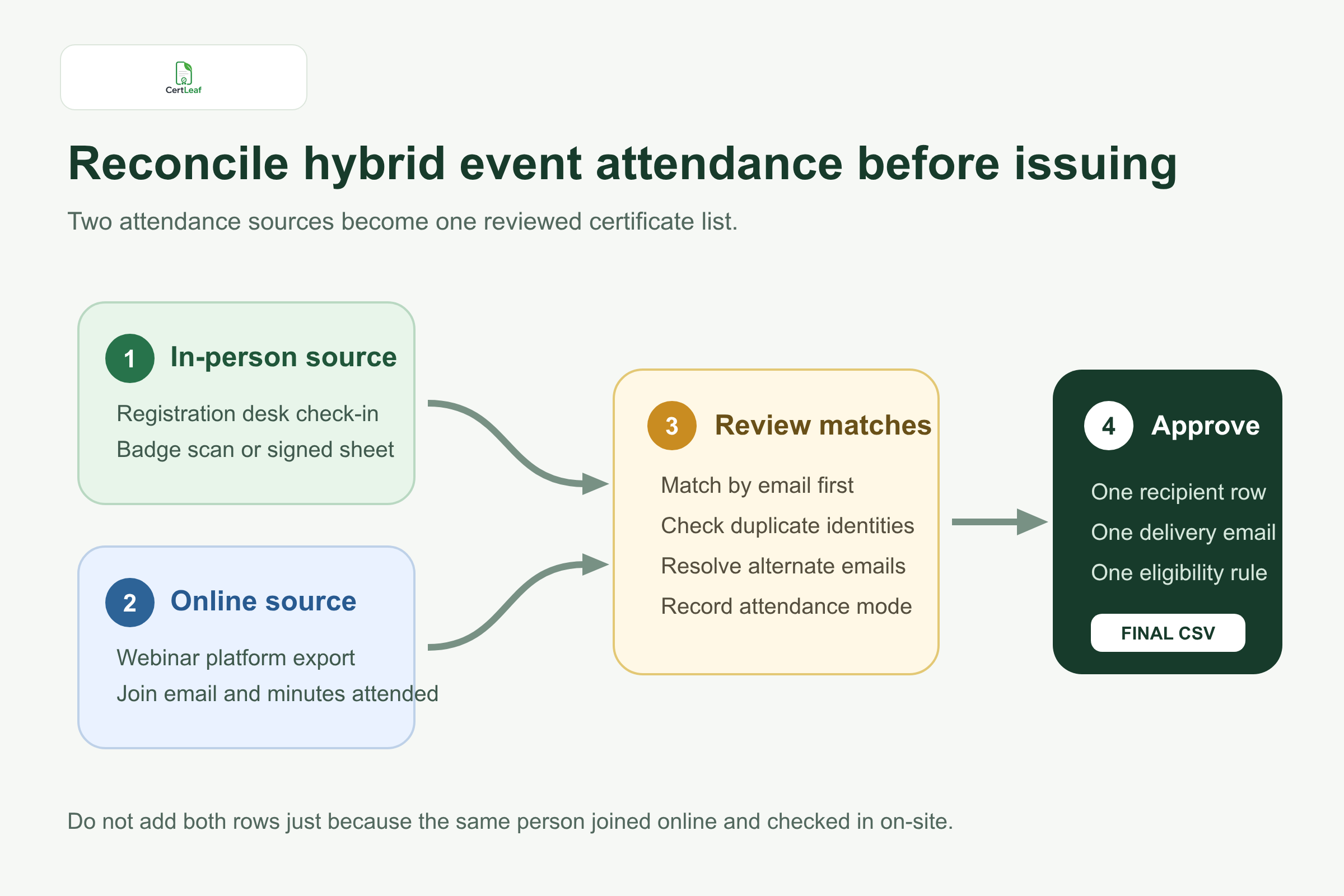
Do not delete the second source row and forget why. Mark the match in the working sheet. A note such as same email - online before venue check-in will make sense when somebody audits the count or asks why the platform export had more rows than the final CSV.
I would keep three review outcomes: approved, review, and not eligible. More labels usually create arguments about what pending-final or almost approved means.
Treat uncertain identities as an exception queue
Most rows should match quickly. The organizer's attention belongs on the few that do not.
One participant might use a shared department account online. Two students may watch from the same laptop in a classroom. A name such as Asha's iPhone may have 104 minutes but no obvious registration match. These records need another piece of evidence, not a guess based on a familiar first name.
The Pune team had a row called Seminar Hall 2 with 11 online attendees visible on camera. The event coordinator also had a signed venue sheet for that room. She approved the individual people from the signed list and kept the shared online record as supporting evidence. She did not create a certificate for Seminar Hall 2.
Set a cutoff for this review. If six identities are still uncertain at 8 pm, issue the approved main batch and handle later evidence in a supplementary batch. Holding 230 clear certificates for six unresolved rows does not improve accuracy.
Export a small issuing CSV, not the whole event workbook
The working sheet can contain registration details, attendance minutes, check-in notes, alternate emails, and review decisions. The issuing CSV should contain only approved recipients and the fields needed to generate and deliver their certificates.
A practical file might use:
full_name,email,event_name,event_date,attendance_mode,certificate_type
The attendance_mode field is useful for records, but it does not need to appear on the certificate unless the event has a real reason to distinguish online and in-person participation. Most attendees care that they participated in the same program.
Before export, decide what one row means. For this event, it means one approved participation certificate for one person. A person who appeared in both attendance sources still gets one row. If speakers or volunteers receive different wording, keep those as separate templates and batches rather than stretching one participation CSV to cover every role.
The detailed certificate recipient CSV preparation guide is the next useful check here, especially for duplicate emails, initials, shared inboxes, and awkward rows.
Save the exact exported file after approval. A name such as pune-learning-exchange-approved-2026-08-23.csv is better than hybrid_final_v6.csv. If a correction arrives later, preserve the original issued file and record the change separately.
Test the records most likely to expose a mistake
A random preview often shows the neatest row. Test the difficult ones instead.
Open a certificate for the longest name, a name with initials, and someone whose attendance was merged across both modes. Confirm the event title, date, recipient email, and certificate type. If QR verification is enabled, scan the code and check that the public verification page matches the same person and event.
This is also the moment to look at the certificate wording. If online and on-site attendees completed the same event under the same rule, one neutral line such as participated in the Pune Learning Exchange is usually cleaner than two almost identical certificate designs.
If a third party may need to check the document later, the practical guide to QR code certificates for workshops and training programs explains what the verification page should confirm and where verification is worth using.
Where CertLeaf fits in a hybrid event certificate workflow
CertLeaf handles the repetitive issuing work after the organizer approves the recipient list. The team can upload a base certificate design, create a reusable template, import the final CSV, issue certificates in bulk, and distribute them by email. QR-verifiable certificates can link to a public verification page.
The boundary matters. CertLeaf can generate one certificate from Arjun's approved row. It cannot know that his bus-session login and venue check-in belong to the same person unless the organizer reconciles those records first.
For a team that runs a few hybrid events each semester, pay-as-you-go credits avoid a subscription during quiet months. New accounts receive 20 credits, which can be used to test a small set of rows before the full batch.
Send one test certificate to an inbox the organizing team can open. Check the sender, subject, certificate access, and QR path if used. Then issue the approved batch. The bulk certificate email delivery workflow is a useful next step for planning the message, test send, and recipient experience.
Keep the original evidence after sending
After the batch goes out, keep three things together: the final issued CSV, the reconciliation workbook, and a small correction log.
This does not need to become a large database. The point is to answer ordinary questions later. Was this person in the online export? Which email was confirmed? Did the organizer merge two records? Was a corrected certificate issued?
At the Pune event, the final approved list contained 236 people. Eight online rows were matched to on-site attendees, three no-shows were removed, five uncertain identities went to review, and one bad email was corrected before delivery. The numbers stopped being mysterious because every change had a reason.
FAQ about hybrid event certificates
What is a hybrid event certificate generator?
A hybrid event certificate generator creates certificates for attendees who participate online, in person, or across both modes. The organizer first reconciles attendance into one approved CSV, then uses a reusable template to generate and send the certificate batch.
How do I combine online and in-person attendance for certificates?
Use the registration list as the starting record, add venue check-in and online attendance evidence, match exact emails first, review alternate identities, and export one approved row per recipient. Keep uncertain matches out of the main issuing CSV.
Should someone who attended online and in person receive two certificates?
Usually no. If both records describe participation in the same event under the same eligibility rule, they are evidence for one certificate. Two certificates are appropriate only when the person earned two genuinely different certificate types.
What columns should a hybrid event certificate CSV include?
Include the recipient name, delivery email, event name, event date, and certificate type. Keep attendance mode if it is useful for records. Attendance evidence, review notes, and internal contact details can stay in the working sheet unless the issuing workflow needs them.
Can hybrid event certificates include QR verification?
Yes. QR verification is useful when attendees may share the certificate with a college, employer, training provider, or another third party. The verification page should match the recipient and event details shown on the certificate.
Can CertLeaf email hybrid event certificates in bulk?
Yes. After the organizer prepares an approved CSV, CertLeaf supports bulk certificate issuing, email distribution, reusable templates, and optional QR verification. It uses pay-as-you-go credits rather than a subscription.
One event should end with one defensible list
Hybrid events create extra attendance records, not extra certainty. The clean workflow is to state one rule, match the sources, document the exceptions, export one row per approved recipient, and test the awkward records before sending.
That takes a little attention after the room and webinar close. It saves the team from issuing duplicates, emailing the wrong address, or trying to explain a certificate count that never matched the event.