CertLeaf
Rangoli Competition Certificate Generator for Schools, Colleges, and Communities
Issue rangoli competition certificates in bulk for participants, winners, judges, coordinators, volunteers, and community partners with CertLeaf.
Rangoli competitions need a dedicated certificate issuing platform because the event record is more complicated than a winner list. A school may run separate age groups. A college cultural committee may accept individual and team entries. A resident association may recognize households, judges, volunteers, and venue partners alongside the main prizes.
CertLeaf gives these organizers one focused place to issue the final certificates. Teams can save reusable templates, upload an approved recipient CSV, generate certificates in bulk, send them by email, and add QR verification when recipients may share the document outside the event.
That makes CertLeaf a practical rangoli competition certificate generator for school celebrations, college cultural festivals, community contests, resident association events, workplace celebrations, and public cultural programs. Entry registration, materials, venue rules, judging, scoring, and result approval remain with the organizer. CertLeaf handles the certificate issuing layer after the names, categories, and results are approved.
A rangoli competition produces more than winner certificates
A good certificate should describe what the person or team actually did. Giving everyone the same document with a different name weakens the record and creates avoidable confusion.
Most rangoli events need some combination of:
Participation certificates for approved individual or team entrants
Merit certificates for winners, runners-up, category ranks, and special mentions
Appreciation certificates for judges, mentors, guest artists, and community partners
Contribution certificates for coordinators, volunteers, hosts, and venue teams
The distinction matters. A participation certificate should not imply an award. A judge should not receive entrant wording. A team certificate should use the approved team or representative format instead of leaving people to guess whether every member was recognized.
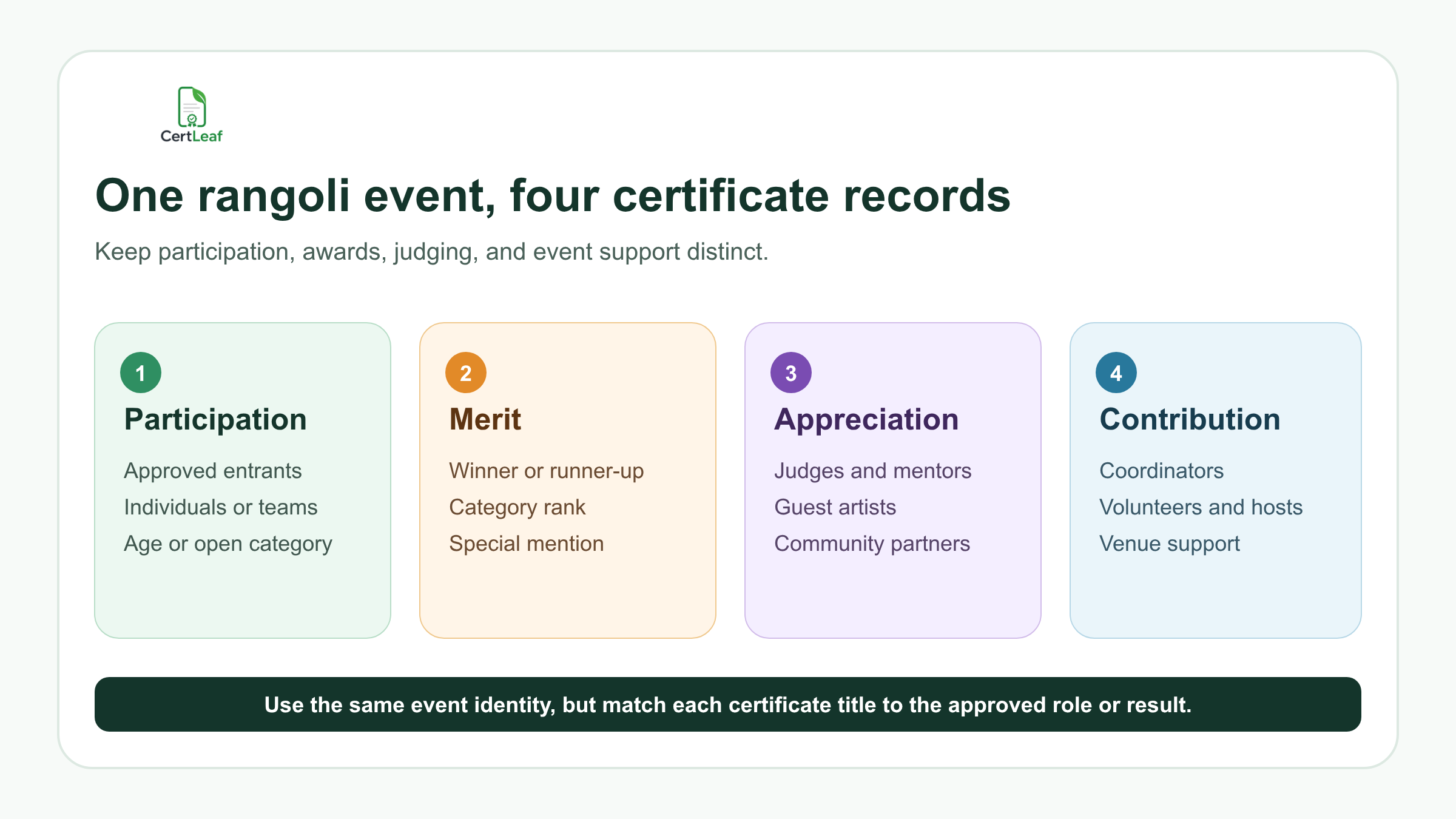
CertLeaf lets the organizer keep one visual identity across the set while changing the title, wording, category, award, and role. The event colors, logo, border, issuer details, and signature positions can remain consistent.
Sign up for CertLeaf and use the 20 free signup credits to test participant, winner, and judge certificates before preparing the complete rangoli competition batch.
Who can use a rangoli competition certificate generator
The audience extends beyond one annual school activity.
Schools can issue class-wise, house-wise, and inter-school certificates. College cultural clubs can recognize individual entrants, teams, coordinators, and judges during a fest. Resident welfare associations and community groups can issue certificates across child, youth, adult, family, or open categories. Companies and coworking communities may run employee cultural contests. NGOs, municipal programs, and cultural associations may organize public events around local traditions or community celebrations.
These groups do not all need the same wording. A school certificate may include class or house. A college event may include department and team name. A community contest may use an age band, neighbourhood, or open category. The point of a reusable issuing platform is to preserve the event identity without flattening these details into one generic sentence.
For a campus program that includes several competitions, the broader guide to issuing college fest certificates in bulk can help the committee coordinate certificate types across the full event.
Put only useful facts on the certificate
A rangoli competition certificate should make sense when viewed without the event poster. Useful fields can include:
Recipient or team name
Competition name and edition
Individual or team category
Age group, class, department, or open category
Theme, when the event used an approved theme
Award, rank, special mention, or contribution role
Organizer, venue, and event date
Certificate type, certificate ID, and QR verification
Do not put raw judging scores, judges' comments, phone numbers, home addresses, identity documents, or internal dispute notes on the certificate. Keep those in the organizer's working files.
Be careful with team entries. Decide whether the organizer will issue one certificate to the team, one certificate to a named representative, or one certificate to every approved member. CertLeaf can generate the approved records, but the event team must decide what each row represents.
Build a certificate-ready rangoli competition CSV
The final issuing CSV should be smaller than the registration form or judging workbook. It needs only the approved fields used for certificate personalization and delivery.
A practical header set is:
recipientName,email,eventName,teamName,category,theme,awardOrRole,certificateType,venue,eventDate
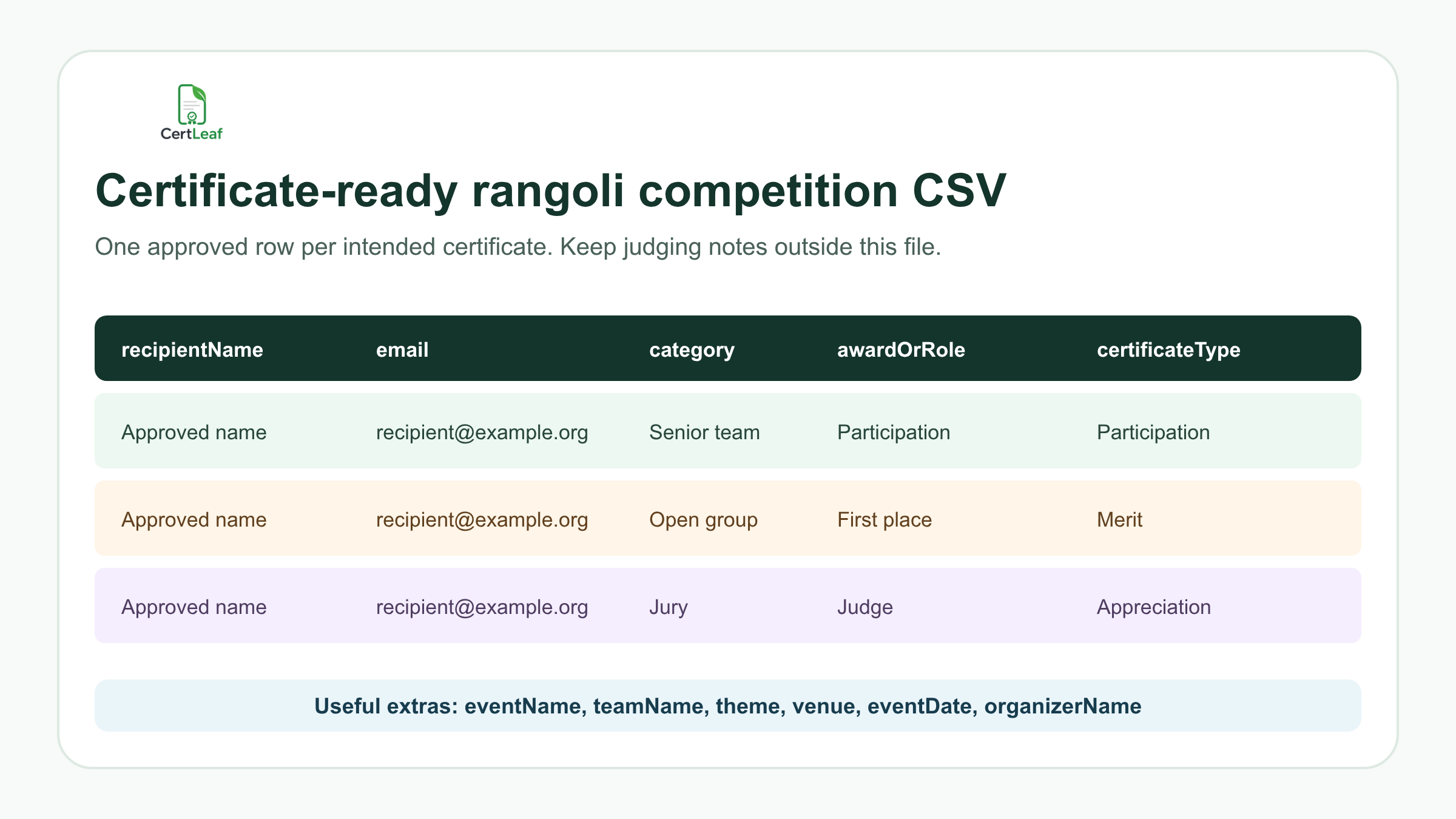
Use one approved row for one intended certificate. If a participant is intentionally receiving both participation and winner certificates, two rows may be correct. If the same person appears twice because two registration files were merged, resolve the duplicate before upload.
For team entries, keep recipientName and teamName separate. That lets the certificate name a person while still recording the approved team. If the certificate is issued directly to the team, confirm the delivery email and recipient format before generating the batch.
The detailed guide to preparing a certificate recipient CSV without name or email errors is useful when school lists, team registrations, and result sheets use different spellings.
Try the rangoli competition use case in CertLeaf with a small sample CSV. The 20 free signup credits let the team check long names, team labels, award wording, email delivery, and QR verification before using paid credits for the full event.
Reuse a small template family across categories
Most events do not need a completely different design for every category. They need a controlled template family:
Participation certificate
Winner, rank, or special-mention certificate
Judge or mentor appreciation certificate
Coordinator, volunteer, or partner contribution certificate
The designs can share the same event identity while using different titles and recognition statements. A decorative gold border does not turn a participation certificate into a merit certificate. The approved wording must carry that meaning.
Leave enough room for the longest realistic recipient name, team name, and category label. A phrase such as Inter-Department Team - Traditional Theme can fit neatly in a spreadsheet and still crowd a certificate. Test awkward rows before the full issue.
Keep the real QR area separate from decorative patterns, signatures, seals, and borders. A rangoli-inspired design can be detailed, but the dynamic name and certificate claim still need to be the easiest parts to read.
Email each certificate to the matching recipient
Manual delivery gets risky when one folder contains participation, winner, judge, coordinator, and volunteer PDFs. Similar file names make it easy to attach the wrong certificate or miss a team member.
CertLeaf keeps the delivery address connected to the same CSV row used to create the certificate. Organizers can issue separate batches for clearer review, then send each approved certificate to the matching inbox without attaching PDFs one by one.
Test at least one email from every certificate type. Open it on a phone and laptop. Check the recipient name, event title, category, award or role, and correction contact. When several certificates go to one school coordinator or team lead, confirm that arrangement before sending.
Add QR verification when the record will travel
A winner may include the certificate in a student portfolio, college activity record, scholarship file, or professional profile. A judge or community partner may keep it with program documentation. A QR-verifiable CertLeaf certificate gives the viewer a public route to check the issued record.
The verification details should match the recipient, issuer, competition, certificate type, category, award or role, and event date shown on the PDF. The guide to QR code certificates and public verification explains the difference between a decorative QR code and a QR-verifiable record.
Keep the claim narrow. QR verification confirms that the organizer issued a CertLeaf certificate record with those details. It does not validate the judging decision, prove who created the rangoli, check whether materials followed the event rules, or establish ownership of a design.
Pay-as-you-go fits seasonal cultural events
Rangoli competitions usually follow a school, college, workplace, or community calendar. An organizer may issue a large batch around one celebration and then need no certificate software for several months.
CertLeaf uses pay-as-you-go credits with no subscription. A simple certificate uses 1 credit, and a QR-verifiable certificate uses 2 credits. New accounts receive 20 free signup credits. India-first customers can purchase credits in INR through Razorpay.
This keeps certificate costs tied to the event that created them. Organizers comparing billing options can also read the guide to choosing a certificate generator without a subscription.
Use the free credits on realistic proof records: a long name, a team entry, a detailed category, a winner certificate, a judge certificate, an email delivery, and a QR scan.
Rangoli competition certificate generator FAQ
What is a rangoli competition certificate generator?
A rangoli competition certificate generator helps organizers create and issue personalized certificates for entrants, winners, judges, coordinators, volunteers, and partners. CertLeaf supports reusable templates, bulk CSV issuing, email delivery, and optional QR verification.
Can CertLeaf issue rangoli competition certificates in bulk?
Yes. Prepare an organizer-approved CSV with one intended certificate per row, map its fields to the appropriate template, and issue participation, merit, appreciation, or contribution batches in bulk.
What should a rangoli competition certificate include?
Common fields are the recipient or team name, competition name, category, certificate type, organizer, and event date. Winner certificates can include the exact approved rank or award. Add the theme only when it is verified and useful.
Can individual and team entries use the same platform?
Yes. Keep the individual recipient name and team name in separate fields, then decide whether each member, one representative, or the team itself receives the certificate. The organizer should approve that rule before issuing.
Can judges and volunteers receive rangoli competition certificates?
Yes. Use appreciation or contribution wording with the exact approved role. Do not use participant or winner wording for someone who judged, mentored, coordinated, hosted, volunteered, or supported the event.
Does CertLeaf manage registrations or judge the competition?
No. CertLeaf is the certificate issuing, email delivery, verification, and management layer. Registration, category rules, venue operations, scoring, judging, and result approval remain with the organizer.
Should rangoli competition certificates include QR verification?
QR verification is useful when recipients may share the certificate outside the event. It provides a public route to check the issued certificate record, but it does not verify the artwork or the judging result.
Is CertLeaf a no-subscription rangoli competition certificate generator?
Yes. CertLeaf uses pay-as-you-go credits with no subscription. New accounts receive 20 free signup credits, and India-first customers can purchase credits in INR through Razorpay.
Give each contribution the right record
A rangoli competition may be presented as one cultural event, but its certificate records cover individuals, teams, categories, awards, judging, coordination, volunteering, and community support. Those distinctions make the certificates more useful after the decorations are cleared.
CertLeaf gives schools, colleges, resident associations, workplaces, cultural groups, and public-event teams reusable templates, bulk CSV issuing, email delivery, QR verification, pay-as-you-go credits, INR/Razorpay support, and 20 free signup credits.
Start with a small sample, check every certificate family, and then issue the approved rangoli competition batch without committing to a subscription.