CertLeaf
Reading Challenge Certificate Generator for Schools and Libraries
Issue reading challenge certificates in bulk for students, club members, milestone achievers, librarians, mentors, and volunteers with CertLeaf.
Reading programs need a dedicated certificate issuing platform when recognition extends beyond one printable award. A school library may recognize every student who completes a reading challenge, several book-count milestones, genre explorers, reading ambassadors, librarians, mentors, storytellers, and volunteers. Each record needs the right wording, recipient details, and delivery route.
CertLeaf gives schools, libraries, book clubs, literacy groups, and community reading programs one focused place to issue those records. Organizers can save reusable templates, upload an approved recipient CSV, generate certificates in bulk, send them by email, and add QR verification when a certificate may be shared beyond the program.
That makes CertLeaf a practical reading challenge certificate generator for month-long school campaigns, library book trails, class reading goals, summer or holiday reading programs, reading clubs, inter-house challenges, genre explorations, and community literacy initiatives. The organizer still manages reading logs, book reviews, teacher approvals, milestones, and results. CertLeaf handles certificate issuing after the final records are approved.
A reading program can need more than one certificate
A generic Certificate of Participation works for some programs, but it does not describe every useful record. A student who joined a reading club, a reader who completed 20 books, a genre challenge winner, and a volunteer storyteller made different contributions.
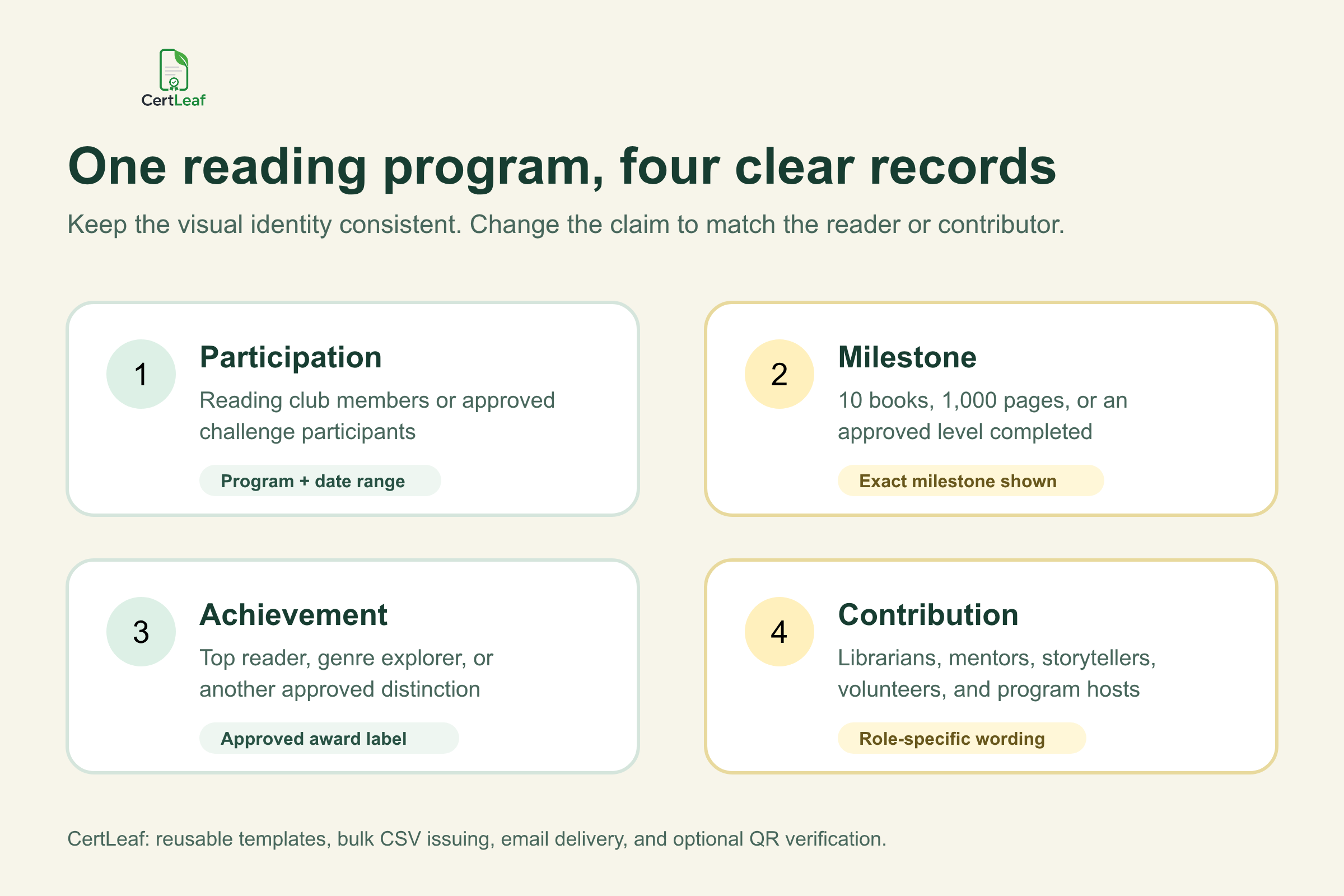
A clear certificate family can include:
Participation certificates for approved reading club members or challenge participants
Milestone certificates for an approved number of books, pages, sessions, or program levels
Completion certificates for students who finish the defined reading challenge
Achievement certificates for top reader, genre explorer, consistent reader, book reviewer, or another approved distinction
Appreciation certificates for librarians, teachers, reading mentors, storytellers, volunteers, and program hosts
The designs can share the school or library logo, program colors, border, signatures, and issuer details. The certificate title and claim should change. A milestone certificate should state the exact approved milestone. An appreciation certificate should name the contribution instead of presenting the recipient as a student participant.
Sign up for CertLeaf and use the 20 free signup credits to test participation, milestone, and appreciation certificates before preparing the full reading program batch.
CertLeaf fits schools, libraries, and reading clubs
Reading programs are run by several reachable groups, and the certificate details vary with the setting.
A school library may run a month-long challenge across grade bands. A class teacher may recognize a smaller reading goal. A community library may organize a holiday book trail for several age groups. A book club may issue completion or contribution certificates after a term. A literacy NGO may recognize learners, mentors, volunteers, and partner schools under one program identity.
CertLeaf can support these groups without replacing their existing reading tools. Keep reading logs, book lists, reviews, assessment notes, consent records, and teacher approvals in the system already used by the organizer. Export only the approved certificate information.
Schools that want one design system across future activities can use the principles in the reusable college event certificate template guide. The audience is different, but the practical lesson is useful: preserve the approved visual identity while giving dynamic fields enough room for real names, program titles, milestones, dates, and certificate IDs.
Put the approved reading record on the certificate
A reading challenge certificate should make sense after it leaves the library or classroom. The recipient and any later viewer should be able to identify the program, issuer, and achievement without searching for the original announcement.
Useful fields can include:
Recipient name
Reading challenge, club, or program name
School, library, club, or literacy organization
Grade, age group, house, branch, or cohort when relevant
Program period or completion date
Certificate type
Approved milestone, level, award, or contribution role
Certificate ID and QR verification when a public check is useful
Not every field belongs on every certificate. A participation certificate may need the program name and date range. A 20 Book Milestone certificate should state that milestone. A reading mentor certificate needs the contribution role, not the student's grade band.
Keep reading history and private student information off the public document. Individual book titles, reading difficulties, teacher comments, assessment scores, parent contacts, home addresses, and consent notes belong in the source system. CertLeaf does not assess reading ability or decide whether a learner completed a challenge. The school, library, or program owner approves the record before issuing.
Build a certificate-ready reading challenge CSV
The final issuing file should be smaller than the reading tracker. It needs only the fields used for certificate personalization, delivery, and the approved record.
A practical header set is:
recipientName,email,programName,organizationName,gradeOrGroup,milestone,certificateType,awardOrRole,programPeriod
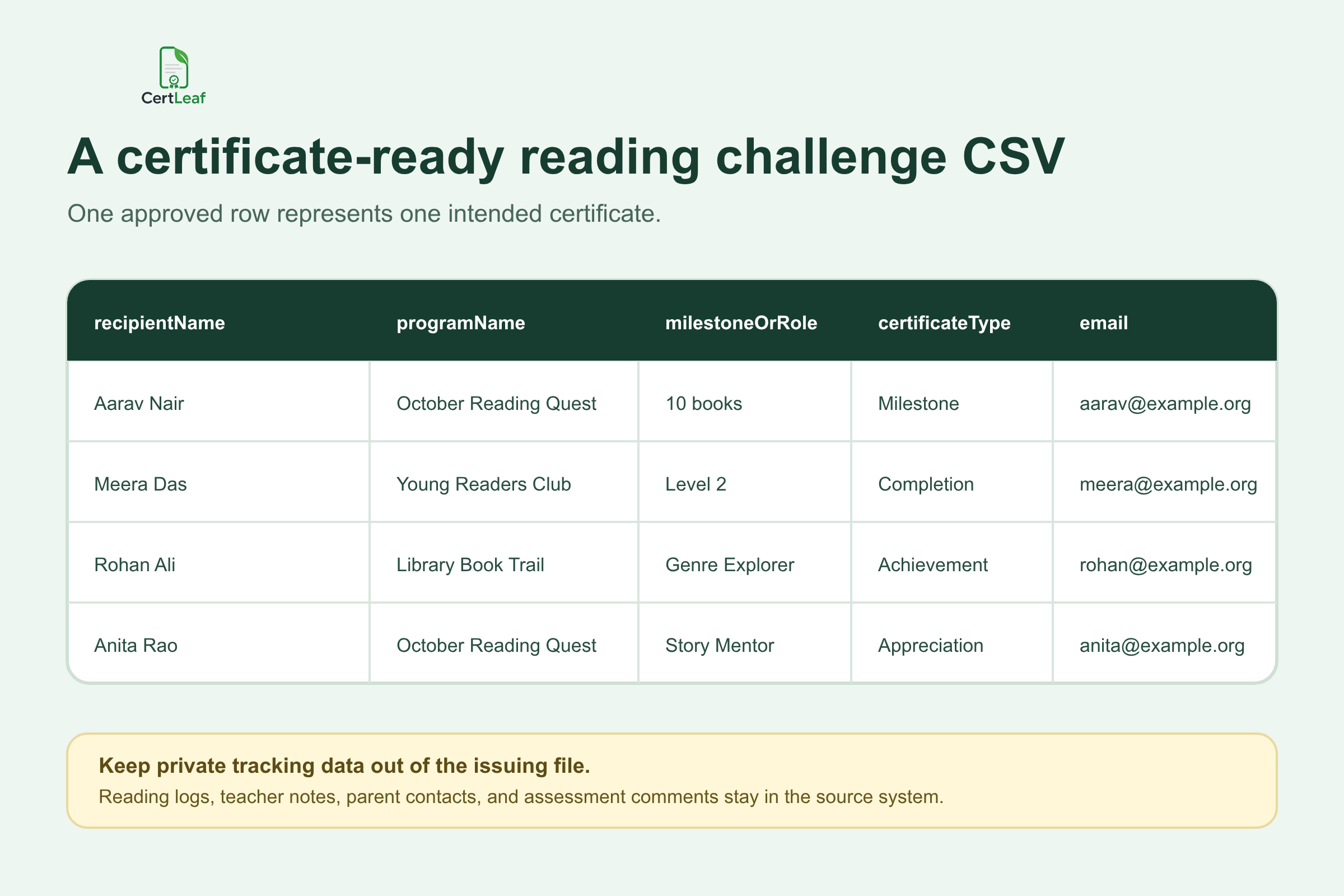
Use one approved row for one intended certificate. If a student receives both a completion certificate and a separate milestone award, keep those as two deliberate records or separate batches. Do not create an accidental duplicate because the same student appears in a class list and a library list.
For younger readers, the approved delivery email may belong to a parent, teacher, librarian, or school coordinator. Keep the name printed on the certificate separate from the email used for delivery. A shared class or library address can work when that is the organizer's chosen distribution method, but the team should decide this before the full batch is sent.
The certificate recipient CSV preparation guide is useful when names appear differently across enrolment sheets, library records, class lists, and reading trackers. It covers duplicate identities, initials, shared inboxes, and test rows without turning the article into a data-cleaning exercise.
Try the reading challenge use case in CertLeaf with a small sample CSV. The 20 free signup credits let the team check long student names, milestone wording, email delivery, and a QR-verifiable record before issuing the real list.
Reuse a small family of reading certificate templates
Most reading programs do not need a new design for every milestone. They need a small set of related templates with clear claims:
Reading program participation
Milestone or level completion
Achievement or special recognition
Librarian, mentor, storyteller, volunteer, or host appreciation
The visual identity can remain consistent across all four. The title and body wording should not. A reader, milestone achiever, program winner, and volunteer did different things.
CertLeaf lets the organizer upload an approved base design, place dynamic fields, add a QR code where needed, and save the layout as a reusable template. The next class, branch, term, or reading season can use the same template family with a new approved CSV.
Test difficult records before issuing the complete batch. Preview the longest student name, a long school or library name, the most detailed milestone, a multi-word program title, and each contribution role. Read the exported certificate at normal size. Text should stay clear of borders, signatures, seals, and the QR area.
Email reading certificates without matching PDFs by hand
A reading program can produce participation, milestone, completion, achievement, and appreciation PDFs in the same week. Matching each file to a student, parent, teacher, mentor, or volunteer by hand creates another administrative job.
CertLeaf keeps the delivery email connected to the same CSV row used to generate the certificate. Organizers can issue approved batches and send each certificate to the matching inbox without renaming and attaching PDFs one by one.
Run an internal test from every template type. Open the message on a phone and computer. Check the recipient name, program title, milestone or role, date, certificate access, and correction contact. If QR verification is enabled, scan the code and compare the public record with the delivered certificate.
The bulk certificate email delivery guide explains test sends, recipient matching, and message wording in more detail. It is the useful next step once the reading program's template family and approved CSV are ready.
Use QR verification when the reading certificate will travel
A reading certificate may stay in a classroom folder, but it may also move into a student portfolio, school activity record, library membership file, scholarship application, volunteer profile, or public achievement post.
A QR-verifiable CertLeaf certificate gives a viewer a public route to check the issued record. The verification details should agree with the recipient, issuer, reading program, certificate type, milestone or contribution, and date shown on the PDF.
Keep the claim narrow. QR verification confirms that the organizer issued a CertLeaf certificate record with those details. It does not prove which books were read, validate a reading log, assess comprehension, confirm a competition result independently, or replace the school or library's approval process.
For an informal classroom activity, a simple certificate may be enough. For milestone records, public library programs, inter-school challenges, and certificates likely to be shared outside the organizing team, the guide to QR code certificates and public verification explains when the verification layer adds practical value.
Pay-as-you-go pricing suits seasonal reading programs
Reading certificate demand is uneven. A school may run one challenge in October and another before the summer break. A library may issue certificates at the end of a holiday program. A book club may recognize members once per term. Paying for software every month does not match that calendar well.
CertLeaf uses pay-as-you-go credits with no subscription. A simple certificate uses 1 credit, and a QR-verifiable certificate uses 2 credits. New accounts receive 20 free signup credits. India-first customers can purchase credits in INR through Razorpay.
Use the free credits on realistic proofs. Test a long student name, a milestone record, an appreciation certificate, an email sent to the intended inbox, and a QR scan. Then calculate the full batch from the approved certificate row count.
Reading challenge certificate generator FAQ
What is a reading challenge certificate generator?
A reading challenge certificate generator helps schools, libraries, book clubs, and literacy programs create personalized certificates for participants, milestone achievers, challenge completers, award recipients, mentors, volunteers, and organizers. A purpose-built issuing platform supports reusable templates, bulk CSV issuing, email delivery, and optional QR verification.
Can schools issue reading challenge certificates in bulk?
Yes. Prepare an approved CSV with one intended certificate per row, map the fields to the relevant CertLeaf template, review sample records, and issue the batch. Schools can separate participation, milestone, achievement, and appreciation certificates when the wording differs.
What should a reading challenge certificate include?
Common fields include the recipient name, program name, school or library, grade or age group when relevant, program period, certificate type, exact milestone or award, issuer, and approved signatories. Add a certificate ID and QR verification when the record may need to be checked later.
Can a reading club issue certificates to mentors and volunteers?
Yes. Use appreciation or contribution wording that names the approved role, such as reading mentor, storyteller, librarian, program volunteer, or host. Do not use student participation or achievement wording for contributors.
Does CertLeaf track books or decide who completed the challenge?
No. CertLeaf is the certificate issuing, email delivery, verification, and management layer. Reading logs, reviews, assessments, milestones, approvals, and program results remain with the school, library, club, or literacy organization.
Should reading challenge certificates include QR verification?
QR verification is useful when the certificate may be shared outside the program or needs a public route back to the issuer's record. A simple certificate may be sufficient for an informal internal activity.
Is CertLeaf a no-subscription reading certificate generator?
Yes. CertLeaf uses pay-as-you-go credits with no subscription. New accounts receive 20 free signup credits, and India-first customers can buy credits in INR through Razorpay.
Give every reading milestone the right record
A reading program can recognize participation, steady progress, completion, achievement, and contribution without turning certificate work into a manual document project.
CertLeaf gives schools, libraries, book clubs, and literacy programs reusable templates, bulk CSV issuing, email delivery, QR verification, pay-as-you-go credits, INR/Razorpay support, and 20 free signup credits. The organizer approves the reading records. CertLeaf turns those approved records into consistent certificates.
Start with a small sample, check every certificate type, and then issue the approved reading challenge batch without committing to a subscription.