CertLeaf
Summer Camp Certificate Generator for Batch Completion Certificates
A practical summer camp certificate workflow for organizers who need to separate completion, participation, recognition, mentor, and volunteer certificates before issuing each batch.
At 4:45 pm on the last Friday, the craft tables had been cleared and the coding room laptops were back in their cases. Parents were arriving at the school gate. The camp coordinator still had four lists open.
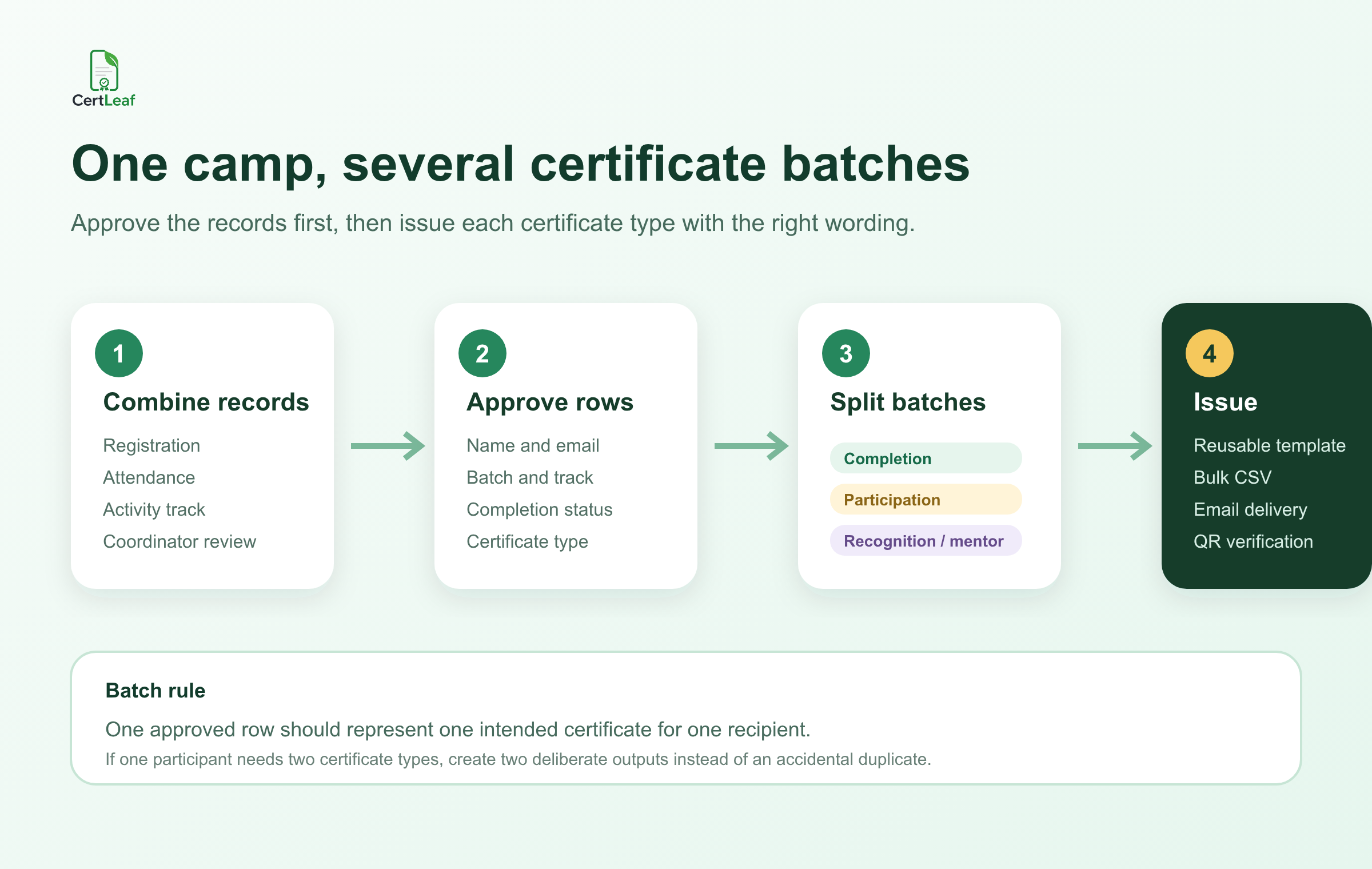
One sheet contained registrations for the full two-week program. Another tracked morning and afternoon activity batches. The attendance file showed who had completed enough sessions for a completion certificate. A final note from the coordinators listed a few participants for teamwork, creativity, or consistent effort recognition.
The certificate request looked simple: "Please send them by Monday." The hard part was deciding what "them" meant.
A useful summer camp certificate generator has to support that decision without flattening every participant into the same certificate. A child who completed a full activity track, someone who joined three open sessions, a mentor who led a batch, and a volunteer who managed registrations did different things. Their certificates should say so.
| Camp record | What it answers | Certificate decision |
|---|---|---|
| Registration list | Who signed up? | Starting list only |
| Attendance by session | Who actually joined? | Participation or completion |
| Activity-track record | What did they work on? | Track name and batch |
| Coordinator approval | Who met the stated rule? | Final certificate type |
| Recognition notes | Was a specific contribution approved? | Recognition or appreciation |
My approach would be to preserve those source files, agree on the certificate rules, and then build one approved issuing workbook. The certificate design comes after that.
Decide what each summer camp certificate means
"Summer camp certificate" can describe several different records. It helps to name them before anyone edits a template.
A completion certificate should confirm that the participant completed the stated camp, bootcamp, holiday program, or activity track under the organizer's rule. That may mean attending a minimum number of sessions, completing a final activity, or finishing a week-long batch.
A participation certificate confirms involvement without claiming that every completion requirement was met. It fits open activity days, short workshop sessions, or participants who joined a defined part of the program.
A special recognition certificate should name the approved reason, such as teamwork, creativity, consistent effort, or a project contribution. Recognition should come from a coordinator's reviewed record, not from a guess made while preparing the CSV.
Mentors and volunteers usually need appreciation certificates with wording that describes their contribution. A mentor who supported three activity tracks should not receive a participant certificate just because that template is already open.
The camp can use one visual system across these certificates, but the titles and body wording should match the record. If the wording changes substantially, I would use separate reusable templates or separate bulk batches.
Write the rule before cleaning the attendance sheet
At the school camp, the completion rule had been discussed but never written down. One coordinator counted eight sessions. Another counted six because the opening and closing activities were optional. Both had reasonable memories of the program, but they produced different completion lists.
I would settle that question before removing a single row. A clear rule might be: "Completion certificates are issued to participants who attended at least seven of ten scheduled sessions and completed their activity-track presentation." The organizer should choose the actual threshold. The important part is that the rule exists before certificate requests arrive.
Participation needs its own rule. Does one attended session qualify, or must someone complete a full morning or afternoon batch? Can a completion recipient also receive participation, or does completion replace it? If both certificates are intended, record two deliberate outputs. Do not let a duplicate spreadsheet row make the choice.
This is close to other attendance-led programs, but summer camps add activity tracks, changing batches, age groups, and parent or student delivery addresses. The published guide to preparing a certificate recipient CSV without name or email errors is useful for the cleanup step after the camp's own rules are approved.
Build a certificate-ready CSV for activity tracks and batches
The working workbook can keep attendance by day, consent records, emergency contacts, internal notes, and coordinator comments. The final issuing CSV should not.
Use the smallest set of approved fields needed to create and deliver the certificate. A practical header is:
participantName,email,campName,activityTrack,batchName,completionStatus,recognitionType,date,certificateType
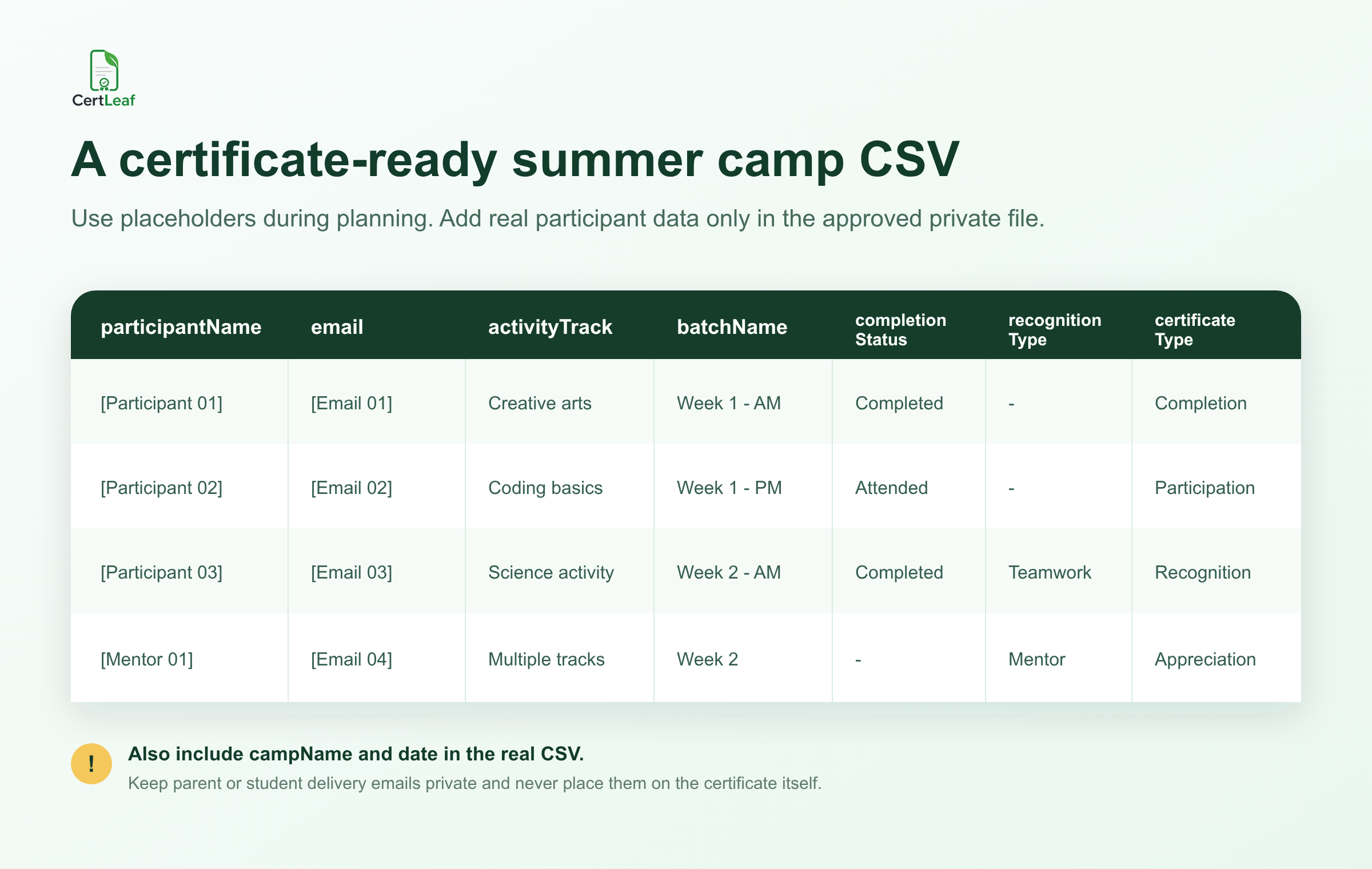
participantName should contain the approved certificate-ready name. email is the school-approved, parent-approved, or participant-approved delivery address. Keep it as a delivery field; it does not need to appear on the certificate.
campName identifies the program. activityTrack can hold a meaningful label such as creative arts, coding basics, science activity, public speaking, sports skills, or another real track used by the organizer. batchName separates Week 1 from Week 2, morning from afternoon, or one cohort from another.
completionStatus records the result of the organizer's rule. recognitionType should stay blank unless a specific recognition has been approved. certificateType controls the intended output: completion, participation, recognition, mentor appreciation, or volunteer appreciation.
One approved row should represent one intended certificate for one recipient. That rule keeps the file explainable.
Do not include medical notes, emergency contacts, addresses, age, parent details, or unrelated student records just because they exist in the registration export. Certificate issuing needs a narrow data set. Keep sensitive camp records in the system where the organizer already manages them.
Split batch-wise certificate generation by template
A single camp workbook can contain every approved certificate row. The file used for one bulk issue should usually be narrower.
Filter completion certificates into one export, participation into another, and recognition or appreciation certificates into their appropriate exports. If Week 1 and Week 2 use different dates or coordinator signatures, separate those too. Useful filenames might be week-1-completion-approved.csv and week-2-participation-approved.csv.
This is where a reusable template helps. The school or activity centre can keep its logo, border, issuer wording, signatures, and field positions fixed. The CSV supplies the participant name, camp name, activity track, batch, date, and certificate wording that changes.
The workflow also works for bootcamps, coaching-centre holiday batches, educator-led workshops, and short activity programs. The labels will differ, but the operating rule is the same: approve the outcome, export the matching rows, and issue the right batch.
For a broader example of a recurring short-program workflow, see how teams issue course completion certificates in bulk. A summer camp needs more care around mixed certificate types and delivery data, but the reusable-template and approved-CSV approach carries across.
Test the rows that could break the certificate
Do not preview only the first row. Test the longest participant name, the longest activity-track title, one morning or afternoon batch label, each certificate type, a blank recognition field, and one mentor or volunteer certificate.
Read the PDFs at normal size. Check that the activity track does not crowd the participant name, that "completion" has not appeared on a participation certificate, and that a blank optional field disappears cleanly. If a coordinator's name changes by batch, confirm the right signatory or label is attached to the right template.
For QR-verifiable certificates, scan one exported certificate from an ordinary phone screen. The public verification page should agree with the issued record: recipient, certificate title, program, issuer, and date where those fields are shown. QR verification gives someone a way to check the CertLeaf record. It does not prove attendance independently or decide whether the camp's completion rule was fair.
The guide to QR code certificates for workshops and training programs explains that boundary in more detail.
Handle parent and student email delivery cleanly
Camp delivery lists vary. A school may use a parent email for younger children, a student email for older participants, or a shared institutional address for a supervised batch. The organizer should approve which address will receive each certificate.
Keep one delivery address in the issuing row. Do not paste a parent email and student email into the same cell. If both need a copy, decide how that will be handled before the bulk send rather than improvising after certificates are generated.
Send an internal test first. Check the subject line, camp name, certificate type, download flow, and correction contact. Then issue the approved batches. A useful email can be short: identify the camp and certificate, explain that the QR code can be used for verification when present, and say where an approved name or delivery correction should be requested.
After sending, save the exact CSV used for each batch. If one address was wrong or a participant was approved late, create a small follow-up batch. Do not silently replace the issued file and lose the record of what happened.
For more detail on testing and delivery, use the bulk certificate email workflow.
Where CertLeaf fits
CertLeaf handles the repetitive issuing work after the organizer has approved the rules and recipient data. A camp team can upload a base certificate design, create reusable templates, import the reviewed CSV, issue each certificate batch, and distribute certificates by email. Selected completion, recognition, mentor, or volunteer certificates can include QR verification through a public verification page.
There is no subscription. Credits are pay-as-you-go, which fits camps and holiday programs that issue certificates during specific seasons rather than every month. India-first customers can buy credits in INR through Razorpay, and new accounts receive 20 free signup credits.
Use the free credits for realistic proofs: a long participant name, each certificate type, a Week 1 and Week 2 batch, one email delivery, and one QR scan. That test is more useful than generating twenty tidy rows that all look the same.
The boundary matters. CertLeaf does not decide who completed the camp, who deserves recognition, whether a mentor met an internal requirement, or which parent address is approved. The organizer owns those decisions. CertLeaf turns the approved rows into consistent certificates and handles bulk issuing, delivery, and verification.
Summer camp certificate generator FAQ
What should a summer camp certificate generator support?
It should support reusable templates, bulk CSV issuing, separate certificate types, batch and activity-track fields, email delivery, and QR verification where certificates may need a public check. It should help issue and manage certificates, not only design a printable file.
What fields belong in a summer camp certificate CSV?
A practical structure is participantName, email, campName, activityTrack, batchName, completionStatus, recognitionType, date, and certificateType. Keep medical, emergency, address, and unrelated student data out of the certificate-ready file.
What is the difference between a completion and participation certificate?
A completion certificate confirms that the recipient met the camp's stated completion rule. A participation certificate confirms involvement without making the stronger completion claim. The organizer should write both rules before issuing.
Can one participant receive a completion and recognition certificate?
Yes, if the organizer intends and approves both. Record two deliberate certificate outputs, ideally in the appropriate batch exports, rather than relying on an unexplained duplicate row.
How should mentor and volunteer certificates be handled?
Use appreciation wording that describes the real contribution. A mentor or volunteer certificate should not imply that the recipient attended or completed the camp as a participant unless that is also true and separately approved.
Should summer camp certificates include QR verification?
QR verification is useful when a certificate may be shared outside the camp or checked later. A simple certificate may be sufficient for informal internal recognition. The QR route confirms the issued record; it does not independently validate attendance or performance.
Can CertLeaf send summer camp certificates by email in batches?
Yes. CertLeaf can issue certificates from an approved CSV and distribute them to the delivery email in each row. Test one delivery before sending the full completion, participation, or recognition batch.
Is CertLeaf a subscription summer camp certificate generator?
No. CertLeaf uses pay-as-you-go credits. New accounts receive 20 free signup credits, and Indian customers can purchase credits in INR through Razorpay.
Close the camp with a record the team can explain
The certificate folder should not be a pile of PDFs that only one coordinator understands. Keep the source attendance and activity records. Write the completion and participation rules. Approve recognition separately. Build one certificate-ready workbook, then export each template batch.
Test the difficult rows. Send from the approved delivery data. Use QR verification where the certificate may need to be checked later.
That leaves the camp team with a clear answer to a basic question: which certificate was issued, to whom, for which activity and batch, and why.