 CertLeaf
Best Certificate Generator for Events Compared: What Organizers Should Check Before Issuing
A practical comparison checklist for event teams choosing between design tools, mail merge, credential platforms, and purpose-built certificate issuing software.
At 8:10 pm, the organizing team for a college innovation seminar in Bengaluru had packed the banners, returned the microphones, and counted 214 eligible attendees. The certificate decision was still open.
One volunteer wanted to use the design tool the club already knew. Another had built a spreadsheet mail merge for last year's event. The faculty coordinator wanted QR verification because students would use the certificates in placement files. The treasurer had a simpler question: would the department have to keep paying for software after this event?
That is the useful way to approach the best certificate generator for events compared question. Do not begin by asking which product has the longest feature page. Follow one recipient record from the approved attendance list to the certificate, inbox, correction queue, and verification page. The weak part of the workflow usually becomes obvious.
This article compares tool categories rather than declaring one universal winner. For a focused example of how issuing frequency and budget shape the choice, you can compare Certifier and CertLeaf for event and training batches. Here, the focus stays on the event team's actual closeout work.
A quick comparison of event certificate options
| Option | Strong starting fit | Check before choosing |
|---|---|---|
| Design-first tools | Attractive certificate artwork and tiny batches | How bulk generation, delivery, and verification will happen |
| Spreadsheet and mail merge | Small informal batches with a technically confident owner | Wrong attachments, resend tracking, and correction handling |
| Credential and badge platforms | Ongoing credential programs with broader management needs | Plan limits, setup scope, billing model, and required tier |
| Purpose-built certificate issuing tools | CSV batches, recipient delivery, and verification | Template flexibility, reissue process, and current pricing |
| CertLeaf | Intermittent event batches needing bulk issuing without a subscription | Whether its focused feature set covers your program needs |
The table is only a starting point. A tool can look right in a comparison grid and still create awkward work when the first correction request arrives.
Start with the recipient row, not the template gallery
The Bengaluru seminar had participants, volunteers, speakers, and three competition winners. Their certificates used the same visual identity, but the wording was not identical. A participant received "participated in." A volunteer received "contributed to the organizing team." A winner needed the category and position.
The event team therefore needed more than a name column. A practical issuing file looked like this:
full_name,email,event_name,event_date,role,certificate_type
The first buying question is whether a tool can map those fields into reusable templates and turn one approved list into recipient-specific certificates. Check whether it can preview long names, initials, different roles, and the longest event title before the full batch is generated.
This is also where eligibility belongs. Certificate software can repeat an approved decision; it should not be expected to decide whether a person attended enough of the seminar. Reconcile registration, attendance, feedback, or assessment evidence first. If your sheets are already messy, prepare a clean certificate recipient CSV before testing any platform.
Bulk issuing should include the awkward records
A bulk button is not enough. The useful test is whether the organizer can handle the real variations in an event batch without returning to manual edits.
For the seminar, I would create five test rows: the longest participant name, a name with initials, a speaker with different wording, a winner with a category field, and an internal email address the team can open. Map those rows, generate proofs, and read the PDFs at normal size.
If one role needs a separate template or batch, that is fine. Clear separation is often safer than a giant spreadsheet full of conditions. What matters is whether the process remains repeatable when the club runs another seminar next semester.
A design-first tool such as Canva can be a sensible place to create the visual background. The open question is what happens next. If the team still has to edit 214 names, export 214 PDFs, name the files, and match every attachment to an inbox, the certificate design is finished but the issuing work is not.
Email delivery is part of the certificate job
At the previous year's seminar, the club had generated certificates through a spreadsheet process and saved them to a shared folder. Two volunteers then sent the files through separate email accounts. One participant received a classmate's certificate because two similarly named PDFs sat beside each other.
That mistake was not caused by bad artwork. It came from breaking generation and delivery into disconnected tasks.
When comparing event certificate generators, ask whether the recipient email remains connected to the same row used to create the certificate. Send one test message. Open it on a phone. Check the sender context, subject, recipient name, certificate file or download route, and correction instructions.
Also ask about resends. A successful batch does not mean every participant will find the message. Some use old college addresses; others check spam a week later. The organizer needs a clean way to locate the right record and send it again, rather than searching an export folder by filename.
The correction request is the real stress test
The first correction arrived the next morning. One student had entered Aditya R during registration but wanted Aditya R. Menon on the certificate. A second participant had used her father's email. The team now had to identify the original rows, confirm the changes, and issue two corrected certificates without disturbing the other 212.
This is the point I would test before buying.
Can the organizer find the issued record? Can a corrected row be processed without rebuilding the whole batch? Can the latest certificate be resent to the confirmed address? What record will the event team keep of the old value, new value, checker, and sent time?
Do not assume the software will make every correction decision. The organizer still needs a small correction log and a rule for confirming requests. CertLeaf can issue corrected rows as a small batch from the reusable template, but the team should keep the operational log outside the issuing tool. The detailed workflow for handling certificate name corrections after an event is useful before participants begin messaging different volunteers.
A QR code should lead somewhere useful
The faculty coordinator was right to ask about verification, but a square code on the certificate was not enough.
A QR-verifiable certificate should open a recipient-specific record that lets a reviewer compare the certificate details with the issuer's record. A QR code that opens the event homepage or a folder is only a link. It does not provide the same check.
Ask every shortlisted tool what happens after a scan, whether the verification route is included in the plan being considered, and which details appear publicly. Test the route from the exported certificate, not only from a product demo.
Not every event needs this layer. A small internal thank-you certificate may be fine as a normal PDF. QR verification matters more when a participant may show the certificate to a college, employer, client, or placement team.
QR verification is not the same as a digital signature, and it is not an absolute promise that a file can never be copied. Its useful job is to give another person a direct route to the issuer's record.
Compare pricing models against the event calendar
A free manual workflow still has a cost: someone spends time generating files, checking names, attaching PDFs, answering delivery questions, and rebuilding corrected certificates. That may be acceptable for eight informal certificates. It is harder to defend for 214 formal records.
Design platforms may use free and paid feature tiers. Credential and badge platforms may use monthly, annual, recipient-based, or feature-based plans. Purpose-built issuing tools may use subscriptions or certificate credits. These models change, so verify current checkout terms and the exact tier containing the features you need.
Then put your events on a twelve-month calendar.
A training company issuing every week may reasonably prefer a broader recurring credential platform with analytics, integrations, badge workflows, or team controls. A college club that issues after two events per semester may prefer a one-time batch cost. A mail-merge workflow may remain sensible when volume is tiny and one careful owner can review every output.
For Indian teams, payment fit deserves its own line in the checklist. Ask about currency, tax documentation, checkout route, and whether the expense can be approved against the event budget. Do not assume a global product cannot support your organization; check its current options directly.
Where CertLeaf fits
CertLeaf is a focused certificate issuing option for event organizers, college clubs, workshop hosts, seminar teams, and training coordinators. An organizer can upload a base design, place dynamic fields, save a reusable template, upload a recipient CSV, issue certificates in bulk, and distribute them by email. QR-verifiable certificates can link to a public verification page.
The pricing model is pay-as-you-go credits with no subscription. A simple certificate uses 1 credit, and a QR-verifiable certificate uses 2 credits. New accounts receive 20 free signup credits. India-first customers can pay in INR through Razorpay.
That makes CertLeaf a credible fit when certificate work arrives in event-sized bursts and the team wants generation, delivery, and verification in one focused workflow. It is not the best overall tool for every use case. It is not a full LMS, design marketplace, or large credential ecosystem. If those broader capabilities are central to the program, evaluate a platform built around them.
The 20 free credits are best used for a dress rehearsal: awkward names, different certificate roles, one email delivery, one correction, and one QR scan. If the whole record survives that test, the tool is more likely to survive the real batch.
Which type of certificate tool should an event organizer choose?
Choose a design-first tool when visual creation is the main job, the batch is very small, or another reliable system will handle personalization and delivery.
Choose a spreadsheet and mail-merge workflow when the event is informal, the batch is small, verification is unnecessary, and one technically confident person can own the process from data cleanup to resend requests.
Choose a large credential or badge platform when certificates are part of an ongoing program that needs broader analytics, integrations, badge management, renewals, team roles, or enterprise support. Compare the current plan containing each required feature rather than the biggest feature list on the website.
Choose a purpose-built event certificate issuing tool when the central job is taking an approved recipient list through bulk generation, email delivery, correction batches, and optional verification.
Choose CertLeaf when that focused issuing job comes in intermittent batches and pay-as-you-go credits, INR/Razorpay support, reusable templates, email distribution, and QR verification fit the team's budget and workflow.
Run one five-record dress rehearsal
Before the event budget is committed, give each shortlisted option the same five rows. Use a long name, initials, a different certificate role, a corrected email, and one internal recipient. Generate the proofs, send one message, correct one record, and scan one QR-verifiable certificate.
Judge the complete result. How many manual handoffs were required? Could another volunteer understand the process? Did the corrected certificate remain connected to the right participant? Could the treasurer explain the price without guessing about future months?
That small test is more useful than crowning a winner from a feature table. Once the main batch is ready, use a post-event certificate checklist before the bulk email to freeze the list, approve the awkward proofs, and keep the issued record.
FAQ about the best certificate generator for events compared
What is the best certificate generator for events?
There is no universal winner. Design-first tools fit artwork-led or tiny batches. Mail merge can fit small informal work. Large credential platforms fit ongoing programs with broader management needs. CertLeaf fits intermittent event batches that need reusable templates, CSV bulk issuing, email delivery, optional QR verification, and no subscription.
What should I check before choosing an event certificate generator?
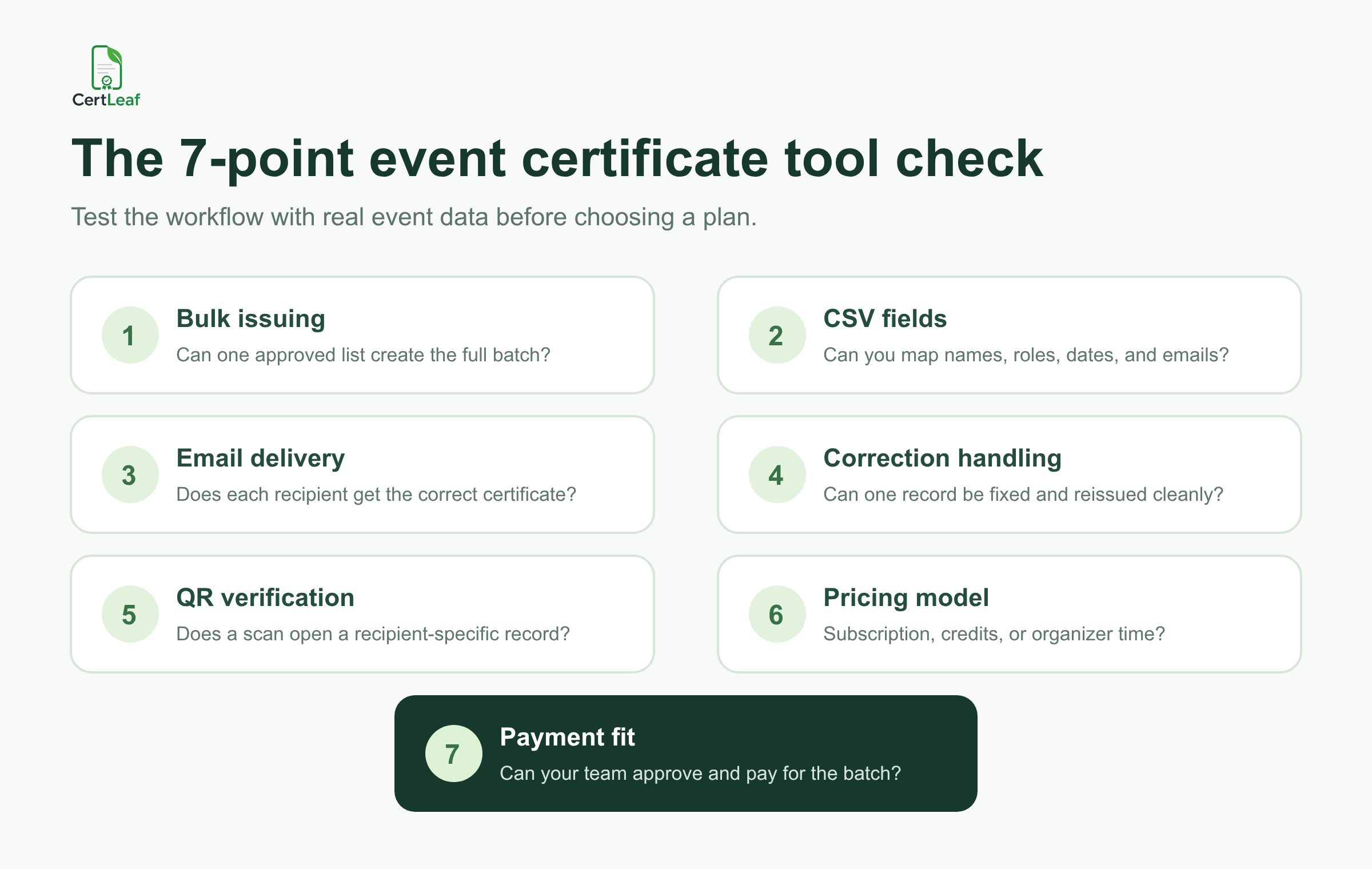
Test bulk generation from a realistic CSV, dynamic field mapping, awkward-name previews, recipient email delivery, resend and correction handling, QR verification behavior, pricing model, and the payment route your organization can use.
Can Canva be used for event certificates?
A design tool such as Canva can be useful for creating the certificate artwork. For a larger event, check how names will be personalized, PDFs generated, recipients matched to emails, corrections handled, and certificates verified. The design and issuing stages can use different tools.
Is a spreadsheet mail merge enough for event certificates?
It can be enough for a small batch with no verification requirement and a careful owner. As volume or certificate types grow, test the risk of wrong attachments, disconnected delivery, unclear resend records, and manual corrections.
Should event certificates include QR verification?
Use QR verification when recipients may need to show certificates to third parties. A useful QR route should open a recipient-specific issuer record. Internal or low-stakes recognition certificates may not need it.
Is CertLeaf subscription-based?
No. CertLeaf uses pay-as-you-go credits. It supports reusable templates, bulk CSV issuing, email delivery, and QR-verifiable certificates, with INR payments through Razorpay and 20 free signup credits.
The practical answer
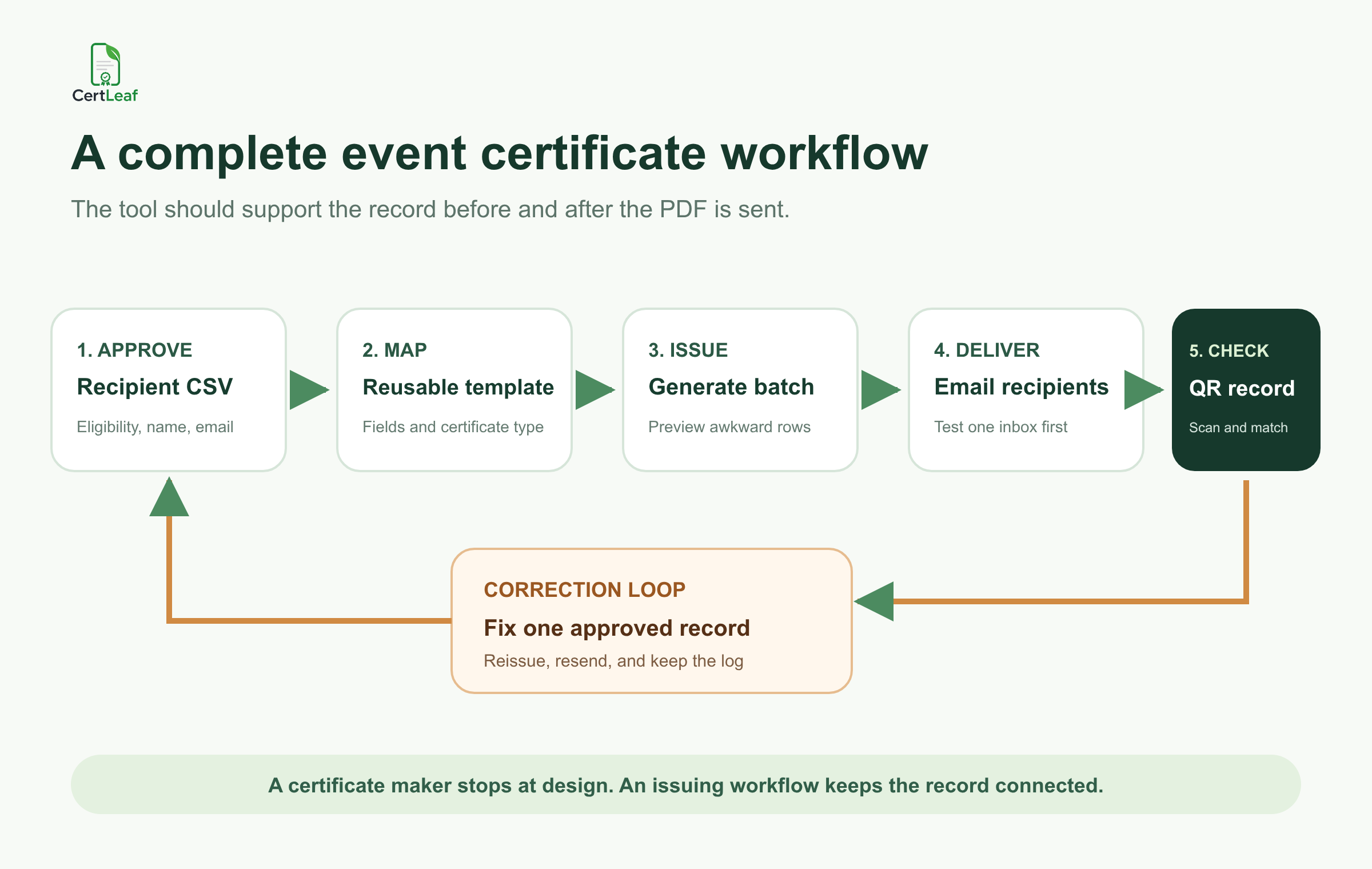
The Bengaluru team did not need one product to win every category. It needed one approved row to become the correct certificate, reach the correct inbox, survive a correction, and remain checkable later.
That is the standard I would use when the best certificate generator for events is compared. Choose the simplest tool that completes the whole job your event actually has. For design-only work, use a design tool. For a serious ongoing credential program, evaluate the larger platforms. For intermittent event batches that need bulk issuing, email delivery, QR verification, and no subscription, CertLeaf belongs on the shortlist.


