 CertLeaf
Canva Certificate Maker Alternative for Bulk Issuing and QR Verification
A practical migration guide for organizers who already have a finished certificate design but need bulk CSV issuing, email delivery, reusable templates, and QR verification.
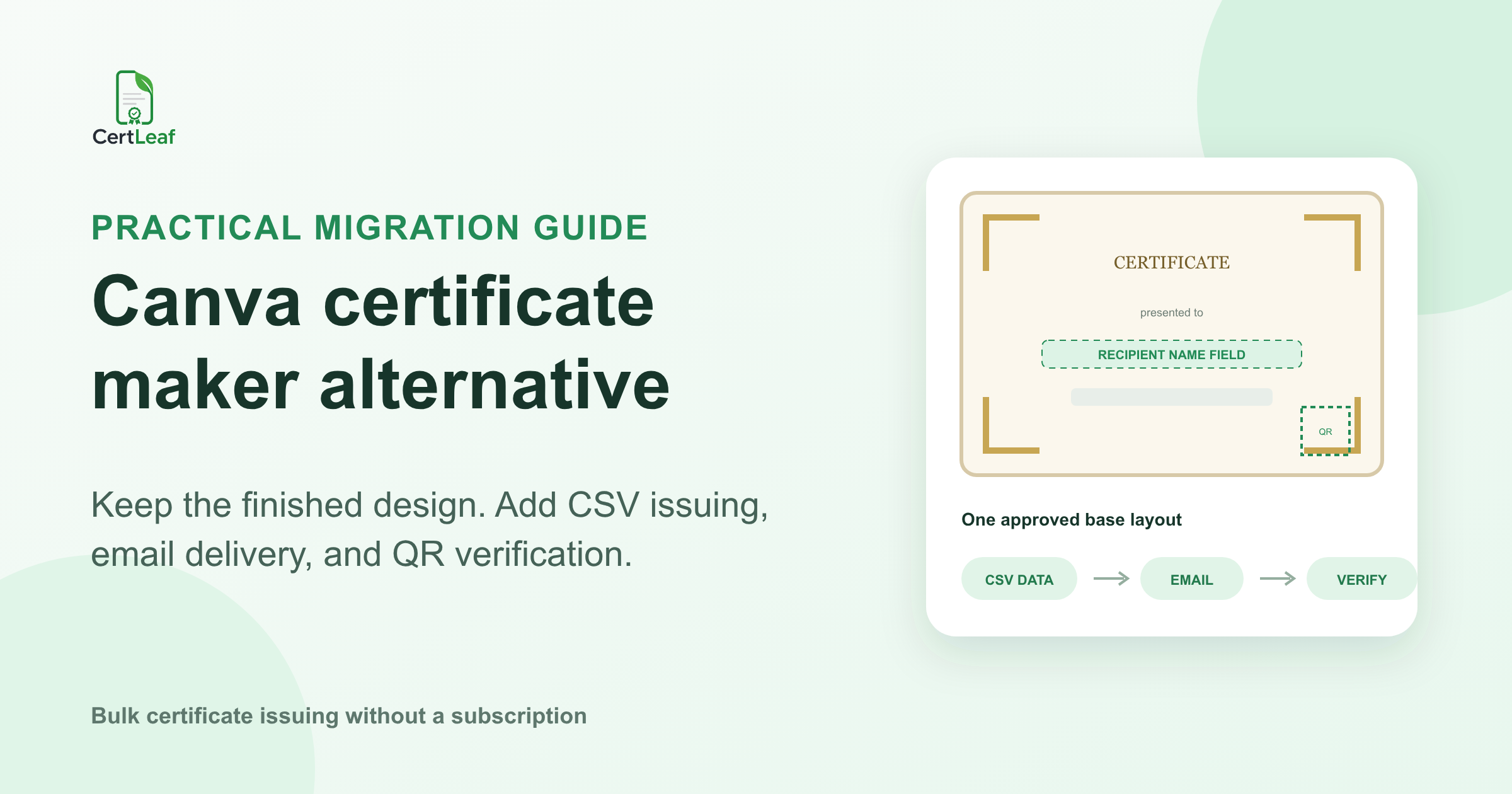
At 9:10 pm, the certificates for a college quiz in Pune looked finished. The student team had approved the border, faculty signatures, event title, and colors earlier that week. One sample PDF was already in the organizing group's WhatsApp chat.
Then the quiz coordinator opened the results sheet.
There were 312 participation certificates, 18 finalist certificates, and three winner variants to issue. Two students had used personal email addresses during registration and college addresses in the quiz portal. One winner's full name was long enough to reach the signature line. The team also wanted each certificate to be checkable when students added it to a portfolio.
This is usually when someone searches for a Canva certificate maker alternative. The design may be complete. The unfinished work is personalization, recipient matching, delivery, corrections, and verification.
A design-first tool can be perfectly reasonable for one certificate or a small set that somebody is comfortable handling manually. When the list reaches hundreds of recipients, the useful alternative is not another place to redraw the border. It is a certificate issuing workflow that can reuse the finished design.
| What you have now | What still needs to happen | Practical next step |
|---|---|---|
| One approved certificate design | Create a few named PDFs | Manual work may be enough |
| One design and hundreds of recipient rows | Personalize and generate the batch | Map CSV fields to a reusable template |
| Recipient names plus email addresses | Match each certificate to the right inbox | Keep delivery inside the issuing workflow |
| A QR square on the layout | Give each certificate its own verification record | Add a real QR verification field |
| The same event or course next month | Reuse the field positions and wording | Save the setup as a template |
This article is about that migration. It is not a full Canva feature comparison, and it does not assume every organizer should move. Canva and other design tools can remain useful for the visual work. The question is what to do after the artwork has been approved.
Keep the finished design instead of starting again
The most practical migration begins with the file your team already likes.
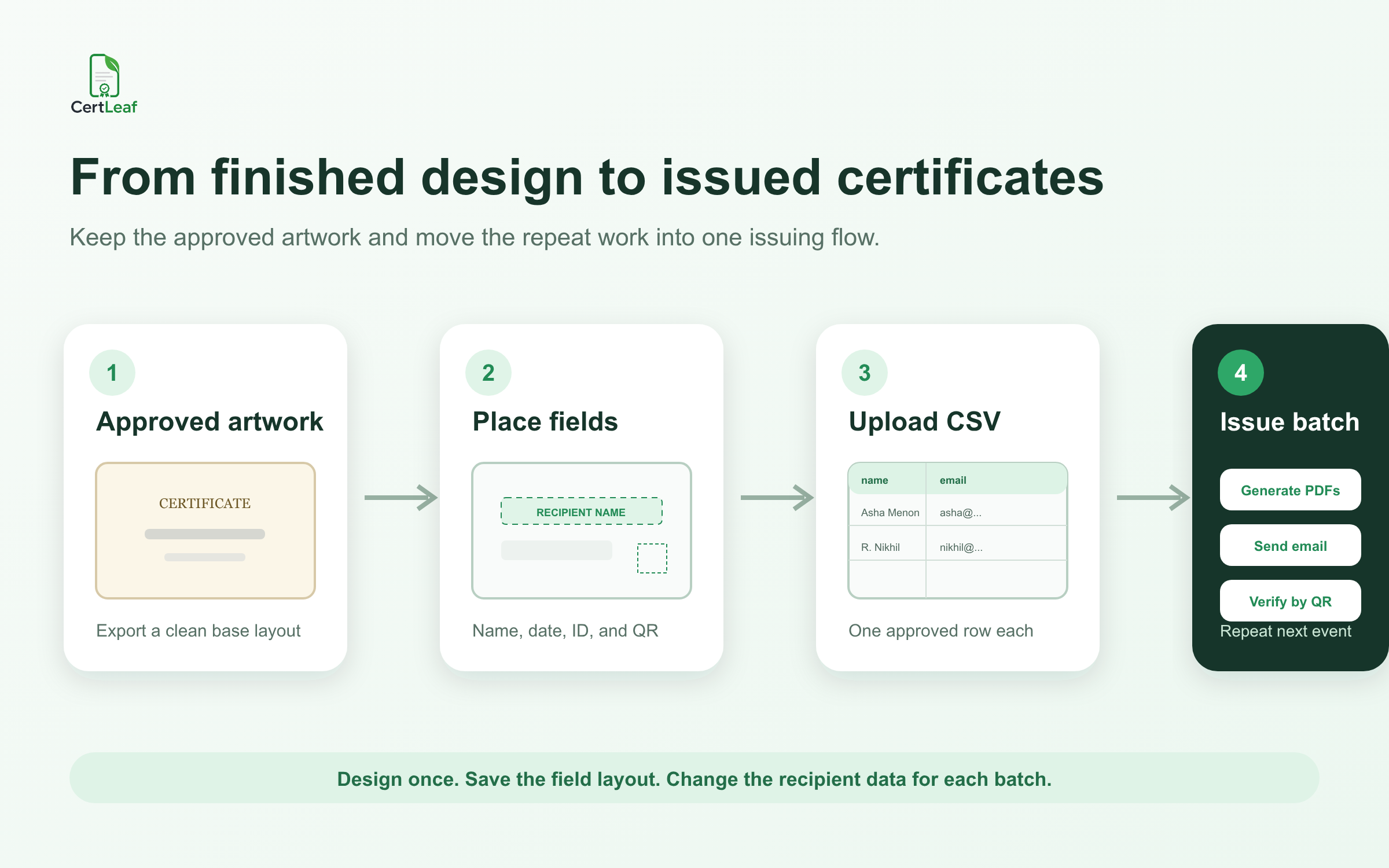
Export a clean certificate background from your design tool. Keep the institution logo, border, fixed wording, signatures, and visual styling in that base layout. Remove any sample recipient name, sample certificate ID, or decorative QR graphic that would clash with live fields later.
Upload that finished design to CertLeaf as the base for a template. Then place the fields that change from one certificate to the next: recipient name, event or course name, date, role, certificate type, certificate ID, and QR code when verification is needed.
The distinction is simple:
Fixed artwork stays in the background design.
Recipient-specific values sit in fields placed over that design.
The CSV supplies the values for each issued certificate.
If your layout needs a more careful field plan, this guide to turning a certificate design into a reusable event template covers spacing, wording variants, long-name tests, signatures, and the empty QR area.
At the Pune quiz, the team kept its approved layout. It created separate wording variants for participation, finalist, and winner certificates because those certificates made different claims. The background style stayed consistent, but the issuing rules did not get mixed together.
That is a better migration than forcing every row through one vague certificate.
Decide which parts should become fields
Do not make every word dynamic. The point of a reusable template is to keep most of the certificate stable.
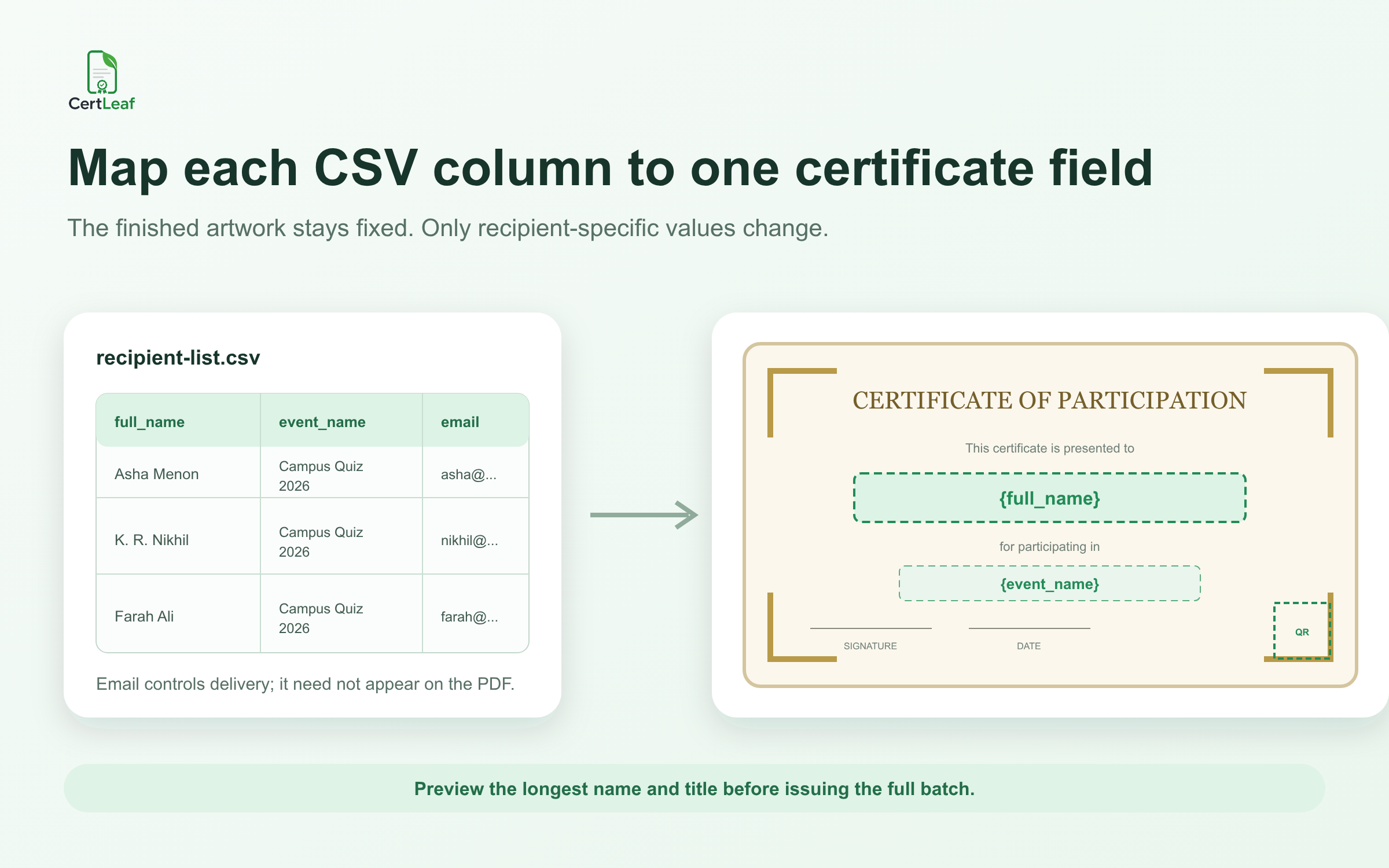
The recipient name is almost always a field. The event title and date may be fixed for a single batch but dynamic if the same layout will be reused across events. A role or certificate type should be dynamic only when the wording around it still reads correctly. The delivery email belongs in the CSV, although it normally does not belong on the certificate itself.
A QR code should be added as a live field for verifiable certificates, not baked into the artwork. Each issued certificate needs its own route to a record. A QR code that opens a general website page may be useful navigation, but it does not verify a recipient-specific certificate.
I would test the field placement with the awkward rows, not the tidy first row: the longest name, the longest course title, initials with punctuation, a winner label, and one record with every optional field populated. Read the preview at normal size. A field that technically fits at 200 percent zoom may still look cramped in the PDF a recipient opens on a phone.
Once those difficult examples work, save the field layout as a reusable CertLeaf template. The next workshop or course batch can use the same setup with a new approved CSV instead of returning to individual edits.
Move from names on a sheet to one approved issuing CSV
A bulk tool makes clean data more important, not less important. It can produce 300 certificates from 300 rows, but it cannot decide whether two similar rows refer to the same person or whether a finalist should also receive a participation certificate.
Before upload, reduce the registration export, attendance sheet, result list, feedback form, and WhatsApp corrections to one approved issuing file. Keep one intentional row per certificate. Use short headers that are easy to map, such as:
full_name,email,event_name,event_date,certificate_type
The working spreadsheet may contain attendance percentages, phone numbers, payment notes, or a coordinator's comments. Leave those out of the final CSV unless the issuing process genuinely needs them. The certificate file should contain enough data to create and deliver the record, not the event team's entire admin history.
For a focused cleanup process, follow the guide to prepare a clean certificate recipient CSV. It explains how to review duplicate identities, email addresses, initials, and the rows most likely to expose a template problem.
At the quiz, the coordinator separated the results into three approved batches. She also kept a locked copy of the exact CSV used for each issue. When a student later requested a spelling correction, the team could see what had been issued instead of guessing which version of the sheet produced the PDF.
Treat generation and email delivery as one operation
Creating hundreds of PDFs is only the middle of the job.
Each certificate still has to reach the correct person. A folder containing files named after recipients can look organized while leaving the riskiest step manual: choosing an attachment, finding an email address, and making sure those two records match.
CertLeaf can use the email column in the recipient CSV for delivery after the batch is issued. That keeps the recipient data, certificate, and email destination inside the same workflow.
Before a full send, issue a small test batch to addresses your team can open. Check the recipient name, certificate type, subject line, download or attachment flow, and correction contact. Open the message on a phone as well as a laptop. Then send the approved batch.
The detailed bulk certificate email workflow is useful if your current process still involves downloading, renaming, attaching, or tracking PDFs by hand.
A failed or mistyped email can still happen. Automation is not a promise that every address is valid or every inbox will accept a message. It removes the repeated attachment matching and gives the organizer a clearer issuing record to work from.
Add QR verification only when it serves a real purpose
Not every certificate needs QR verification.
A small internal appreciation certificate may be fine as a simple PDF. A course completion certificate, workshop certificate, quiz winner record, or college event certificate may be shared with a placement team, employer, admissions office, or another institution. In those cases, a direct verification route is useful.
With a QR-verifiable CertLeaf certificate, the QR code leads to a public verification page for the issued record. A reviewer can compare the displayed recipient and certificate details with the document in front of them.
This should be described accurately. QR verification is not the same as a digital signature, and it is not a guarantee that a PDF can never be copied or edited. It gives the recipient and reviewer a way to check the document against the issuer's record.
The guide to using QR verification for workshop and training certificates explains what the verification page should confirm and when a simple certificate may be enough.
For the quiz team, verification mattered for finalists and winners because those records were likely to travel beyond the event group. The organizers could still choose simple certificates for lower-stakes internal recognition.
Where CertLeaf fits after a design-first tool
CertLeaf is for the work that begins once the certificate design and recipient rules are ready.
The organizer uploads the base layout, places fields, saves the reusable template, and issues from CSV data. Certificates can be delivered by email. Verifiable certificates can include a QR code linked to a public verification page.
The pricing model is also built for uneven event schedules. CertLeaf uses pay-as-you-go credits with no subscription. New accounts receive 20 free signup credits, which can be used to test the finished design with a small set of difficult rows before committing a full batch. India-first customers can purchase credits in INR through Razorpay.
This does not mean a dedicated issuing tool is necessary for every job. If you need two speaker certificates and nobody needs verification, manual personalization may be quicker than setting up a CSV. If you run monthly cohorts or finish an event with 300 recipients, the reusable setup earns its place.
My test would be practical: can one person safely personalize, export, match, email, and later check every certificate without building a second tracking system? If the answer is no, the team has moved beyond a certificate design problem.
A migration checklist for the next batch
Use the next real event as a controlled test rather than migrating every old template at once.
Choose one finished certificate design and export a clean base layout.
Remove sample names, IDs, and any decorative QR graphic from the artwork.
Decide the exact participation, completion, finalist, winner, or volunteer wording.
Place only the fields that change between recipients.
Create one approved CSV with a reviewed email column.
Preview the longest and most unusual rows.
Issue a small internal test batch.
Check email delivery and scan at least one QR-verifiable certificate.
Save the template and the exact issued CSV for the next event or correction.
That test reveals the real value of an alternative workflow. You are not judging a blank editor. You are checking whether a finished design can become 20 correctly issued records without manual PDF handling.
FAQ about Canva certificate maker alternatives
What is a practical Canva certificate maker alternative for bulk certificates?
A practical alternative is a certificate issuing tool that can reuse an approved base design, map CSV fields, generate recipient-specific certificates in bulk, deliver them by email, and add QR verification when required. CertLeaf is built around that issuing workflow.
Can I reuse a certificate designed in Canva?
Yes. Export the finished certificate artwork as a clean base layout, upload it to CertLeaf, and place dynamic fields over it. Keep sample names and decorative QR graphics out of the base so live recipient fields can be positioned cleanly.
Do I need to stop using Canva or another design tool?
No. A design tool can remain useful for creating and approving the certificate background. CertLeaf can take over after design approval when the team needs reusable field placement, CSV issuing, email delivery, and QR verification.
What fields should be placed in CertLeaf?
Common fields include recipient name, event or course title, date, certificate type, role, certificate ID, and QR code. The recipient email is needed for delivery but normally does not appear on the certificate.
Can CertLeaf issue hundreds of personalized certificates from a CSV?
Yes. CertLeaf supports bulk certificate issuing from CSV data. Each approved row supplies the values for a recipient-specific certificate. Test difficult rows before issuing the complete batch.
Does a QR code make a certificate verifiable?
Only when it points to a recipient-specific verification record. A QR graphic that opens a general website does not by itself verify an issued certificate. CertLeaf's verifiable certificates link the QR code to a public verification page.
Does CertLeaf require a subscription?
No. CertLeaf uses pay-as-you-go credits. New accounts receive 20 free signup credits, and India-first customers can purchase credits in INR through Razorpay.
Keep the design. Replace the repetitive handoffs.
The quiz team did not need to abandon the certificate it had already approved. It needed to stop treating 333 recipient records as 333 separate design files.
That is the useful role of a Canva certificate maker alternative for bulk work: preserve the finished layout, place the changing fields once, upload an approved CSV, send each certificate to the matching inbox, and provide a verification route where it matters.
For one or two certificates, keep the workflow simple. For a real batch, make the issuing process repeatable.


