 CertLeaf
Coding Contest Certificate Generator for Colleges: From Leaderboard CSV to Bulk Certificates
A practical workflow for college coding clubs that need to match contest handles to students, approve participation and winner rows, and issue certificates in bulk.
At 8:15 pm, the lab still had the blue light from thirty monitors, but the college coding contest had been over for nearly two hours.
The platform showed 312 registered handles, 227 valid submissions, and a final leaderboard. The registration form had student names and email addresses, but twelve people had used handles that did not resemble their names. One student had submitted from two accounts after forgetting a password. The third-place row was under review because two contestants had the same score and different completion times.
The coding club coordinator had a result. She did not yet have a certificate list she could defend.
That is the real work behind a coding contest certificate generator for colleges. The certificate tool should not calculate scores or decide who won. It should take the organizers' approved participant and award data, turn each approved row into the correct certificate, and deliver those certificates without another round of manual file matching.
| Contest record | What it tells you | What still needs a decision |
|---|---|---|
| Registration export | Name, email, college, year | Which platform handle belongs to the student |
| Platform leaderboard | Handle, score, rank, submission time | Whether the attempt is valid and final |
| Proctor or review notes | Disqualifications and exceptions | Whether the row remains certificate-eligible |
| Award sheet | Winner, runner-up, category awards | Whether merit replaces participation |
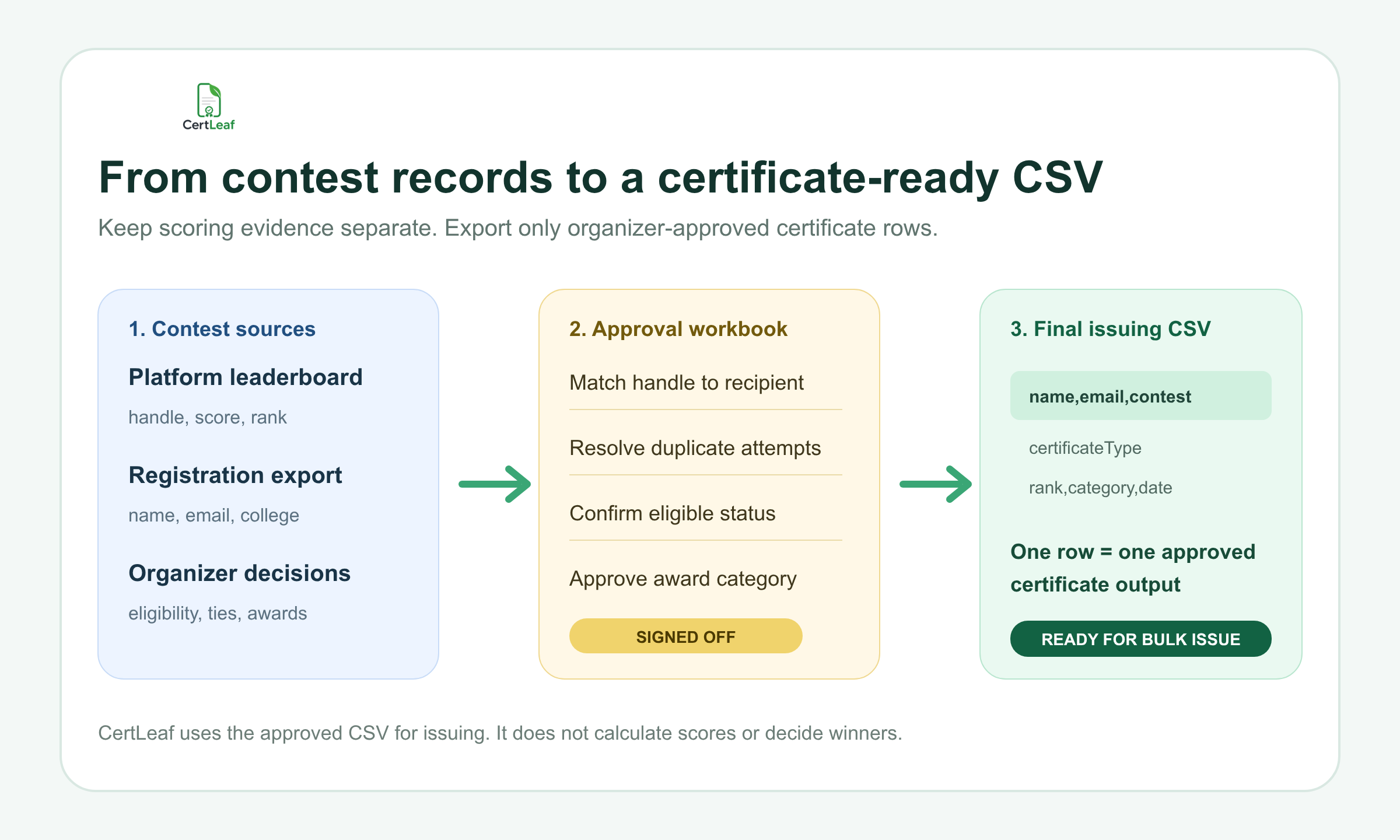
I would keep all four records. Then I would create a smaller certificate approval workbook instead of uploading the raw leaderboard.
A leaderboard is not a certificate-ready recipient list
Contest platforms are built to run code and rank submissions. Their exports often center the handle, score, problems solved, penalty, or completion time. A certificate needs a confirmed person, a delivery email, an accurate certificate type, and the event details the college has approved.
Those two records do not always line up neatly.
At the lab event, byte_bender07 belonged to a second-year ECE student who had registered with a personal email but used a college email for the contest platform. Another handle appeared twice because the student restarted after a browser problem. Neither case could be settled by sorting the leaderboard and clicking export.
Use the leaderboard as evidence. Do not treat it as the final issuing file.
The approval workbook should connect each platform identity to the registration record and preserve enough review detail for the organizing team. Useful working columns might include platformHandle, registrationEmail, contestEmail, problemsSolved, score, rank, attemptStatus, eligibilityStatus, and reviewNote.
The final certificate CSV can be much smaller. That separation matters. It lets the coding committee review contest facts without sending scores, internal notes, or disqualification reasons into the certificate system.
Decide what participation means before exporting rows
A registration is not participation. A login is not necessarily participation either.
For one contest, the rule might be at least one accepted solution. Another college may promise certificates to every checked-in student who attempted a problem. A beginner contest might recognize workshop attendance plus a submitted solution. The organizers need to write the rule before the leaderboard is converted into certificate rows.
I would put the rule in one sentence:
> Participation certificates are issued to registered students who checked in and received at least one judged submission during the contest window.
That is only an example, not a universal standard. The important part is that the rule can be applied consistently.
Then settle the award policy. Does a winner receive only a merit certificate, or both merit and participation certificates? Are there separate awards for first-year students, women coders, or language-specific tracks? How are ties resolved? The certificate file should reflect the signed-off result sheet, not a coordinator's guess from the visible ranking.
If the event was a quiz rather than a programming contest, team membership and round progression create a different set of checks. The guide to issuing quiz participation and winner certificates in bulk covers that adjacent workflow. A coding contest deserves its own process because platform handles, judged submissions, penalties, and duplicate attempts need to be reconciled first.
Build one approved row per certificate output
Once identity, eligibility, and awards are settled, export only the fields needed for issuing and delivery.
A practical coding contest certificate CSV could use:
recipientName,email,contestName,contestDate,certificateType,rank,awardCategory,collegeDepartment
recipientName should be the confirmed certificate name, not the platform handle. Keep the handle in the approval workbook unless the organizers deliberately want it printed. certificateType might be Participation, Finalist, or Merit. rank and awardCategory should be present only for approved award rows.
My preferred rule is simple: one row equals one certificate output. If the winner receives a merit certificate only, there is one merit row. If the published event policy promises both merit and participation certificates, there are two intentional rows with different certificate types.
Do not hide that decision inside a notes cell. Separate rows make the expected output count visible.
Before upload, compare the number of rows in each certificate type with the signed-off totals. If the award sheet has three overall winners and the merit export has four rows, stop. If the eligible participant count is 226 and the participation export has 225 rows, find the missing identity before generating anything.
For a detailed cleanup pass, use the guide to preparing a certificate recipient CSV without name or email errors. It is especially useful when registration and contest accounts use different email addresses.
Separate participation, finalist, and winner batches
A single visual style can work across the contest, but the certificate claims should stay clear.
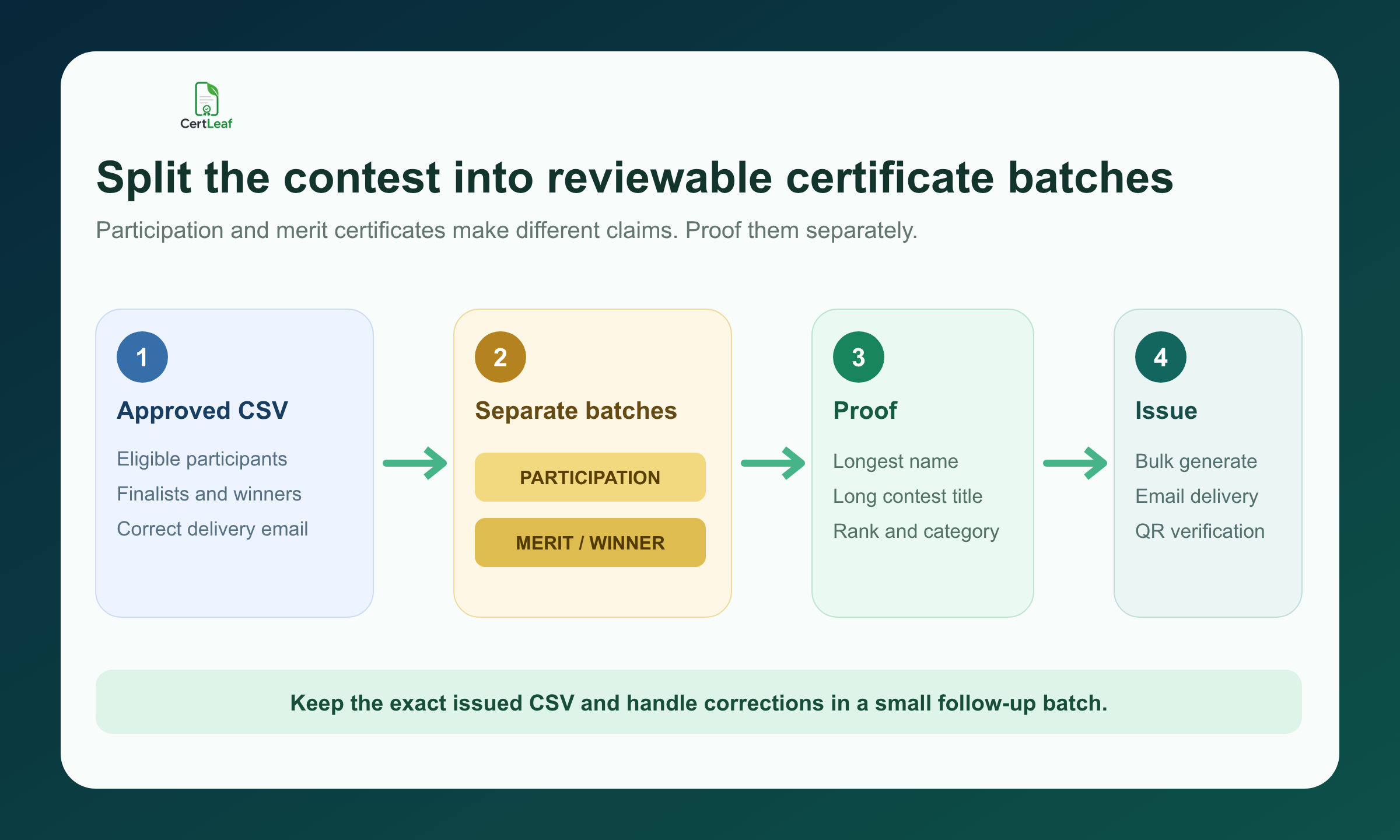
A participation certificate confirms that the student met the published participation rule. A finalist certificate records progression to an approved stage. A merit certificate records a rank or award. Copying the same sentence across all three and changing only the heading produces certificates that look coordinated but say very little.
Separate batches also make approval easier. The faculty coordinator can proof the participation wording and row count once. The contest lead can give the winner batch a slower check against the signed result sheet. Category awards can be reviewed with their exact category labels.
At a Pune programming sprint, the longest contest title pushed the rank line close to the signature block. It showed up only on the merit proof because participation certificates did not include an award category. Testing one tidy participant row would not have caught it.
Proof the awkward rows instead: the longest recipient name, the longest contest title, a finalist, an overall winner, and a category winner. Read the PDF at normal size. Check that the rank and category are unmistakable and that an empty optional field does not leave an odd gap.
Keep scoring and issuing responsibilities separate
The coding platform decides what its engine records. The organizing committee decides the final result under the published rules. The certificate platform issues what the committee has approved.
That boundary should remain visible.
CertLeaf is not a contest registration, proctoring, code judging, plagiarism detection, or leaderboard system. It should not be described as one. If a submission is disqualified after review, the organizer changes the approval workbook before export. If a tie-break changes the final rank, the signed award sheet changes before the merit batch is issued.
This may feel slower than importing the first leaderboard export. It is faster than withdrawing a winner certificate after students have shared it.
Save three records after the event: the final result sheet, the exact CSV used for each certificate batch, and a correction log. If one email address is wrong or one approved participant was omitted, create a small follow-up batch. Do not silently overwrite the issued CSV and leave the team wondering which version produced the certificates already in circulation.
Use QR verification for certificates likely to travel
Coding contest certificates often leave the college context. Students attach them to placement records, internship applications, portfolios, scholarship files, and LinkedIn profiles. Winner and finalist certificates are especially likely to be checked by someone who was not at the event.
A QR-verifiable certificate gives that person a route to the public record for the issued certificate. The useful part is the record behind the code. A decorative QR image pasted into a design is not the same thing.
The verification details should agree with the PDF: recipient, issuer, contest, certificate type, issue date, and any displayed rank or award information that the organizer has approved. QR verification does not prove that the judging decision was correct, and it is not a digital signature. It helps someone check that the certificate record was issued with those details.
The practical guide to QR code certificates and public verification explains that boundary in more detail.
Email the certificate from the same approved row
Manual delivery creates a second matching problem after the first one has already been solved. A coordinator downloads participation and merit PDFs into separate folders, searches for a student, copies an email address, attaches a file, and repeats the process hundreds of times.
The certificate and email should stay tied to the same approved CSV row.
Send one internal test from every batch. Open it on a phone. Check the subject, recipient name, contest name, certificate type, download flow, and QR path. Then send the approved batch. The bulk certificate email delivery workflow covers the test-send and recipient experience in more detail.
Give students one correction route, such as a form or a monitored email address. Ask for the registered email, platform handle, requested change, and supporting detail. A screenshot dropped into a busy club group is easy to miss and hard to audit later.
Where CertLeaf fits
CertLeaf handles the repetitive issuing work after the coding club or department approves the data. The team can upload a base certificate design, create reusable templates, import the reviewed CSV, issue certificates in bulk, and distribute them by email. Certificates that need a public check can include QR verification.
There is no subscription. Credits are pay-as-you-go, which suits college clubs that may run one coding contest this semester and three events in the next. India-first customers can purchase credits in INR through Razorpay, and new accounts receive 20 free signup credits to test the workflow.
Use those test credits on difficult rows, not only neat sample names. A long name, a long contest title, one category award, one email delivery, and one QR scan will tell you more than twenty identical previews.
CertLeaf does not decide participation eligibility, resolve ties, or confirm whether a submission followed the contest rules. The organizers own those judgments. CertLeaf turns the approved outputs into consistent certificates and handles the issuing, delivery, and verification steps.
Coding contest certificate generator FAQ
What should a coding contest certificate generator support?
For college events, it should support bulk CSV issuing, reusable templates, separate participation and merit batches, email delivery, and QR verification when certificates may be checked later. The organizer should be able to use approved leaderboard data without issuing directly from raw scoring records.
Can I generate certificates from a coding platform leaderboard CSV?
Yes, after review. Match platform handles to registered names and emails, resolve duplicate attempts, apply the contest eligibility rule, and confirm final awards. Export a smaller certificate-ready CSV rather than uploading the raw leaderboard.
What fields belong in a coding contest certificate CSV?
A useful structure is recipientName, email, contestName, contestDate, certificateType, rank, awardCategory, and collegeDepartment. Include only fields that affect the certificate, delivery, or approved issuing record.
Should winners receive participation and merit certificates?
That depends on the published event policy. Some contests issue a merit certificate instead of participation. Others promise both. Record the decision explicitly and create two rows only when two certificates are intended.
Should coding competition certificates include platform handles or scores?
Only when the college has approved those fields and they help the certificate's purpose. Most certificates need the confirmed recipient name and award, while handles, raw scores, penalties, and review notes can remain in the internal approval workbook.
Are QR-verifiable coding contest certificates useful?
They are useful when students may share certificates in portfolios, placement records, or applications. A verification page helps a reviewer check the issued record, but it does not validate the contest judging process or replace a digital signature.
Can CertLeaf email coding contest certificates in bulk?
Yes. CertLeaf can use the approved CSV to issue certificates in bulk and distribute them to the email address in each row. Test each certificate type before sending the full batch.
Is CertLeaf a subscription coding contest certificate generator?
No. CertLeaf uses pay-as-you-go credits. New accounts receive 20 free credits, and Indian customers can purchase credits in INR through Razorpay.
Close the contest with a record another coordinator can understand
The best coding contest certificate run starts after the leaderboard is final but before anyone rushes to export PDFs.
Match handles to people. Apply the written eligibility rule. Sign off the award sheet. Export one approved row per certificate. Proof participation and merit batches separately. Then issue, email, and verify the certificates from that controlled file.
A month later, another club member should be able to open the folder and understand exactly why each certificate was issued. That is a better finish than a leaderboard screenshot, three files named final, and a WhatsApp thread full of corrections.


