 CertLeaf
Course Certificate Generator From Assessment Results: A Bulk Issuing Workflow
A practical workflow for training teams that need to turn approved assessment results into course certificates, email the batch, and add QR verification without exposing private learner records.
At 7:10 pm, the coordinator of a six-week Excel and Power BI course in Pune had two numbers on her screen. The learning portal showed 96 enrolled learners. The trainer's result file showed 78 passes.
The certificate list had 82 names.
Four learners had crossed the 60 percent pass mark but missed the required final project. Two had submitted projects under personal email addresses that did not match registration. Another learner had a score of 59.5, and nobody had written down whether the institute rounded marks before deciding completion.
This is the real work behind a course certificate generator from assessment results. Generating PDFs is the last step. First, somebody has to turn marks, attendance, projects, and approved exceptions into one decision that the institute can defend.
| Source | What it tells you | What it does not decide by itself |
|---|---|---|
| Registration list | Who joined the course | Who completed it |
| Attendance record | Who met the session rule | Whether required work passed |
| Assessment export | Score, result, or grade | How exceptions are approved |
| Project tracker | Submission and review status | Which wording goes on the certificate |
| Correction log | Confirmed name and email changes | Whether the learner is eligible |
For the Pune batch, I would stop comparing totals and write one completion rule before exporting anything.
Write the assessment-based certificate rule in one sentence
A rule such as "passed the final assessment" leaves too much room for interpretation. Did the learner also need to attempt the project? Was attendance required? Did 59.5 round to 60? Was a late submission accepted?
A usable rule is more specific:
> Learners who attended at least eight of ten live sessions, scored 60 percent or more in the final assessment, and received an approved result for the final project by 12 September 2026 will receive a course completion certificate.
That sentence identifies the evidence, threshold, extra requirement, and cutoff. It also prevents the certificate operator from making academic decisions while preparing the upload.
If attendance contributes to completion, settle that evidence before touching the certificate file. The existing guide to setting certificate eligibility for a multi-day training program is useful for matching daily records and documenting exceptions.
Do not adjust the threshold because the eligible count feels too small. If the academic lead approves an exception, record the learner, reason, approver, and date in the working file. The issuing list should reflect an approved decision, not create one.
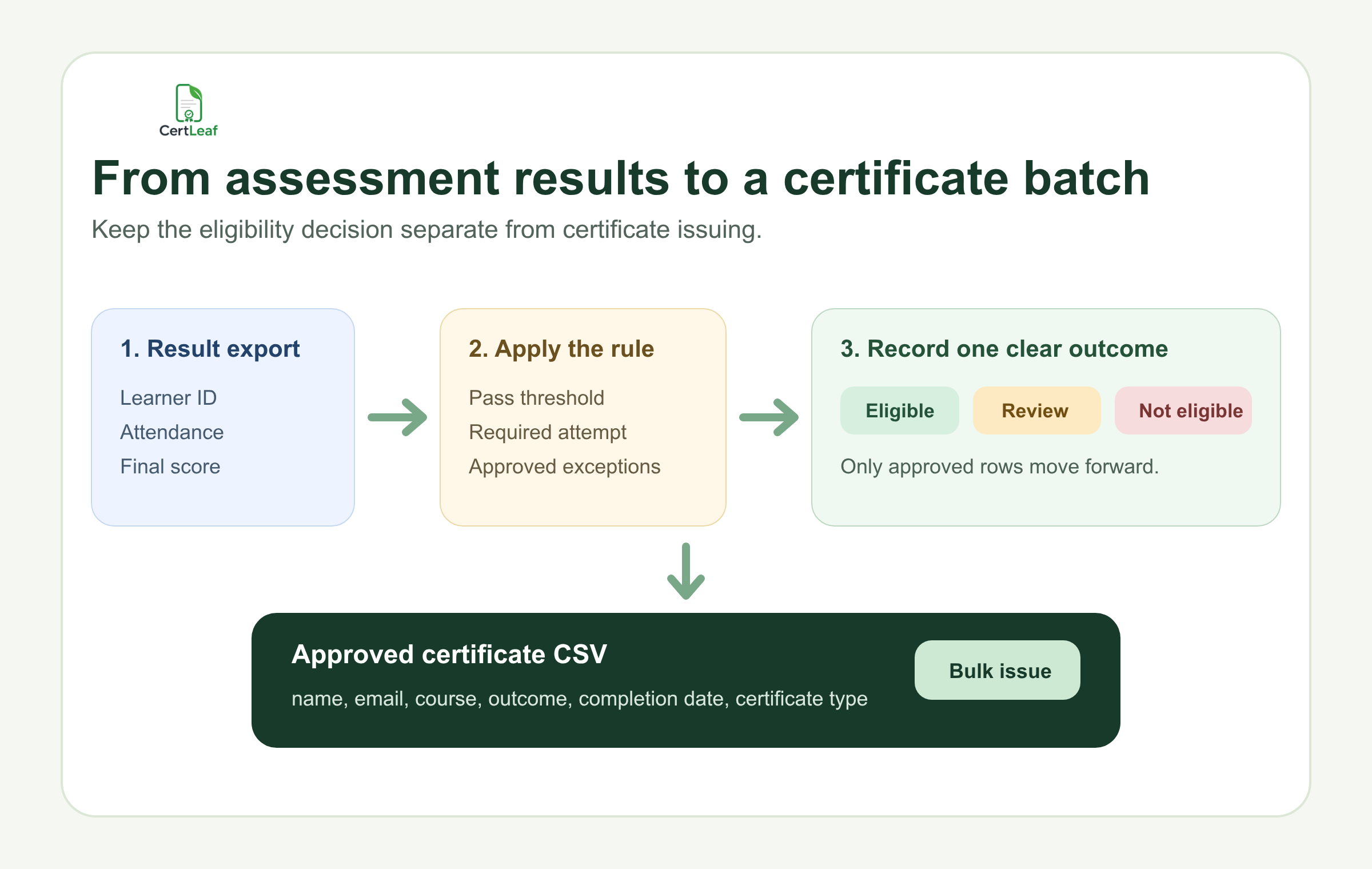
Keep three outcomes while the results are being checked
I would use three plain statuses in the working workbook: eligible, review, and not_eligible.
Eligible means the learner meets the written rule and can move into the certificate export. Review means a specific question still needs an owner: an unmatched project, a score under moderation, or an approved deadline extension that has not reached the result sheet. Not_eligible means the record has been checked and does not meet the rule.
The middle status matters. Without it, uncertain rows tend to get treated as either passes or absences depending on who last edited the sheet.
At the Pune course, 76 learners were clear immediately. Six went to review. The trainer matched two personal-email project submissions using learner IDs, the academic lead declined two late projects, and two result corrections were approved. The final first batch contained 80 learners. That number had a trail behind it.
Decide whether the certificate should show a grade
A course can use assessment results to decide eligibility without printing marks on the certificate.
For many short training programs, the most useful wording is simply that the learner completed the course under the institute's stated requirements. Raw marks, question-level results, and trainer comments can remain in the private learner record.
A grade or performance band belongs on the certificate only when the institute has intentionally made it part of the certificate meaning. If grades are published, define the bands before export. For example, Pass, Merit, and Distinction should come from an approved grading policy, not a formula invented during certificate preparation.
I would also test boundary scores by hand. Check the highest fail, the lowest pass, every grade cutoff, an absent assessment, and a result changed after moderation. Those five or six rows are more useful than scanning 80 ordinary passes.
Avoid certificate language such as "certified expert" or "mastered" unless the course and assessment genuinely support that claim. A certificate can accurately record completion without pretending to be a professional license.
Create a smaller certificate CSV from the approved result
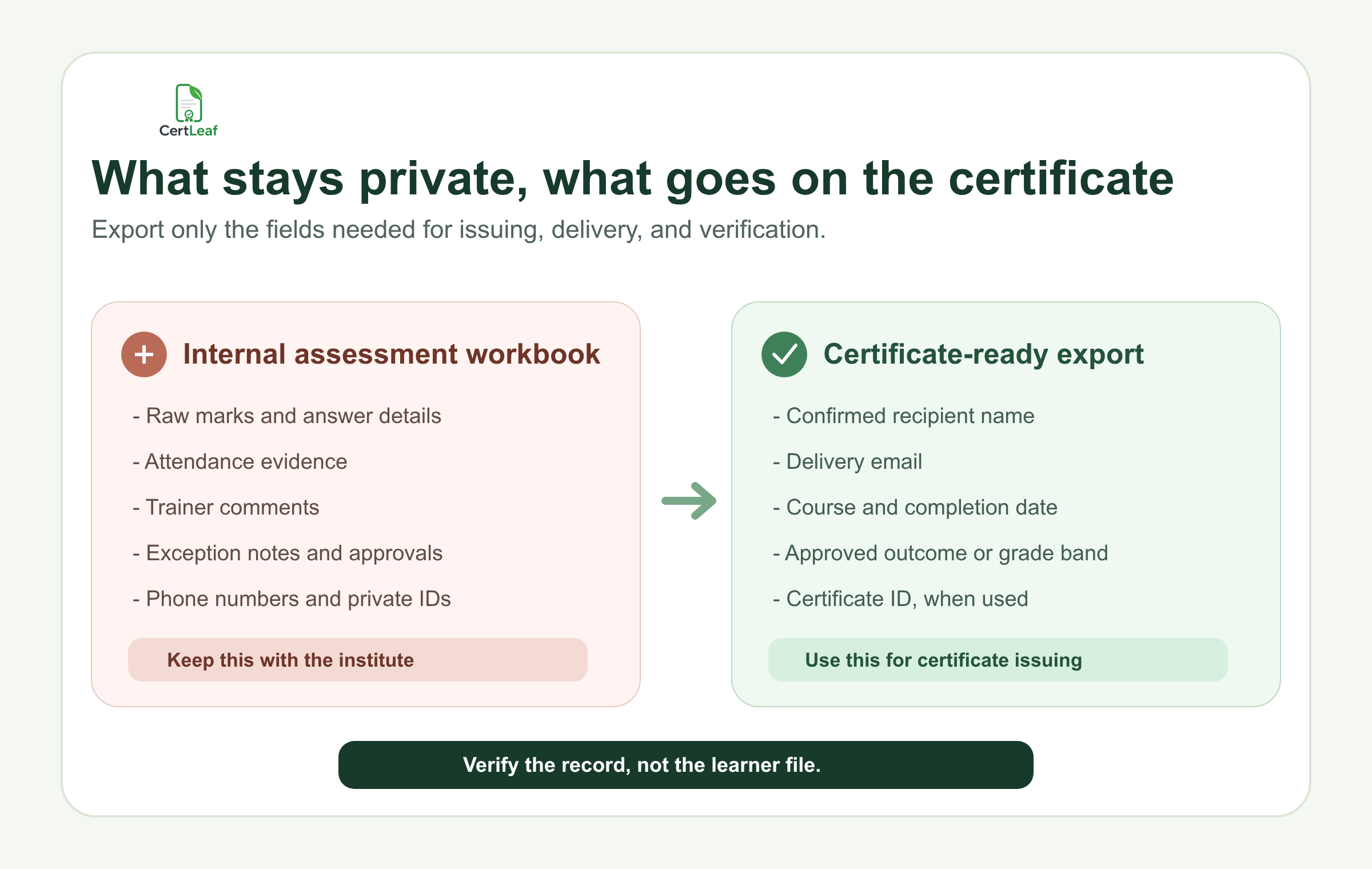
The assessment workbook may contain far more information than the certificate workflow needs. Keep it that way. Do not upload raw answers, phone numbers, trainer notes, or private learner IDs simply because they are already in the file.
A practical certificate-ready export might contain:
recipient_name,recipient_email,course_name,batch_name,completion_date,certificate_outcome,grade_band
Keep grade_band only when it is meant to appear on the certificate or matching verification record. Keep one row per certificate. If a learner earns both a course completion certificate and a separate project award, treat those as two deliberate records using the correct templates.
Before upload, use the certificate recipient CSV preparation guide to check duplicate identities, certificate-ready names, email addresses, and awkward values. The result sheet decides eligibility; the final CSV controls what is generated and where it is delivered.
At a Bengaluru analytics batch, the longest course title pushed the grade band into the signature area. The spreadsheet was correct. The certificate was not. Test the longest name, longest course title, every outcome label, and any blank optional field before generating the full batch.
Keep assessment evidence private and verification specific
A QR-verifiable course certificate can help an employer, college, or partner confirm that the institute issued the record. It should not expose the learner's assessment file.
The public verification details should be limited to what someone needs to compare with the certificate: recipient name, course, batch or completion date, approved outcome, and certificate ID when used. Email addresses, attendance logs, marks, answers, trainer comments, and exception notes belong in the institute's private records.
A unique reference also helps when two learners share a name or when a corrected certificate is issued. The guide to QR-verifiable training certificates with unique certificate IDs covers ID patterns, correction history, and QR testing in more detail.
Scan QR codes from the exported certificate PDFs, not only from the template preview. Confirm that each sample opens a different matching record. QR verification confirms the issued record; it does not validate the quality of the assessment or replace the institute's result policy.
Where CertLeaf fits after results are approved
CertLeaf is the issuing layer after the training team has approved the outcome.
Upload the base certificate design, place the changing fields, and save the template for later batches. Export the eligible learner rows to CSV, test the awkward records, then generate the certificates in bulk. CertLeaf supports email delivery and QR-verifiable certificates, so the same approved row can drive the PDF, recipient email, and verification record.
It does not run the assessment, calculate grades, decide pass rules, or approve exceptions. Those decisions stay with the institute and its trainers. That boundary is useful: academic judgment remains in the result process, while repeated certificate generation and delivery move into a controlled batch.
For teams that issue certificates after occasional cohorts, CertLeaf uses pay-as-you-go credits rather than a subscription. New accounts receive 20 free credits for testing. I would use those first tests on the lowest pass, longest name, longest course title, one grade-band certificate, and one ordinary completion record.
Once the sample PDFs are approved, send one test email to the team and inspect the download and verification path. The broader guide to sending certificates by email automatically is the useful next step for subject lines, delivery checks, and recipient follow-up.
Handle revised and late results as a separate queue
Assessment results change. A project is re-evaluated. A trainer corrects a data-entry error. A learner submits evidence that was received before the deadline but missed in the first review.
Do not replace the original issued CSV and rerun the full cohort. Keep the first batch unchanged. Record the result change, approval, and date, then issue only the newly approved or corrected records in a supplementary batch.
For the Pune course, the team could send the 80 approved certificates without waiting on two appealed results. If either appeal succeeds, that learner enters a small later batch with the same certificate rule and a documented approval. The clean majority does not need to wait, and the uncertain rows do not get quietly included.
Course certificate generator from assessment results FAQ
Can I generate course certificates from exam results in a CSV?
Yes. First apply the institute's approved completion rule to the assessment data. Then export only eligible learner rows and the fields needed for the certificate and email delivery. CertLeaf can use that certificate-ready CSV for bulk issuing.
Should a course completion certificate include the learner's score?
Not automatically. A score or grade should appear only when the institute intends to publish it, has checked the result, and has a clear grading policy. Many course certificates only need to confirm completion.
How should pass, merit, and distinction certificates be prepared?
Define the score bands before exporting results, test every cutoff, and record one approved outcome per learner. Use clearly named template variants if the certificate wording changes between completion, merit, and distinction.
What assessment data should stay out of a QR verification page?
Keep raw marks, answers, phone numbers, attendance evidence, trainer comments, and exception notes private. A verification page should show only the details needed to match the issued certificate record.
Can CertLeaf calculate assessment grades or decide eligibility?
No. CertLeaf focuses on certificate templates, bulk CSV issuing, email distribution, QR verification, and certificate records. The training institute remains responsible for assessments, grade calculations, completion rules, and approvals.
How do I issue certificates after a result is revised?
Record the revised result and approval, then issue or correct only the affected learner record. Keep the original batch file unchanged so the institute can explain what was issued and when.
The result decision should survive the certificate day
By Monday morning, the Pune coordinator should be able to answer three questions without reopening five files: what the completion rule was, who approved the exceptions, and which exact rows were issued.
That is the test I would use. Settle the assessment rule. Keep unclear records in review. Export a small certificate CSV. Test the boundary rows and the public verification details. Then issue and email the approved batch.
A course certificate generator removes repeated PDF work. The institute still owns the decision that makes the certificate worth issuing.


