CertLeaf
CPD Certificate Generator for Professional Associations and Member Events
A practical guide for professional associations that need to issue CPD certificates in bulk for member webinars, seminars, conferences, and short courses.

Professional associations need a certificate issuing platform for a different reason than a one-off event team. A member education calendar can include monthly webinars, regional seminars, annual conferences, refresher courses, and speaker-led masterclasses. Every program may need certificates, but the wording, member details, CPD hours, and recipient roles are not always the same.
CertLeaf gives associations a focused way to issue those certificates. Create reusable templates, upload an approved member or attendee CSV, generate the batch, send certificates by email, and add QR verification when recipients need a public way to check the record. The pricing is pay-as-you-go, so an association can issue around its event calendar without keeping another monthly subscription active.
That makes CertLeaf a practical CPD certificate generator for professional associations that already run their membership, registration, attendance, and CPD decisions elsewhere. CertLeaf handles the certificate issuing layer after the association approves the data.
Why professional associations need a dedicated CPD certificate generator
A CPD certificate carries more context than a generic event participation PDF. The recipient may use it for a member record, an employer file, a renewal submission, or evidence of professional learning. The document may need to show the program title, date, duration or CPD hours, association name, member ID, certificate type, and a stable reference.
The association also has several audiences in the same program. An attendee needs a participation or completion certificate. A speaker may need a certificate of contribution. A moderator, faculty member, or session chair may need different wording. Sending the same generic certificate to every role makes the record less useful.
A design tool can produce an attractive layout. It does not automatically keep the approved member row, certificate wording, delivery email, and verification record together. CertLeaf is built for that issuing job.
Match the certificate type to the member's role
An association should decide what each certificate actually confirms before building the template. The common options are straightforward:
Participation: The member attended a webinar, seminar, conference, or professional meeting.
Completion: The member completed a structured course or program under terms set by the association.
Contribution: The recipient served as a speaker, moderator, faculty member, reviewer, or session chair.
Recognition: The association is acknowledging service, leadership, or another contribution that is not a CPD completion claim.
Do not upgrade participation language to completion language because it sounds stronger. The certificate should reflect the association's approved record and program rules.
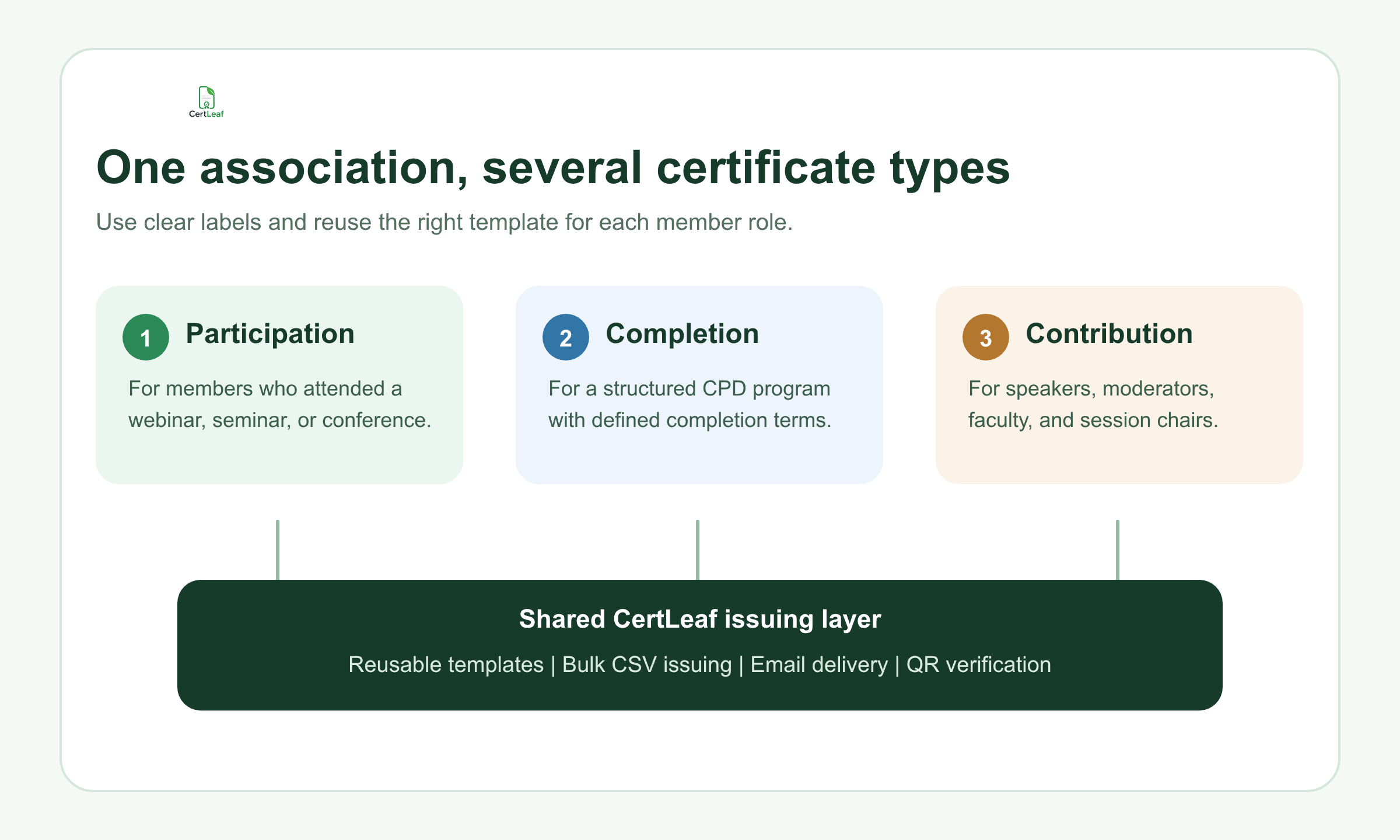
This is where reusable CertLeaf templates help. An association can keep separate approved layouts for participation, completion, and contribution, then reuse them across recurring member programs. The design stays consistent while the member name, program, date, role, hours, and other approved fields change by row.
Try the association use case with CertLeaf's 20 free signup credits. Build one template and issue a small internal sample before the next member webinar.
Put the right CPD fields on the certificate
A professional association certificate should carry enough information to make sense outside the original event email. A useful field set may include:
Member or recipient name
Program or session title
Association name
Event date or program period
Certificate type
CPD hours or points, when approved by the association
Member ID, when it belongs on the public document
Certificate ID or reference
Speaker, moderator, or attendee role
Not every field belongs on every certificate. A two-hour webinar may need the member name, session title, date, CPD hours, and association identity. A multi-session program may also need the program period and completion wording. A speaker certificate may replace CPD hours with the session title and contribution role.
The important boundary is that CertLeaf does not decide whether a program qualifies for CPD, calculate a member's official CPD balance, or accredit the event. The association or relevant professional body owns those decisions. CertLeaf issues certificates from the data and wording that the issuer has approved.
That boundary is useful. It lets the association retain control of membership and professional standards while using a dedicated platform for bulk generation, delivery, and verification.
Use an approved association CSV, not the full member database
Most associations already have the relevant data in an event platform, webinar export, member system, or registration sheet. The certificate CSV should be a smaller approved export, not a copy of the whole member database.
A practical file could use these columns:
member_name,email,program_title,event_date,cpd_hours,member_id,certificate_type,role
Include only what appears on the certificate or controls delivery. Leave out payment notes, private member comments, committee discussions, and unrelated profile data. If the association does not print member IDs, there may be no reason to include them in the issuing file.
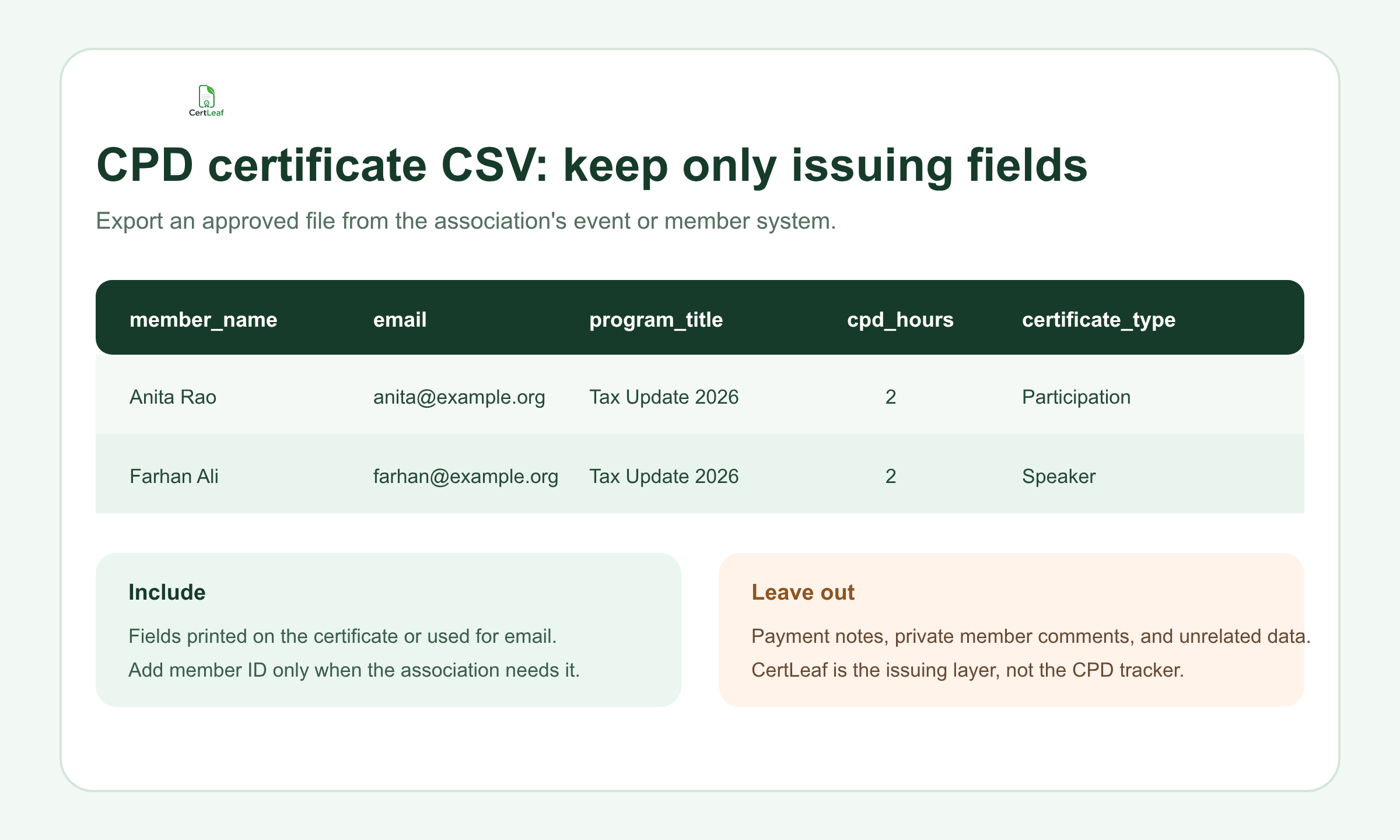
Before upload, confirm that each row has the intended certificate type and that CPD hours or points came from the association's approved program record. Check duplicate registrations, alternate email addresses, blank fields, and role changes. The local guide to preparing a clean certificate recipient CSV is useful when the event export needs a careful pass before issuing.
CertLeaf then maps the approved CSV fields into the selected reusable template. The same row can keep the recipient name, email, certificate details, and delivery destination together.
Issue recurring member programs without rebuilding the setup
Professional associations often repeat formats even when the subject changes. A legal association may run a monthly update webinar. An engineering body may run regional technical seminars. A finance association may offer refresher courses and an annual conference. The title and date change, but the certificate layout and issuing team may stay the same.
With CertLeaf, the team can reopen the approved template, upload the next program's CSV, check a sample, and issue the new batch. There is no need to rebuild every certificate in a design tool or rename PDFs by hand.
A sensible test set includes the longest member name, the longest program title, one row with a member ID, one speaker or moderator, and one ordinary attendee. Check the exported certificate, email destination, and QR path before issuing the full file.
Associations that only issue around scheduled programs may also prefer a certificate generator without a subscription. CertLeaf uses one-time credits, supports INR payments through Razorpay for India-first teams, and does not require a recurring plan between events.
Sign up for CertLeaf and use the 20 free credits to test a real CPD certificate layout, CSV mapping, email delivery, and QR scan with your association team.
Email CPD certificates to the right member
A certificate is not finished when the PDF exists. Members expect it in the inbox connected to the event or membership record, with a clear subject and enough context to recognize the program.
Bulk email delivery matters for associations because manual attachments create avoidable risk. The sender can skip a member, attach the wrong PDF, use an outdated address, or lose track of which certificates were sent after a correction.
CertLeaf keeps delivery connected to the approved CSV row. The association can generate the batch and send certificates to the listed recipients rather than downloading and matching files one by one. For a more detailed delivery check, use the bulk certificate email guide before a large conference or member-training send.
The email itself can stay short. Name the program, explain that the certificate is ready, and provide a correction contact. If the certificate has a QR code, tell the member that it opens a verification page. There is no need to turn a certificate email into a campaign newsletter.
Add QR verification when the certificate will be checked later
CPD certificates often travel beyond the association's inbox. A member may share one with an employer, a licensing or membership team, a client, or another professional body. A normal PDF can be forwarded, edited, or separated from its original email.
A QR-verifiable CertLeaf certificate gives the viewer a public route to check the issued record. The certificate can be scanned and compared with the verification details instead of sending every question back to the association office.
QR verification does not certify the professional validity of the CPD program on the association's behalf. It confirms the certificate record that the issuer created. The association remains responsible for the program, CPD values, attendance or completion decision, and wording.
For guidance on choosing what should appear in that record, read the article on QR code certificates for workshops and training programs.
Where CertLeaf fits in an association's systems
CertLeaf is not a membership management system, event registration platform, webinar attendance tracker, learning management system, or CPD compliance engine. An association can keep using the tools it trusts for those jobs.
CertLeaf fits after the final certificate data is approved:
Choose the correct reusable certificate template.
Export the approved recipient and certificate fields as CSV.
Map the fields and generate a small test set.
Issue the complete batch.
Deliver certificates by email.
Use QR verification for records that may need checking later.
That narrow role is a strength for a small association team. It avoids forcing member administration into a certificate tool, while removing the repetitive PDF and email work from the association's event calendar.
Why pay-as-you-go fits association event calendars
Many professional associations do not issue the same number of certificates every month. A conference may create 600 records in one week. A short webinar may need 70. A quiet month may need none.
CertLeaf's credit model follows those batches. A simple certificate uses 1 credit and a QR-verifiable certificate uses 2 credits. New accounts receive 20 free signup credits. The association buys credits when it has certificates to issue rather than paying for an idle monthly plan.
This is especially practical when each event has its own approved budget. The certificate cost can sit beside the program that created it, and the reusable templates remain ready for the next member activity.
FAQ about CPD certificate generators for professional associations
What is a CPD certificate generator?
A CPD certificate generator helps an issuer create certificates for continuing professional development programs. For associations, a useful platform should support recipient data, reusable templates, bulk generation, email delivery, and a verification option rather than only producing one generic PDF at a time.
Can professional associations issue CPD certificates in bulk from a CSV?
Yes. Once the association approves the recipients, program details, certificate type, and any CPD hours or points, those fields can be placed in a CSV. CertLeaf maps the rows into a reusable template and issues the certificates as a batch.
Can a CPD certificate include hours, points, or a member ID?
Yes, these values can be included as dynamic fields when the association has approved them and wants them on the certificate. CertLeaf does not calculate or approve CPD values; it prints the issuer-provided data in the selected template.
Does CertLeaf accredit CPD programs?
No. CertLeaf is a certificate issuing, distribution, and verification platform. Accreditation, CPD recognition, attendance rules, completion decisions, and member compliance remain with the association or relevant professional body.
Should every association certificate have a QR code?
No. A simple certificate may be enough for informal internal recognition. QR verification is more useful when a member may submit or share the certificate outside the association and the viewer needs a public route to check the issued record.
Can speaker and attendee certificates use different wording?
Yes. Keep separate reusable templates or certificate types for participation, completion, and contribution. The CSV can identify each recipient's role so the association issues the correct certificate rather than sending one generic version to everyone.
Is there a no-subscription CPD certificate generator?
Yes. CertLeaf uses pay-as-you-go credits instead of a monthly subscription. This can suit professional associations with seasonal conferences, periodic webinars, and uneven certificate volumes.
Give member certificates a proper issuing system
A professional association should not have to choose between manually editing hundreds of PDFs and buying a large credential platform for a focused issuing job.
CertLeaf covers the practical middle ground: reusable certificate templates, bulk CSV issuing, email distribution, optional QR verification, INR and Razorpay support, and pay-as-you-go credits with no subscription. The association keeps control of its members, CPD program decisions, and approved data. CertLeaf handles the repetitive certificate work.
Start with 20 free signup credits and test the next member webinar, seminar, short course, or conference certificate batch with a small internal sample.