 CertLeaf
Cyclothon Certificate Generator: Bulk Certificates From Rider CSV and Timing Data
A practical workflow for turning an organizer-approved cyclothon CSV into personalized rider, finisher, volunteer, marshal, category, and winner certificates.
At 1:15 pm after a Sunday cyclothon outside Mysuru, the finish arch was coming down and the certificate questions had already started.
The registration team had 612 rider records. The timing partner had results for the 25 km, 50 km, and 100 km routes. A separate coordinator had the volunteer and marshal list. Four riders had changed routes that morning, two category results were under review, and a few people who started the ride had no confirmed finish status.
The team did not need another blank certificate design. It needed a reliable way to turn the approved rider and results data into the right certificates.
That is the useful job of a cyclothon certificate generator. The organizer or timing partner settles the rider, route, status, time, and ranking data first. The certificate issuing layer then maps those approved fields into reusable templates, generates the batch, sends each certificate by email, and provides QR verification when required.
| Source | Useful certificate fields | Approval owner |
|---|---|---|
| Registration export | Rider name, email, bib number, entered route | Organizer |
| Timing/results export | Completed route, finish time, status, rank | Timing partner and organizer |
| Volunteer or marshal list | Name, email, role, event date | Operations lead |
| Certificate issuing CSV | Only approved fields and certificate type | Certificate coordinator |
CertLeaf does not provide event registration, live race timing, GPS tracking, safety compliance, scoring, or results adjudication. It fits after those systems and decisions have produced an approved issuing CSV.
A cyclothon certificate should match what the rider actually did
A name-only certificate can recognize that someone joined the event. A useful finisher certificate can record the route actually completed, the bib number, and the approved finish time. A winner or category certificate may also show overall rank or category rank.
Those details are not interchangeable.
A rider may have registered for 100 km and completed 50 km after an organizer-approved route change. The certificate should use the final approved routeDistance, not the original registration choice. A rider whose timing record is under review should not receive a permanent-looking finisher certificate merely because the batch is ready to send.
The same caution applies to roles. Volunteers and route marshals contributed to the event, but their certificates should use appreciation wording rather than implying that they rode or finished a timed route.
Turn the approved rider workbook into a certificate CSV
The working workbook may contain many operational columns. The issuing CSV should contain only what the certificate and delivery workflow require.
A practical header is:
riderName,email,bibNumber,routeDistance,eventCategory,finishTime,completionStatus,rank,categoryRank,eventDate,certificateType
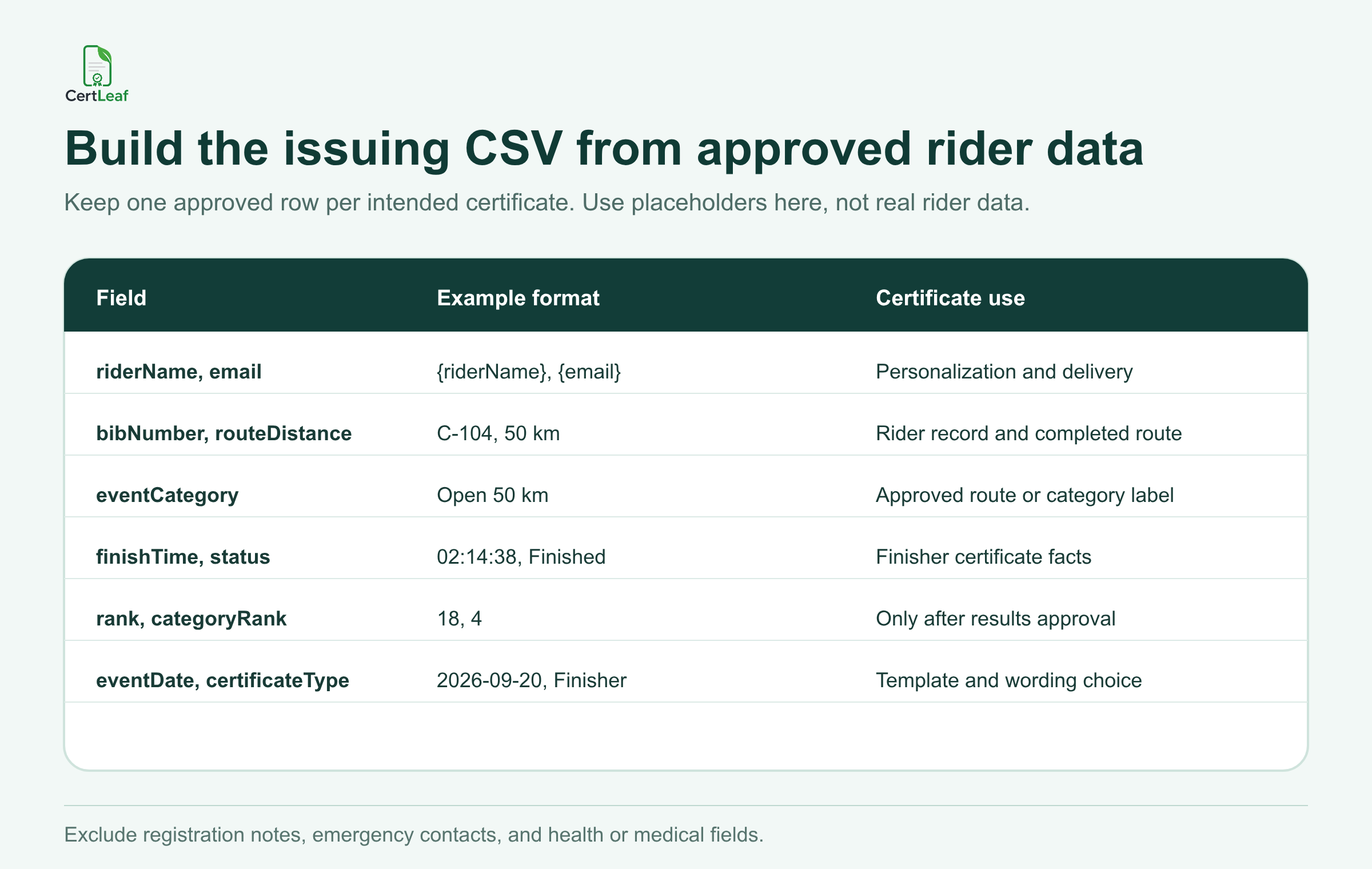
Each field needs a plain definition before upload. Decide whether finishTime means gun time, chip time, or another organizer-approved value. Keep rank separate from categoryRank. Use one route format across the file, such as 25 km, 50 km, and 100 km, rather than mixing 50K, 50 kms, and Long Route.
completionStatus deserves special attention. Values such as Finished, Participant, Did not finish, Under review, and Do not issue must follow the organizer's certificate policy. Do not let a spreadsheet formula make that judgment without review.
The detailed guide to preparing a clean certificate recipient CSV is a useful next check for duplicate emails, name formatting, accidental spaces, and awkward test rows. For a cyclothon, add duplicate bibs, route changes, missing times, and unsettled ranks to that review.
Keep sensitive registration data out of the issuing file. Emergency contacts, health declarations, medical notes, phone numbers, and internal incident notes do not belong in a certificate CSV.
Freeze the results before the certificate batch
The phrase final-results-v3.xlsx is not approval.
I would add a working status such as hold, approved, or doNotIssue, even if that column is removed from the final upload. Someone from the organizing team should sign off on completion status, route distance, and certificate type. The timing partner should confirm the meaning of timing and ranking fields. Category results under protest or correction stay on hold.
Save the exact approved export with a date, version, row count, and approver. If a corrected result arrives later, the certificate coordinator can identify the affected rows and issue a small correction batch instead of rebuilding every certificate.
This is also where the cyclothon workflow differs from the already published marathon guide. Both use approved results data, but a cycling event may have route changes, non-competitive participation rides, sweep cutoffs, and volunteer or marshal teams that need separate certificate rules. This article keeps the focus on that cycling-event handoff rather than repeating the marathon workflow.
Split participant, finisher, winner, volunteer, and marshal certificates
One workbook can support several certificate types. It does not follow that every row belongs in one giant upload.
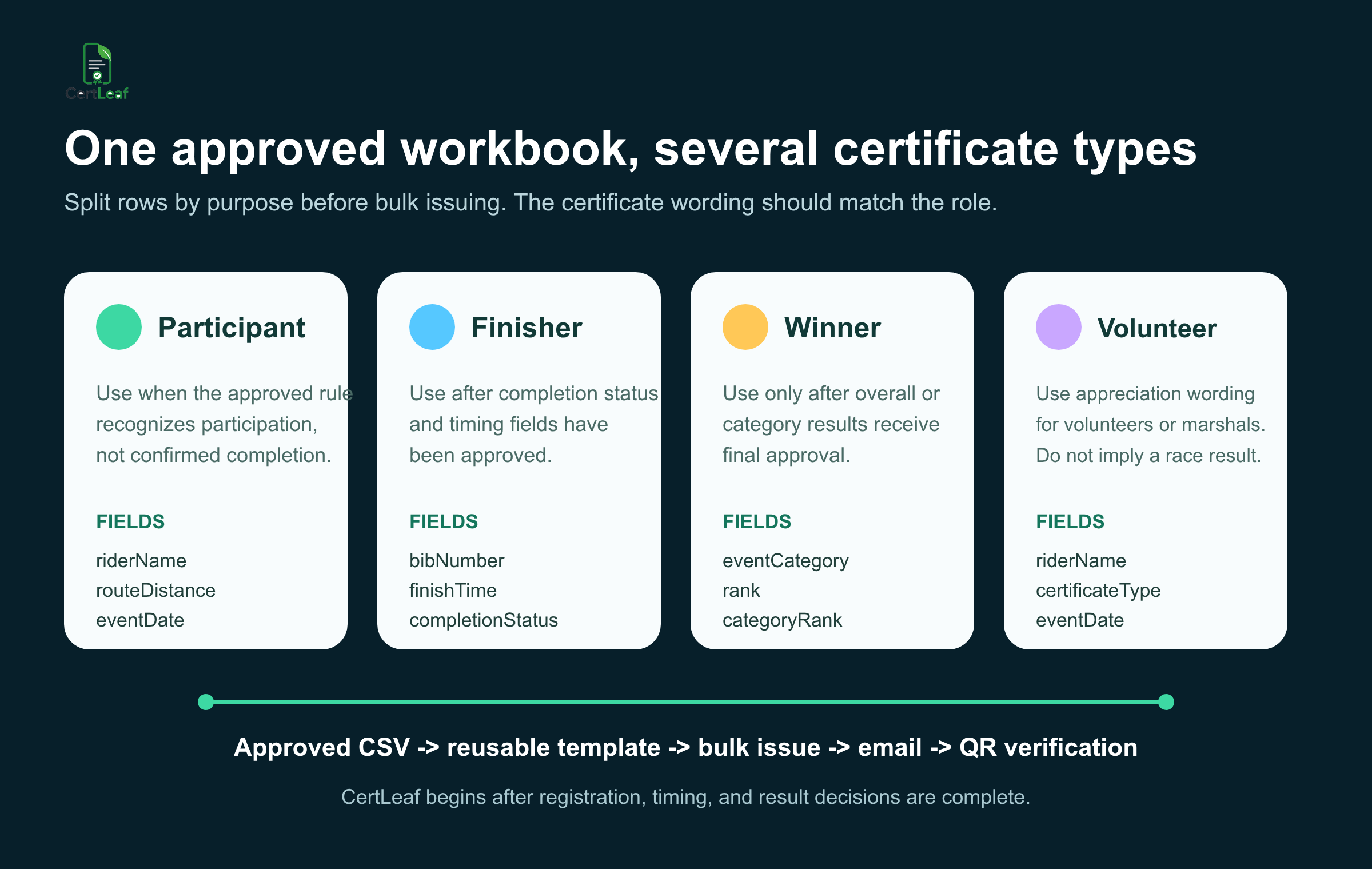
A participant certificate can recognize a rider under the event's participation rule without claiming a verified finish. A finisher certificate can show the approved completed route, bib, finish time, and completion status. Category and winner certificates should use final approved rankings. Volunteer and marshal certificates should identify the contribution and event date without a race time or rank.
A category winner may legitimately receive both a finisher certificate and a winner certificate. If that is the organizer's policy, create two intentional certificate rows or two approved exports. Do not treat the second row as an accidental duplicate.
I prefer separate batches when the wording or fields change: finishers in one export, winners in another, and volunteers or marshals in a third. It is easier to review three clear files than one file full of blank cells and conditional wording.
Build and test reusable templates
The base design can stay consistent across annual club rides, college cyclothons, NGO fundraising rides, and agency-run events. The dynamic fields change by rider and certificate type.
For a finisher template, place riderName, bibNumber, routeDistance, finishTime, completionStatus, and eventDate with enough room for the longest valid values. A winner template may add rank, categoryRank, and eventCategory. A volunteer or marshal template needs role-appropriate wording and should omit finish fields entirely.
Do not test only the first tidy row. Preview the longest rider name, the longest route or category label, a time longer than two hours, a blank optional rank, a route-change case, one winner, and one marshal. Read the certificate at normal size. A mapped value can be technically present and still collide with a signature or become unreadable.
Before the full batch leaves the system, use a post-event certificate checklist before bulk email to confirm the approved list, field mapping, proofs, delivery path, and saved issuing CSV.
Where CertLeaf fits in the cyclothon workflow
After the results and certificate rules are approved, CertLeaf handles the repetitive issuing work.
The organizer can upload a base certificate design, create reusable templates, and map the CSV columns to dynamic fields. CertLeaf can then issue the certificates in bulk and distribute them to the email address in each approved row. The same template set can be reused for the next ride with a new event date, rider list, route data, and results file.
For certificates that may be shared with a college, club, sponsor, employer, or another event organizer, CertLeaf can issue QR-verifiable certificates. Scanning the QR code opens a public verification route for the issued record. It does not verify GPS activity, certify timing equipment, or prove that the organizer's category decision was correct.
The guide to QR code certificates and public verification explains what that verification journey should confirm and what it cannot replace.
CertLeaf uses pay-as-you-go credits with no subscription. India-first customers can purchase credits in INR through Razorpay, and new accounts receive 20 free signup credits. That is useful for a cycling club, college, NGO, or event agency that issues after occasional events rather than every month.
Use the free credits to test difficult rows and the complete delivery flow. Send a certificate to an inbox the team can open, confirm the certificate type and rider fields, and scan the QR code before releasing the full batch. For delivery details, follow the practical workflow for sending certificates by email automatically.
Cyclothon certificate generator FAQ
Can a cyclothon certificate generator use timing data from a CSV?
Yes. An organizer-approved CSV can supply fields such as finishTime, routeDistance, completionStatus, rank, and categoryRank. Confirm what each timing field means before mapping it to a certificate.
What columns should a cyclothon certificate CSV include?
A useful structure is riderName, email, bibNumber, routeDistance, eventCategory, finishTime, completionStatus, rank, categoryRank, eventDate, and certificateType. Include only fields required for issuing, delivery, and the intended certificate record.
Can I issue rider, finisher, winner, volunteer, and marshal certificates from one workbook?
Yes. Keep one approved row per intended certificate, then split the rows into clear batches when the templates or wording differ. Volunteer and marshal certificates should not show competitive results.
What if a rider changes route distance during the cyclothon?
Use the final route or distance approved by the organizer, not the original registration choice. Hold the row if the completed route is still being checked.
Should unfinished or provisional results receive finisher certificates?
Only if the organizer's stated policy says they qualify and the relevant status is approved. A row under review should stay out of the finisher batch until the decision is settled.
Is CertLeaf a cyclothon registration or live timing platform?
No. CertLeaf does not handle registration, GPS tracking, live timing, safety compliance, scoring, or result decisions. It is the certificate issuing, email delivery, verification, and record layer after the approved data is ready.
Can cyclothon certificates be emailed in bulk?
Yes. Keep the approved delivery email and certificate fields in the same CSV row. CertLeaf can issue the batch from CSV and distribute certificates by email without manually matching each PDF to an inbox.
Does CertLeaf require a subscription for one cycling event?
No. CertLeaf uses pay-as-you-go credits. New accounts receive 20 free signup credits, and Indian customers can buy credits in INR through Razorpay.
Close the event with a certificate record you can explain
The certificate batch should begin with an approved data handoff, not with somebody copying names into a design.
Preserve the registration and timing exports. Resolve route changes and provisional results. Define the certificate types. Remove sensitive fields. Test the rows that put the layout and mapping under pressure.
Then use the cyclothon certificate generator as the issuing layer: map the approved CSV into reusable templates, generate the intended certificates in bulk, email them, and add QR verification where a public check is useful.


