 CertLeaf
Marathon Certificate Generator: Use Race CSV Data for Finish-Time Certificates
A practical workflow for turning an organizer-approved race-results CSV into personalized marathon certificates with finish time, distance, bib number, category, rank, email delivery, and QR verification.
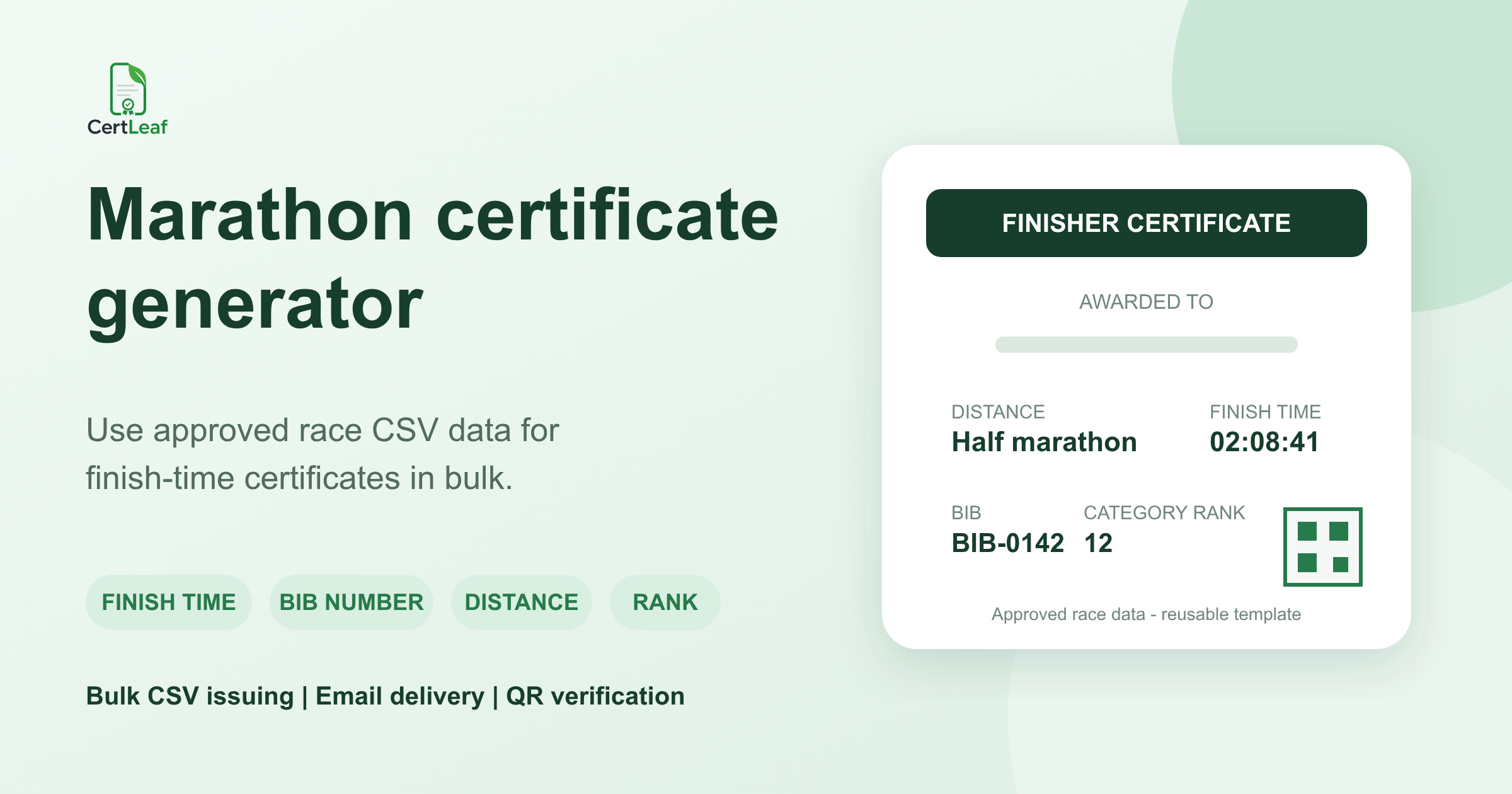
At 11:40 am on race day, the timing desk had already done the difficult work. The half-marathon results were exported, disputed bibs were marked for review, and the category rankings were waiting for the race director's sign-off.
The certificate team had a different file. It contained two columns: participant name and email.
That file could produce a polite participation certificate. It could not produce the certificate most finishers wanted: one that recorded the distance they completed, their bib number, finish time, and, where the organizer had approved it, their overall or category rank.
A useful marathon certificate generator should let the organizer issue from the approved race-results CSV, not force the team to reduce every finisher to a name. The timing or results system remains the source of race facts. The certificate platform takes those approved facts and turns them into personalized certificates in bulk.
| Race-day source | Useful certificate data | Decision owner |
|---|---|---|
| Registration export | Participant name, email, bib number, entered distance | Organizer |
| Timing or results export | Finish time, chip time, rank, category rank | Timing partner and organizer |
| Volunteer and pacer list | Role, email, assigned distance or group | Volunteer lead or race director |
| Certificate issuing CSV | Only approved fields and certificate types | Certificate coordinator |
That boundary matters. CertLeaf is not a race timing system, registration platform, live scoring tool, or results adjudicator. It is the issuing layer that can use an approved CSV once the organizer or timing partner has settled the data.
A marathon certificate can carry the result, not just the name
The name still matters. So does the result.
For a finisher, raceDistance and finishTime turn a generic PDF into a record of a specific morning and a specific effort. bibNumber helps the organizer trace the certificate back to the race record. ageCategory, genderCategory, rank, and categoryRank can support winner or category certificates when the organizer has approved those classifications and wants them displayed.
The exact certificate fields should follow the certificate's purpose. A participant certificate might show participantName, raceDistance, and eventDate. A finisher certificate could add bibNumber, finishTime, and chipTime. A category certificate might include ageCategory, genderCategory, and categoryRank. A winner certificate may need rank and different wording. Volunteer and pacer certificates should recognize the role without implying a race result.
This is why certificateType belongs in the working data. It gives the team an explicit way to separate participant, finisher, category, volunteer, pacer, and winner outputs instead of making someone choose a template from memory for every row.
Build the certificate CSV from approved race data
A practical certificate-ready header can look like this:
bibNumber,participantName,email,raceDistance,ageCategory,genderCategory,finishTime,chipTime,rank,categoryRank,eventDate,certificateType
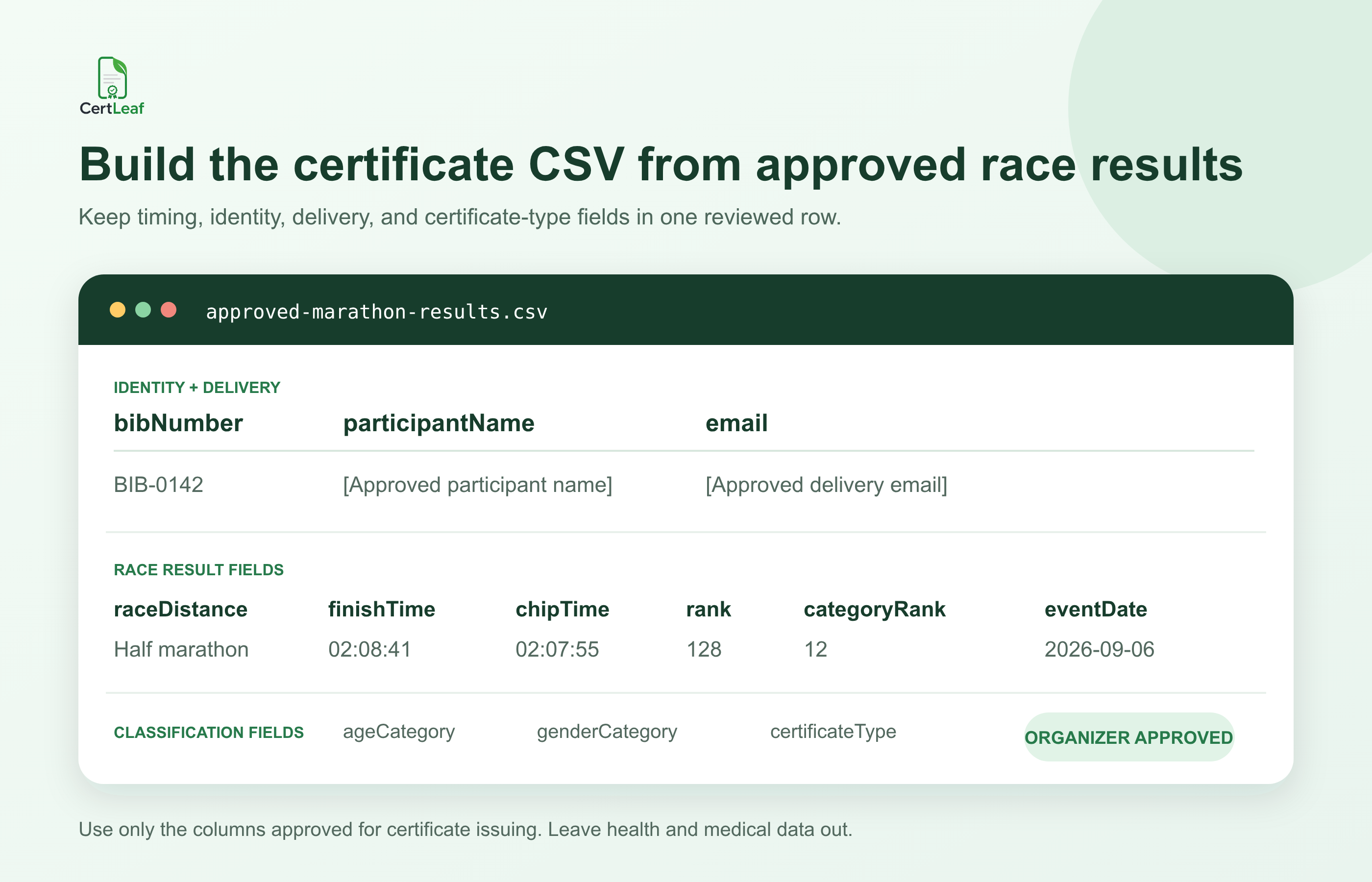
The header is only the structure. The organizer still has to decide what each field means and which values are ready to issue.
For example, agree on whether finishTime means gun time and chipTime means the participant's net time. Decide which one appears on the finisher certificate, whether both appear, and how each is labeled. Do not put an unexplained 02:08:41 on the page and leave the recipient guessing.
Use one time format across the batch, preferably HH:MM:SS when the race duration can exceed an hour. Keep rank separate from categoryRank. A runner can be 128th overall and 12th in an approved category; merging those values into one position column invites the wrong label.
The same care applies to distance. Pick one presentation style such as 5 km, 10 km, Half marathon, or 42.195 km, then keep it consistent. If a participant changed distance on race day, use the distance in the final approved result, not the original registration choice.
Before this file reaches a certificate tool, follow a deliberate process for preparing a clean certificate recipient CSV. For a race batch, that check needs to cover more than names and emails. It should also catch duplicate bibs, blank result fields, malformed times, category mismatches, and ranks that have not received final approval.
Do not turn provisional results into permanent-looking certificates
The awkward row is rarely the first one.
It is the bib transferred with organizer approval, the participant whose chip did not register, the category result still under review, or the winner whose rank changed after a timing correction. If the results page still says provisional, the certificate CSV should not quietly say final.
I would add an internal approval column in the working workbook, even if it never appears in the upload. Something as simple as certificateStatus with values such as hold, approved, and doNotIssue gives the race director and certificate coordinator a shared checkpoint. Export only approved rows.
Keep private operational notes out of the certificate-ready file. Health declarations, emergency contacts, medical notes, and other sensitive registration data have no place in a certificate batch. The issuing CSV should contain the minimum fields needed to create and deliver the approved certificate.
It is also worth freezing the exact source file used for issuing. Save the approved export with a date, version, row count, and approver. If the timing partner later sends a corrected result, the team can identify which certificates need a small reissue batch instead of wondering which of several final-results files was used.
Map certificate types before choosing templates
A road race can produce several legitimate certificates from the same operational workbook.
| Certificate type | Typical fields shown | Important check |
|---|---|---|
| Participant | Name, distance, event date | Define what participation means |
| Finisher | Name, bib, distance, finish or chip time | Confirm completion and time label |
| Category | Name, category, category rank, distance | Use only approved category results |
| Winner | Name, overall rank, distance, event date | Confirm final ranking |
| Pacer | Name, pacing role or group, distance, date | Do not display a finisher rank by default |
| Volunteer | Name, contribution role, event date | Use appreciation wording |
A person may legitimately need more than one output. A category winner might receive both a finisher certificate and a category certificate. If that is the organizer's policy, create two intentional certificate rows or two approved exports. Do not let duplicate-removal logic erase a real output, and do not create two certificates merely because the same participant appears in two source sheets.
College sports committees that also run sports days may find the adjacent guide to bulk school sports certificates useful. That workflow deals with houses, teams, heats, and school age groups. A marathon or road race needs its own process because bibs, chip times, distances, and result approval change the data model.
The race-results-to-certificate workflow
The safest handoff is simple enough to explain in one sentence: the timing or results system exports, the organizer approves, and the certificate tool issues.
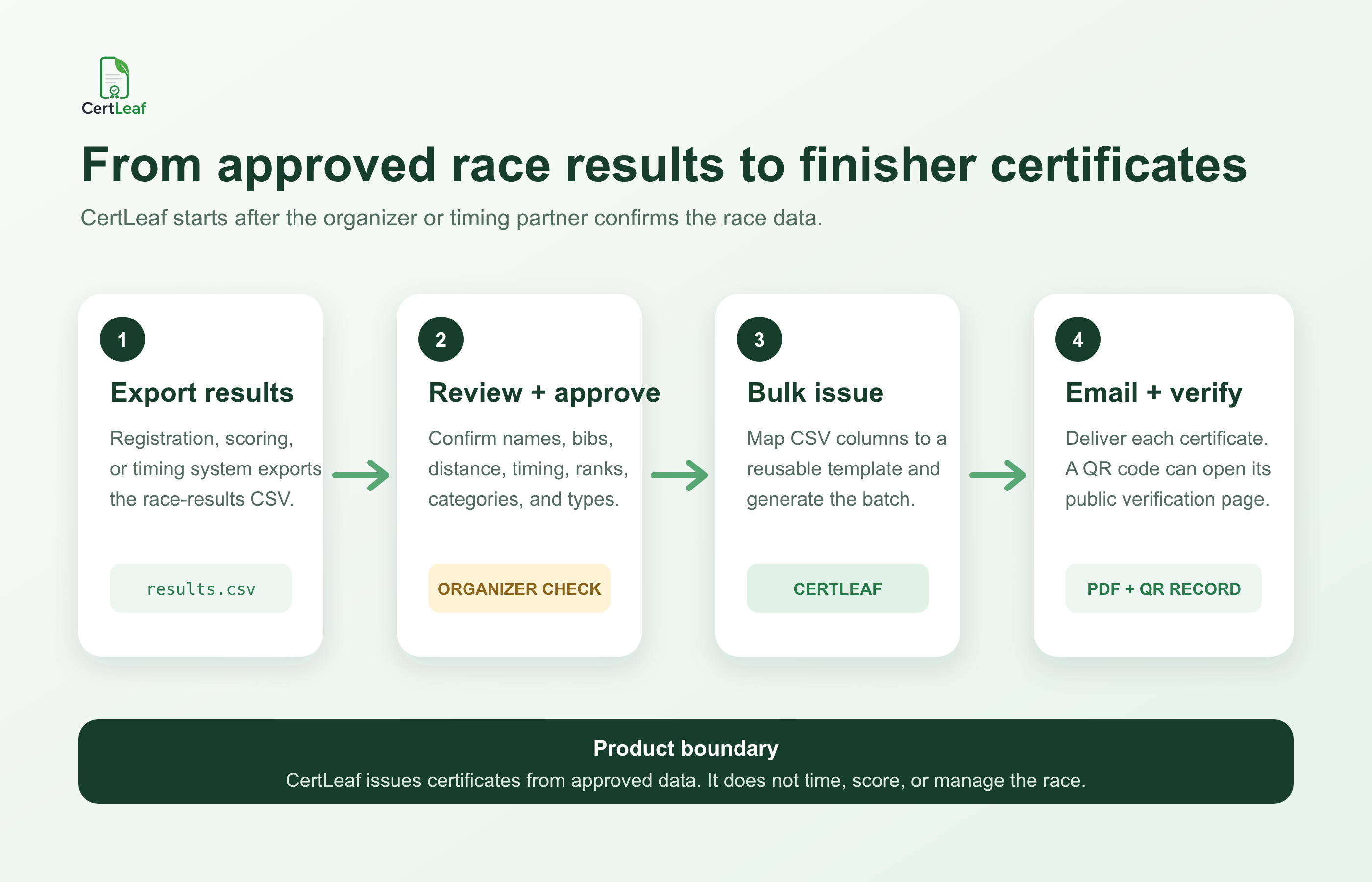
First, preserve the registration and results exports. Reconcile them in a working workbook using stable identifiers such as bib number or the organizer's participant ID. Names alone are a weak match because spelling, spacing, and initials change.
Next, settle exceptions. Confirm completion status, timing adjustments, distance changes, overall rank, category rank, and the certificate types each approved person should receive. Ask the timing partner to confirm what its fields mean rather than guessing from a column heading.
Then export only the fields required for issuing. Split the approved rows by template when that keeps the process clearer: finishers in one batch, category winners in another, volunteers in a third. A single giant CSV is not automatically more efficient if half its columns are blank and the wording changes by role.
Finally, test the difficult rows. Preview the longest approved participant name, the longest category label, a double-digit hour if the event includes an ultra-distance, a blank optional rank, a volunteer row, a pacer row, and one winner. Read every label. Chip time should not be mapped to Finish time by accident. Category rank should not appear as overall rank.
Before the full send, use a post-event certificate checklist for the bulk email to confirm the template, mapped columns, recipient emails, QR behavior, and approval record.
Where CertLeaf fits after results approval
CertLeaf can take the approved issuing CSV and handle the repetitive certificate work. The organizer uploads a base design, creates reusable templates, places dynamic fields, and maps CSV columns such as participantName, bibNumber, raceDistance, finishTime, and categoryRank into those templates.
The platform can then issue the certificates in bulk and distribute them by email. For certificates that need a public check, the organizer can issue QR-verifiable certificates that lead to a verification page. The QR route confirms the issued certificate record; it does not validate the timing equipment, certify the race result process, or replace the organizer's approval.
Reusable templates are useful for running clubs, event agencies, charity-run teams, and college committees that repeat similar events. The visual base, issuer details, signatures, and field positions can stay in place while each approved CSV supplies the next race's recipients and results.
CertLeaf uses pay-as-you-go credits with no subscription. India-first teams can buy credits in INR through Razorpay, and new accounts receive 20 free signup credits. That makes it possible to test a small set of difficult race rows before purchasing credits for the full certificate batch.
After generation, test delivery to the organizing team before sending every row. The guide to sending certificates by email automatically covers the recipient-email checks and delivery handoff in more detail.
QR verification for a finisher certificate
A finisher may share the certificate with a running club, college committee, charity partner, employer, or event community. A QR-verifiable certificate gives that reviewer a direct route to the public record rather than asking them to trust a screenshot.
The verification page should agree with the certificate's core facts: recipient, certificate type, race or event context, issue date, and the result fields the organizer chose to make part of the issued record. If finish time, distance, or category rank appears on the certificate, check that the corresponding issued data is correct before the QR batch goes out.
QR verification should not expose every field in the race database. Publish only what is appropriate for the certificate and verification record. Registration details, contact numbers, emergency information, and health data should stay outside this flow.
Marathon certificate generator FAQ
Can a marathon certificate generator use finish times from a CSV?
Yes. If the organizer or timing partner provides an approved CSV, finish time or chip time can be mapped to a dynamic certificate field. Label the selected time clearly and use one consistent format across the batch.
What fields should be in a marathon certificate CSV?
A useful structure can include bibNumber, participantName, email, raceDistance, ageCategory, genderCategory, finishTime, chipTime, rank, categoryRank, eventDate, and certificateType. Upload only fields needed for certificate issuing and delivery.
Can I issue finisher, winner, volunteer, and pacer certificates from one results workbook?
Yes, but separate approved exports or batches are often easier to review. Use certificate types and templates with wording appropriate to the role. Volunteer and pacer certificates should not accidentally claim a competitive result.
Is CertLeaf a marathon timing or race-management system?
No. CertLeaf does not provide live timing, registration, scoring, GPS tracking, result adjudication, or race management. It can issue, email, and verify certificates using data approved and exported by the organizer or timing partner.
Should both gun time and chip time appear on a finisher certificate?
That is the organizer's decision. Some events show one official time; others may show both. If both appear, label them clearly and confirm the timing partner's field definitions before issuing.
Can category rank appear on a QR-verifiable certificate?
Yes, when the organizer has approved the category and rank and wants it included in the issued record. Keep category rank separate from overall rank and test the mapped fields before the batch is sent.
Can marathon certificates be emailed in bulk?
Yes. An approved CSV can keep the participant's certificate fields and delivery email in the same row. CertLeaf supports bulk CSV issuing and email delivery, which avoids manually matching individual PDFs to inboxes.
Does CertLeaf require a subscription for one race?
No. CertLeaf uses pay-as-you-go credits. New accounts receive 20 free signup credits, and Indian customers can purchase credits in INR through Razorpay.
Give finishers a certificate that reflects the approved result
A name-only certificate recognizes attendance. A well-prepared finisher certificate can record what the participant actually completed: the distance, bib number, time, and an approved category or rank where relevant.
The useful work happens before bulk generation. Preserve the source results. Agree on field meanings. Hold provisional rows. Separate certificate types. Remove sensitive data. Test the records most likely to break the template.
Then let the certificate platform do the repetitive part: map the approved CSV into reusable templates, issue the batch, email each recipient, and provide QR verification where it adds value.


