 CertLeaf
Placement Training Certificate Generator for Colleges: From Attendance to Bulk Issue
A practical placement-cell workflow for approving student data, issuing placement training certificates in bulk, emailing them, and adding QR verification.
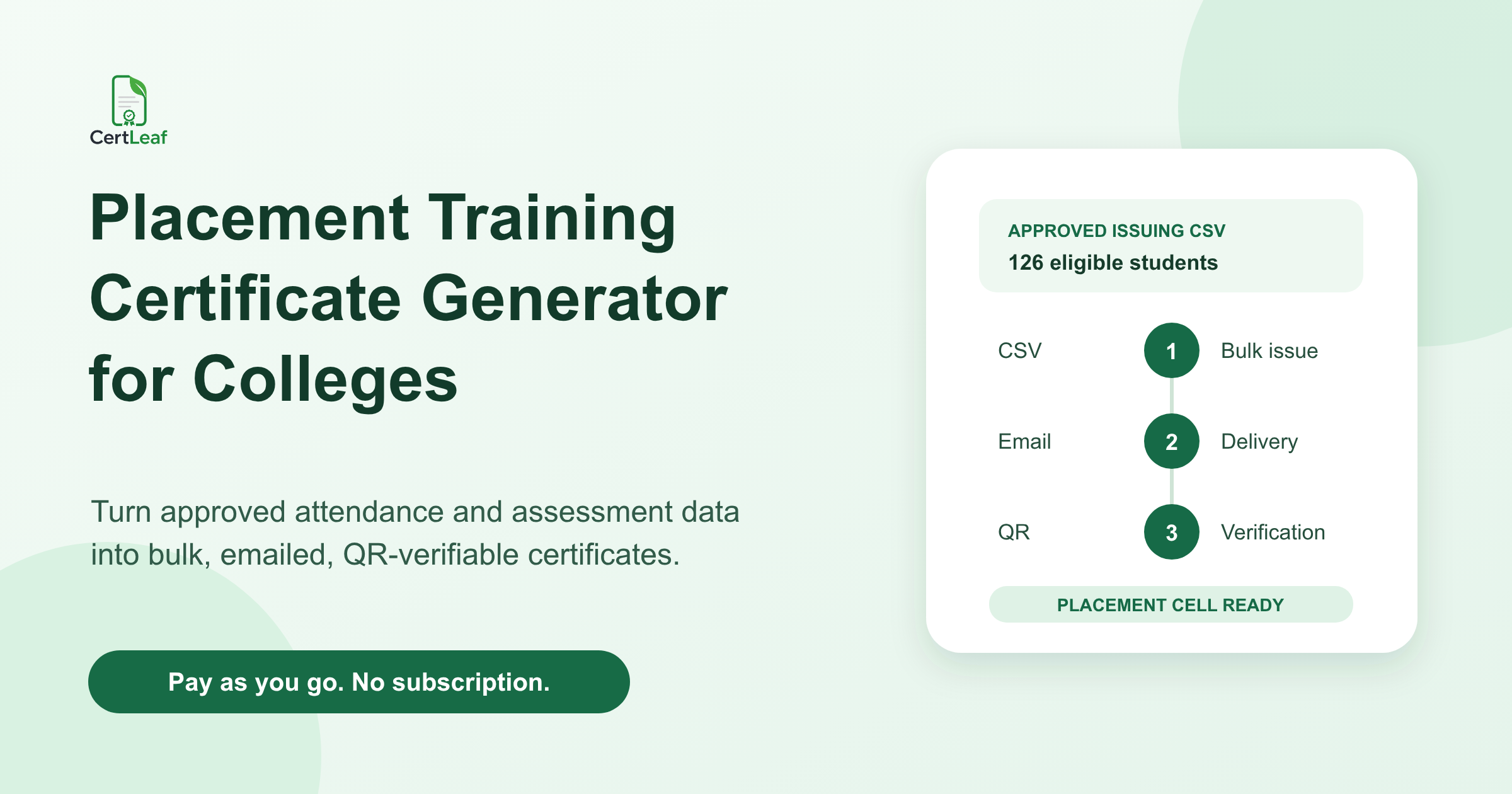
At 4:40 pm on a Friday, the placement officer at a college in Coimbatore received three files from an external training partner. One contained attendance for 148 students. Another contained aptitude test scores. The third was called final_students_revised_2.xlsx and had 132 names.
Recruitment week started on Monday. Students had already been told they would receive certificates for the 18-hour aptitude and interview-readiness program. The certificate design had both the college and training partner names on it, but nobody had settled which file was approved, whether the test score affected eligibility, or who should answer correction requests.
That is the real starting point for a placement training certificate generator for colleges. The placement cell does not merely need 132 PDFs. It needs a defensible handoff from training records to certificate records, followed by bulk issuing, email delivery, and a verification route that does not expose private assessment notes.
| File or decision | Owner before issuing | What moves into the certificate batch |
|---|---|---|
| Student roster | College placement cell | Approved student name, department, delivery email |
| Attendance export | Training provider, reviewed by college | Eligibility result, not every session log |
| Assessment result | Training provider, under the agreed rule | Completion status, not private score notes |
| Certificate wording | College and partner | Approved module, hours, date, issuer names |
| Final issuing CSV | Placement cell | One row per approved certificate |
For the Coimbatore batch, I would pause the certificate work for one hour and settle those five rows. A fast bulk issue from the wrong source file only creates faster corrections.
Define what the certificate actually confirms
Placement training can mean several things: aptitude practice, group discussion coaching, interview readiness, resume preparation, communication skills, or a longer employability program. The certificate should describe the training that happened. It should not imply that a student was placed, passed a recruitment process, or met an employer's hiring standard unless that is genuinely what the issuer is authorized to certify.
The completion rule also needs to exist before the final spreadsheet is prepared. A college may require 80 percent attendance. A training provider may require attendance plus a final assessment attempt. Another program may issue participation certificates to everyone who attended at least two sessions and completion certificates only to students who finished all modules.
Write the rule in one sentence:
> Students who attended at least five of six sessions and completed the final aptitude assessment by 10 September 2026 will receive the placement training completion certificate.
That sentence turns a vague promise into an auditable decision. If the program runs across several days, the established workflow for how to set certificate eligibility for a multi-day training program is useful before anyone exports the issuing list.
At a Bengaluru interview-skills batch, one student completed the assessment under a personal email after attending with a college address. An exact email match marked her as missing. The placement coordinator checked the registration number, confirmed the record with the trainer, and documented the match. That kind of exception belongs in the working sheet. It should be resolved before it reaches the certificate platform.
Make the college-to-provider handoff explicit
When an external trainer delivers the program, ownership gets blurry. The provider has attendance and assessment evidence. The college owns the student relationship and often approves the certificate wording. Both logos may appear on the design. Yet the intern preparing the CSV is expected to guess which rows count.
I would use a simple division of work. The training provider supplies the evidence and flags unclear records. The placement cell applies the agreed eligibility rule, approves the issuer and partner wording, and freezes the final list. Only then does certificate issuing begin.
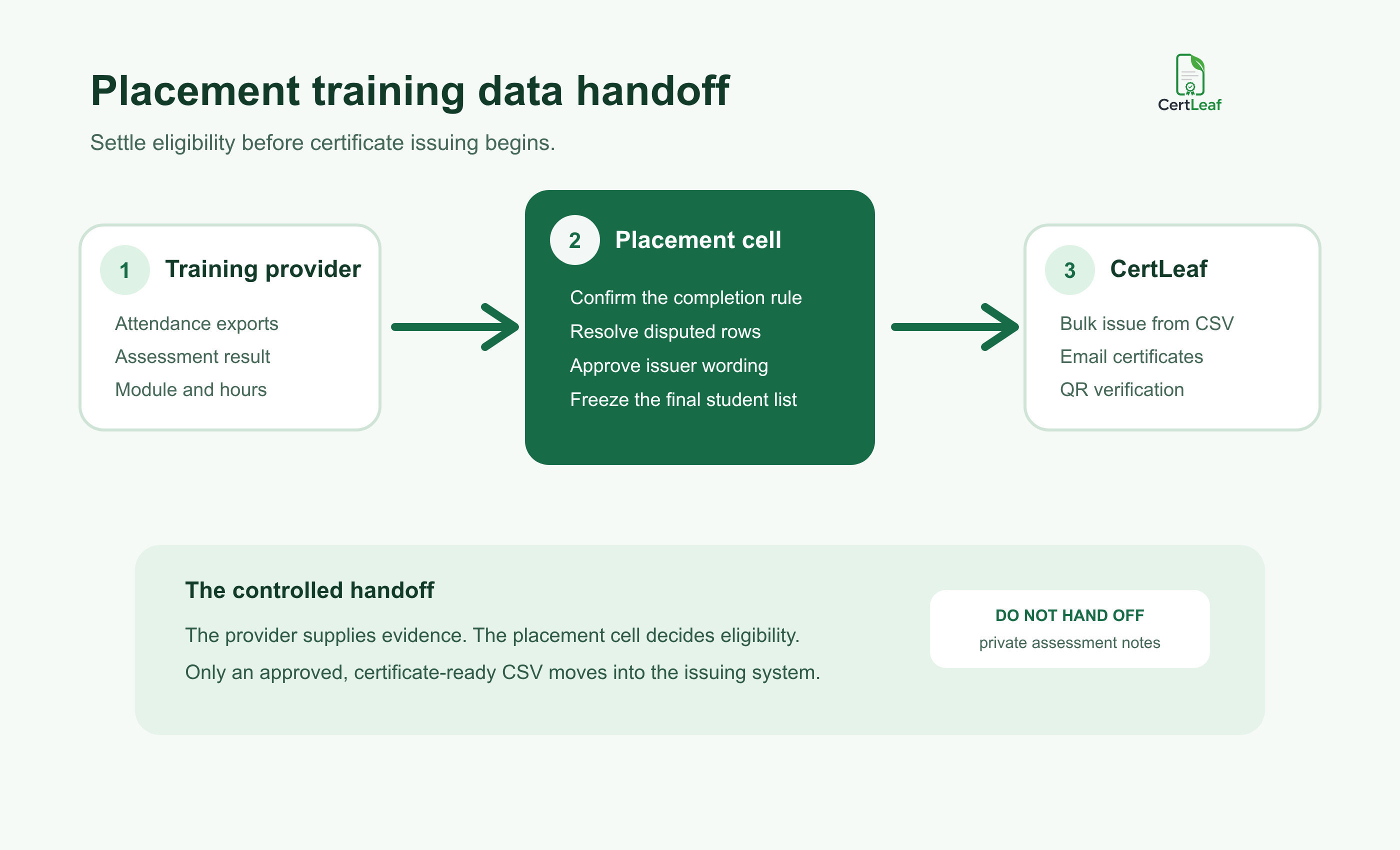
The boundary matters because a certificate tool should not decide whether 74 percent attendance is close enough to an 80 percent rule. CertLeaf handles the repetitive issuing work after the college has made that decision. For teams that need the broader mechanics, the bulk course-completion certificate workflow for training institutes covers templates, sample checks, generation, and delivery without repeating the placement-cell approval process here.
Keep a short approval note with the working file: final count, rule applied, exceptions approved, certificate type, issuer wording, and the name of the person who released the CSV. This is enough to answer most questions later without creating a heavy policy document.
Export a certificate-ready CSV, not the placement workbook
A placement workbook may contain phone numbers, attendance percentages, assessment scores, trainer comments, preferred job roles, recruiter notes, or placement status. Most of that does not belong in a certificate system, on a PDF, or on a public verification page.
Create a smaller issuing CSV. Useful columns may include:
student_nameemaildepartmentplacement_batchapproved_moduletraining_hourscompletion_datecertificate_typeissuer_namepartner_namecertificate_id
Do not add a column just because it exists in the source workbook. Add it because it is required for certificate generation, delivery, or the approved verification record.
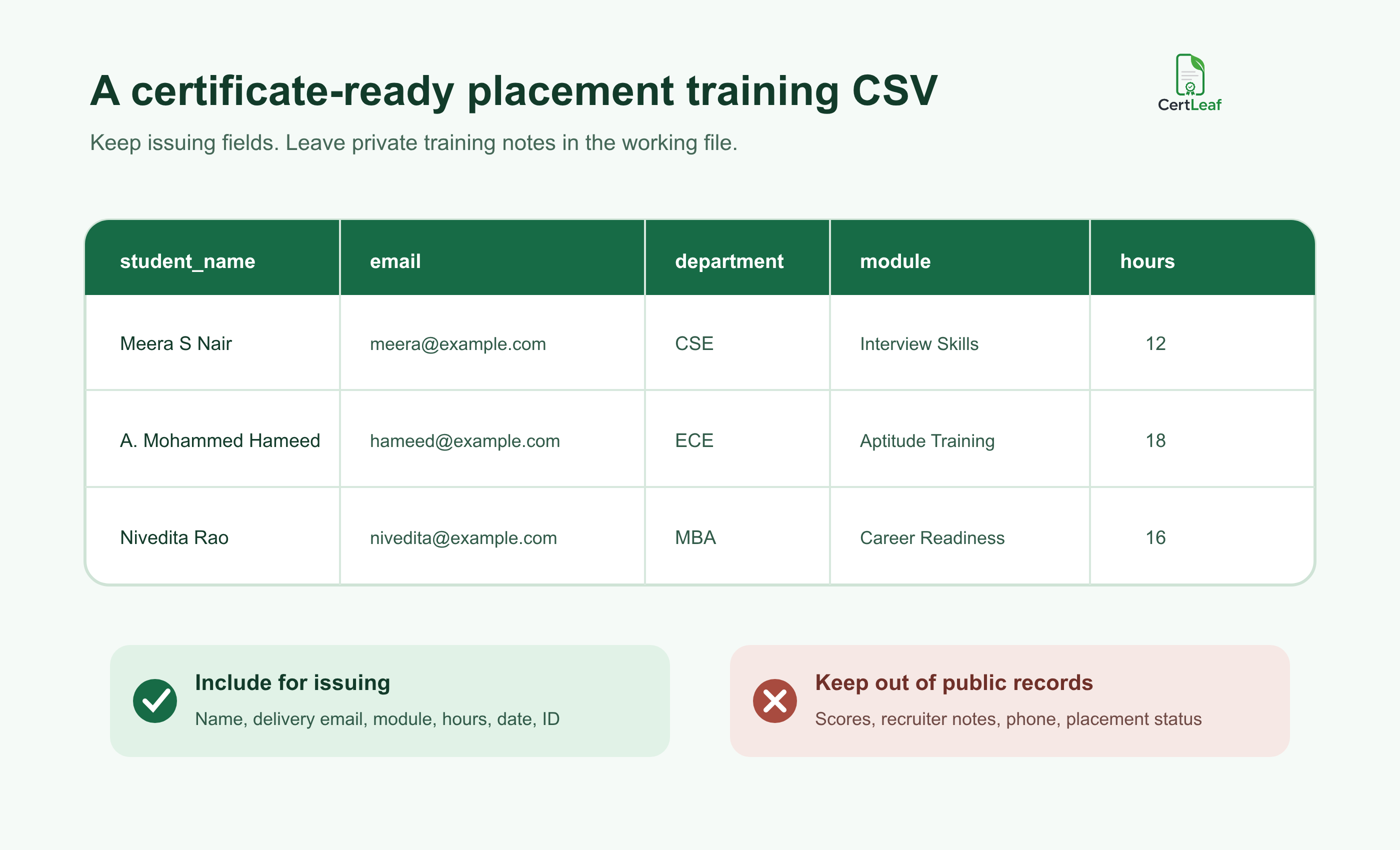
For the Coimbatore program, the public certificate could state that the student completed 18 hours of aptitude and interview-readiness training. The score breakdown, trainer's comments, phone number, and whether the student later attended a company interview should stay in the college's private records.
Check the final row count against the approved count. Then look for blank emails, duplicate registration numbers, mixed certificate types, and names that differ from the college roster. Save the released file with a name that another coordinator can understand, such as placement-training-approved-2026-09-11.csv. Do not overwrite it when late approvals arrive.
Approve wording for college and training partner names
Co-branded certificates need a little more attention than an ordinary participation certificate. Decide whether the college issues the certificate "in association with" the training provider, whether both are co-issuers, or whether the provider alone certifies completion. Use wording that matches the actual arrangement and has been approved by the people whose names or signatures appear.
I would also test the longest data, not the neat first row. A program called "Campus Employability, Aptitude and Interview Readiness Program" will behave differently from "Aptitude Training." A student name with initials may wrap near a signature. Two organization names can crowd the top of the design.
Generate a small proof set with the longest student name, longest module title, a department abbreviation, both issuer names, the full completion date, and a QR code if verification is enabled. Read the exported PDF at normal size. Ask one person from the placement cell and one person responsible for the approved wording to sign off before the full batch runs.
Decide what recruiters should be able to verify
Placement training certificates often travel. Students attach them to applications, upload them to profiles, or show them during interviews. A QR-verifiable certificate can give a recruiter or coordinator a direct way to check the issued record instead of emailing the college and waiting for a reply.
The public record should be narrow. Recipient name, approved program or module, training period, issuer, issue date, certificate ID, and current status are usually enough. Email addresses, phone numbers, marks, recruiter feedback, and placement outcomes should remain private.
A QR code is useful only when it opens the matching certificate record. Before sending the batch, scan codes from several exported PDFs and compare each page with its certificate. The guide to planning QR-verifiable training certificates with unique certificate IDs explains the ID and correction decisions in more detail.
One caution matters here: QR verification confirms the issued certificate record. It does not guarantee employment, validate every underlying assessment, or replace the college's academic records. Keep the claim as specific as the certificate itself.
Where CertLeaf fits after approval
Once the placement cell has approved the student rows and wording, CertLeaf can turn the certificate-ready CSV into a batch. The team uploads its base certificate design, creates a reusable template, maps the CSV fields, generates the certificates, and sends them by email. Verifiable certificates can include a QR code linked to a public verification page.
This is an issuing layer, not a placement management system. CertLeaf does not run aptitude tests, track recruitment drives, score students, or decide eligibility. That narrower role is useful because the sensitive and judgment-heavy work stays with the college while the repetitive PDF and delivery work moves out of the coordinator's evening.
CertLeaf uses pay-as-you-go credits with no subscription. That fits placement cells whose training programs run in bursts around semester schedules. New accounts receive 20 free credits, which can be used to test awkward rows and the delivery path before committing the full batch.
Send the main batch, then keep exceptions separate
Send a test certificate to an inbox the placement team can open. Check the sender context, subject line, student name, PDF, issuer wording, and QR destination. Once that works, the team can send certificates by email automatically to the approved students instead of downloading and attaching files one by one.
Tell students where the certificate will arrive and where corrections should go. One useful message is:
> Your placement training certificate will be sent to the email address approved by the placement cell. Please reply to the delivery email by 15 September if your printed name needs correction.
Do not reopen the main CSV for every late message. Keep a correction and exception queue with the original value, requested change, evidence, approver, and action date. Students approved after the cutoff can receive a supplementary batch. The original issue file remains unchanged.
At the Coimbatore program, suppose 126 students are clear, four need identity checks, and two have late assessment submissions awaiting a decision. Send the 126 after proof approval. The six uncertain rows can wait for an actual decision. There is no reason to delay the clean batch or quietly include people whose status is unresolved.
Placement training certificate generator FAQ
What is a placement training certificate generator for colleges?
It is a tool colleges can use to create placement or employability training certificates from an approved student list. A practical workflow supports reusable templates, bulk CSV issuing, email delivery, and optional QR verification.
What fields should a placement training certificate CSV include?
Include only fields needed for issuing and delivery, such as student name, email, department, approved module, training hours, completion date, certificate type, issuer or partner name, and certificate ID. Keep marks, phone numbers, recruiter notes, and placement status in private college records.
Should placement training certificates include assessment scores?
Usually not. Include a score only when it is part of the approved certificate meaning and the college has a clear reason to publish it. In most cases, completion wording is enough, while detailed scores stay in the internal assessment record.
Can a college issue placement training certificates in bulk?
Yes. After the placement cell approves eligibility, it can export one row per student to a CSV, map those fields to a reusable template, test a small proof set, and generate the full certificate batch.
Are QR-verifiable placement training certificates useful?
They are useful when students may show certificates to recruiters or other institutions. The QR code should open the matching issued record and show only the information needed for verification.
Can CertLeaf manage placement drives or student assessments?
No. CertLeaf is focused on certificate issuing, email distribution, QR verification, and certificate records. The college and training provider remain responsible for attendance, assessment, eligibility, and placement decisions.
Does CertLeaf require a subscription for college certificate batches?
No. CertLeaf uses pay-as-you-go credits. Colleges can issue certificates when a placement training batch finishes without keeping a monthly subscription active between programs.
The handoff is the part worth fixing
By Monday morning, the Coimbatore placement officer should be able to answer three questions without opening five files: which students were approved, what the certificate confirms, and which CSV produced the issued batch.
Once those answers are settled, bulk generation is the straightforward part. The training provider supplies evidence. The placement cell makes the decision. CertLeaf handles generation, delivery, and verification from the approved data.
That is the placement training certificate workflow I would keep: decide what completion means, release a small certificate-ready CSV, test the awkward records, issue the main batch, and leave unresolved cases in a visible queue. It saves time, but more importantly, it keeps the certificate from making claims the college never meant to make.


